

 betwo
betwo
Feature: Add option to emit combined compile_commands.json file
Add an option to emit a combined compile_commands.json file to a central place.
This can then be used by other extensions / tools like clangd.

@betwo Not sure if I'm misconfiguring something but I can't get this work. I have in settings.json (user)
"catkin_tools.mergedCompileCommandsJsonPath": "${workspaceFolder}/compile_commands.json"
however the combined json is never generated.

So I just tried to reproduce with your settings, but running the command Reload / Merge compile commands works in my test workspaces:
- the merged file is created
- the status bar shows the following:

To find out why it doesn't work for you, could you please provide some more context?
Are there any compile_commands.json files generated by catkin in the first place?
Do you get any errors in the console log?
Ok, so that works. I guess I was under the impression that it would automatically happen after performing a build or that I could use it as a Task.
My current workflow is that I chain two tasks together: the build and the merge. Current my merge looks like:
jq -s 'map(.[])' ${CATKIN_BUILD_DIR}/**/compile_commands.json > ${workspaceFolder}/compile_commands.json
Note that it uses jq which has to be installed.
We could add an option to automatically run the merge when one of the compile_commands.json files changes.
Do you think that could work instead of your current workflow?
That should be fine. That would also help in the case where if someone wants to do a shell task to build, it should rebuild the compile_commands.json as well.
Ok, now that's strange:
I just wanted to add a new option, but then I remembered that this effectively already exists: If mergedCompileCommandsJsonPath is defined, merging should already be automatic.
In my setup that also works with the current version. I tested by running catkin build manually on the command line, the merged file was emitted.
I just release a new patch version (3.3.5) that should log this more specifically.
Could you please check the debug log for "Writing merged database" when you are running a catkin command?
I tried both these in settings.json
-
"catkin_tools.mergedCompileCommandsJsonPath": "${workspaceFolder}/compile_commands.json" -
"catkin_tools.mergedCompileCommandsJsonPath": "${workspaceFolder}"
(1) gave me this output:
"${workspaceFolder}/compile_commands.json" could not be found. 'includePath' from c_cpp_properties.json in folder <my project folder> will be used instead.
(2) gave no output (i believe there is an if statement for this in the extension source that does something if it's just ${workspaceFolder}
Neither gave me a compile_commands.json in the workspace Folder. Note: I did use catkin build --this in a package folder. But that should generate one as well. I'll try a full build later today.
Sorry for taking so long, I didn't find time the last days.
"catkin_tools.mergedCompileCommandsJsonPath": "${workspaceFolder}/compile_commands.json" Neither gave me a compile_commands.json in the workspace Folder. Note: I did use catkin build --this in a package folder. But that should generate one as well.
You're right, (1) should have given you a compile_commands.json file in the workspace folder with any catkin command.
Did you find anything in the debug log like this:
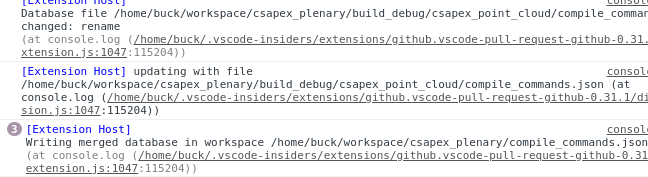 Either with or without the "writing merged..."?
"${workspaceFolder}/compile_commands.json" could not be found. 'includePath' from c_cpp_properties.json in folder
will be used instead.
That actually looks like a problem with the c++ extension, Did you set ${workspaceFolder}/compile_commands.json in your
c_cpp_properties.json file manually?
If that's the case, you might try to use the automatic mode like this:
{
    "configurations": [
        {
            "name": "ROS",
            "cppStandard": "c++20",
            "cStandard": "c11",
            "configurationProvider": "b2.catkin_tools"
        }
    ],
    "version": 4
}
I'll try a full build later today.
Any luck with that?
Also, do you have multiple folders opened in your workspace, or just a single one?