
CodeGlance
 CodeGlance copied to clipboard
 bestv5
Intelij IDEA plugin for displaying a code mini-map similar to the one found in Sublime
MiniMap (A CodeGlance Fork)
This is an unofficial fork of the excellent CodeGlance plugin, which unfortunately no longer seems to be maintained.
Main differences compared to CodeGlance
- Works correctly with virtual space enabled
- Minimap can be used as a scrollbar
Latest build: https://github.com/mgziminsky/Minimap-for-Jetbrains/releases
Jetbrains IDE plugin that displays a zoomed out overview, or minimap, similar to the one found in Sublime into the editor pane. The minimap allows for quick scrolling letting you jump straight to sections of code.
- Works with both light and dark themes using your customized colors for syntax highlighting.
- Color rendering using IntelliJ's tokenizer
- Scrollable!
- Embedded into editor window
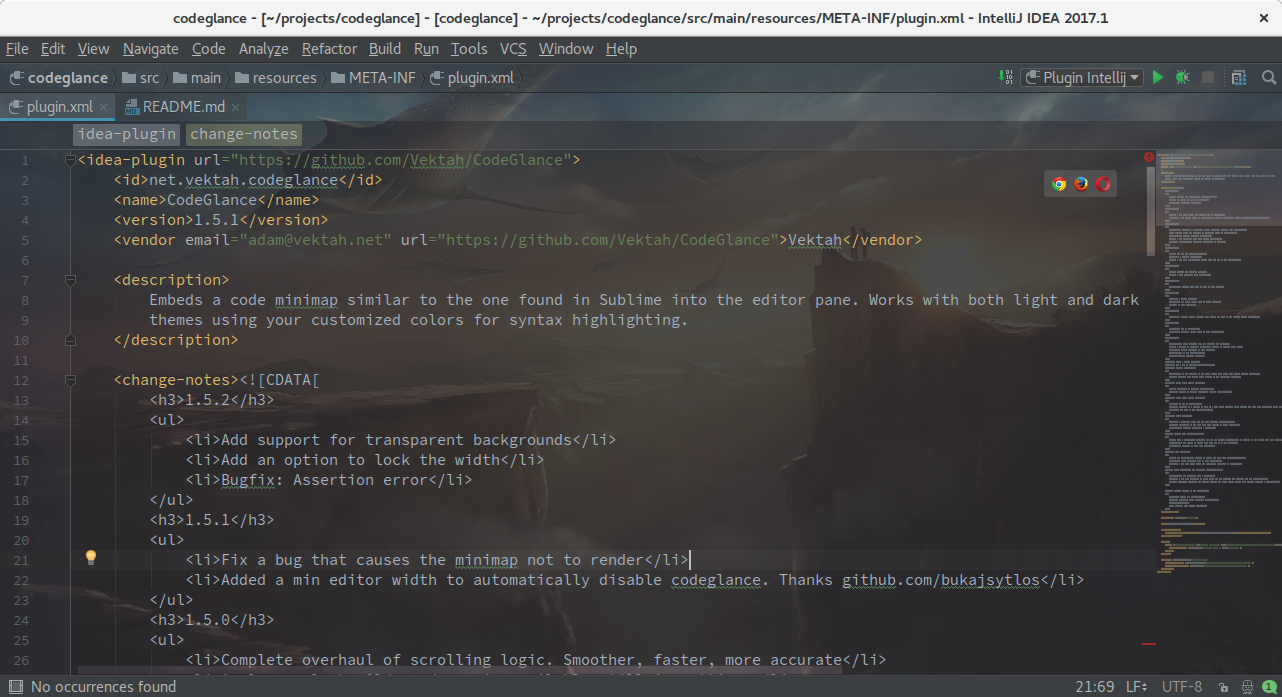
Building using Gradle
git clone https://github.com/mgziminsky/Minimap-for-Jetbrains.git Minimap
cd MiniMap
# run the tests
./gradlew test

# build the plugin and install it in the sandbox then start idea
./gradlew runIde

# build a release
./gradlew buildPlugin
The result will be saved as build/distributions/MiniMap-{version}.zip
Running from source in IntelliJ
Import the gradle project and run the runIde task.
Show/Hide or Enable/Disable Minimap
- Ctrl-Shift-G to toggle minimap.
- Settings > Other Settings > CodeGlance
推荐插件
我的另一个插件也挺有意思的。推荐给大家。 中文字符替换插件 https://gitee.com/bestxu/chinese-char-replace 感兴趣的可以试试看
 bestv5