

 benwinding
Where does the description property get used?
In the documentation you have a name and a description property. In the codepen example I changed the first command item from:
  {
      name: "Goto Profile",
      handler: () => (window.location.hash = "profile"),
      shortcut: "ctrl+9",
    },
to
  {
      name: "Goto Profile",
      handler: () => (window.location.hash = "profile"),
      shortcut: "ctrl+9",
      description: "See my profile",
    },
Looking at the console output, I can see that the code is processing the updated command definition, but I don't see the description shown anywhere. It does seem to be used for fuzzy matching though. So maybe that's my answer for issue #8? Although I would expect a description to be shown to the user and not be used just for search matching.

After code inspection, it looks like it is used by the fuzzy matcher to select commands to display to the user. The description itself is never displayed to the user.
I wonder if it could be displayed in smaller type under the name. That might be too cluttered but it's an idea.
Hi Ben:
That update to README will have to change if I figure out how to add an option to display the description 8-).
For example:
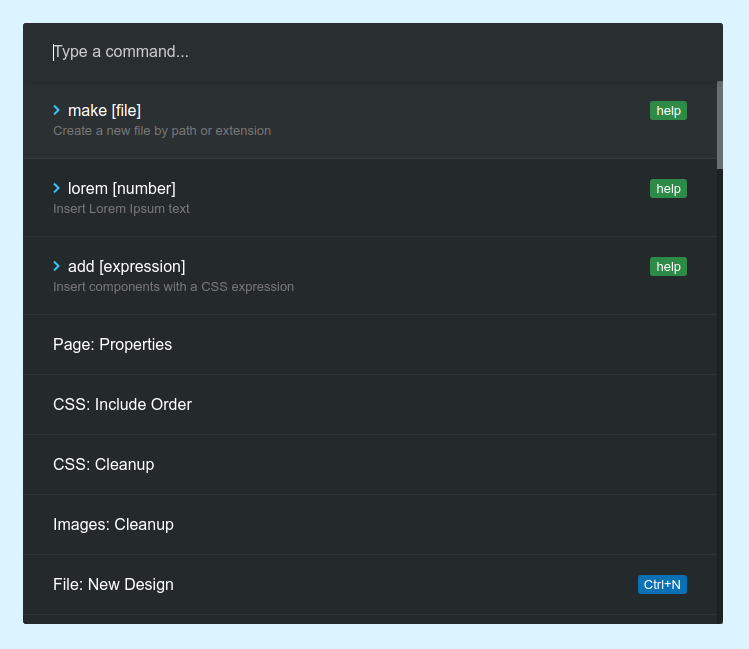
I am considering three ideas:
1. display the description Add:
displayDescriptionoption to CommandPalhideDescriptionoption for use inside of the command object
this way you can have a per command option to display the description and a global option to prevent display. No extra work for fuse as description is already searchable.
2. add caption Alternatively add a "caption" option to the command object. The caption would be included in fuse's search as well and is already per-command.
3. display description add new field for search only text
The other possibility which is a breaking change, is to display description and add a new field searchtext??
just for fuse search. See also #30 which is different. The new field e.g. searchtext would not ever be
displayed as the user searched for the term. It would function like description does now.
Thoughts? I was leaning toward 1, but I think 2 is cleaner.