

 benchislett
Set end notification
Hi there,
great power-up. This is exactly what I was looking for. Is it somehow possible to get a notification outside of Trello that a set as ended? Playing a system sound for example? I keep missing the set ends and thereby my breaks.
Cheers.
I've been diving a bit into this and it seems that trello allows you to post an alert but it doesn't allow you to post a notification (which is what we are looking for since notifications can be set up as push notifications on the phone, sent as emails or become windows native notifications if you download the desktop app).
I think a possible work around would be to make the powerup change some proxy value in the card and [by setting the card on watch] that would trigger a notification [notifying the watchers that some change has been made in the card.

Well i've come to a dirty solution but it works nonetheless.
I've set the iframe to display its own notification.
For this to work is necesary for the user to grant notification permissions to the iframe.
It works on the windows native app too.
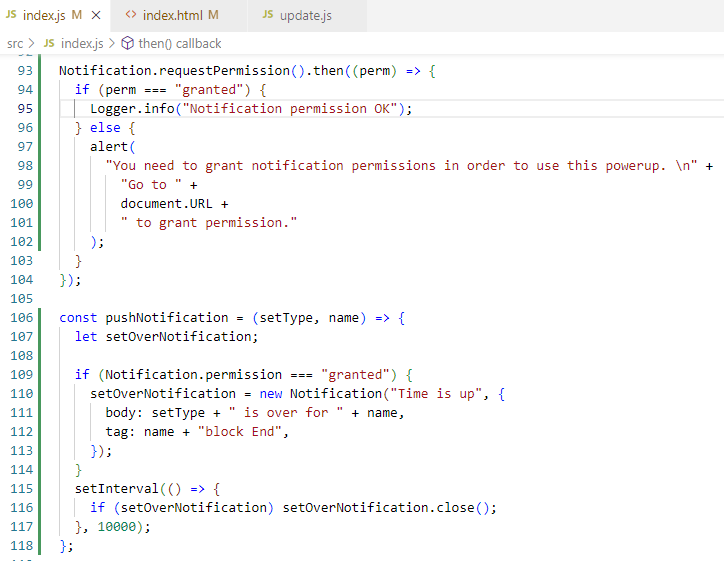 plus this call:
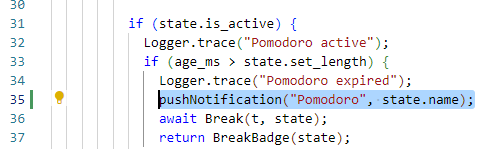
My first attempt was tidier but when i tried to put this code inside the notify() function for some reason it didn't work and since this finally worked i'm done for now.
Hope this inspires some more definitive solution. Cheers
My last solution doesn't work if the board is out of view: (document.visibilityState == 'hidden'). The function that checks the state is within the "render card badge" function which runs on loop if and only if the board is being displayed. (from trello's perspective this seems logical: it wouldn't make sense to render something if theres no one to see it).
A definitive solution would be one that locates this recurring "checkState" function somewhere where trello would still run it even if the board is out of view. (it came to my mind to set it inside some of the board capabilities, maybe within a board button and inside a setInterval loop, but I still don't have a clear idea on how to implement it).
Another possible solution would be to find a way to cheat trello into believing that the tab is on view even when its not. (I tried this with no success but I'm no DOM expert).
For now, I've written this awful solution that does the trick:
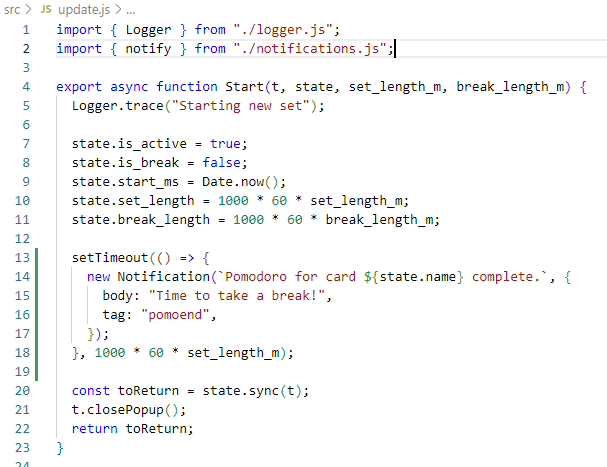
It is super flawed: it doesn't care about the actual state, it breaks if you close the window, and it won't work across different board instances; but it does what I need: it notifies me on my minimized Trello Desktop app when a pomo is over...
Final note: I came to realize this is a much harder feature than I thought.
Developer's Karma: I had a super important task I needed to do quickly and I wanted this feature because I wanted to manage my time super efficiently. I ended up spending almost 40% of said time trying to add this feature. Let's hope it helps me to better manage my remaining 60% .... I'll be back