

 benb0jangles
TGY-i6 bricked on upload
I have the TGY-i6 and attemped to upgrade the FW to 10 chanel. I got a weird error message in chinese and the Tx LCD went blank. When I turn it on it will power my FTD board, so I know its working, but I get no sounds/beeps from it and no display on the LCD.
I attempted to to run the v1 recovery file, but after running it gave me an error message. I could use some help, anyone run into anything similar and find a way to solve it? I'd like to fly my quad :(

Try uploader from my github and use force upload mode by moving trims on the left to center.

Cheers Jakub. I saw a couple of different uploaders on your github, which one do you recommend? I assume using the trim move method puts the controller directly into firmware upgrade mode, with no additional buttons to push?
@seth-o try this one for x64 os:
https://github.com/qba667/FlySkyI6/releases/download/1.6.3/NO_SWE_14_channels_flysky-updater_x64.zip
The forced firmware update usually works that is requested trims combination
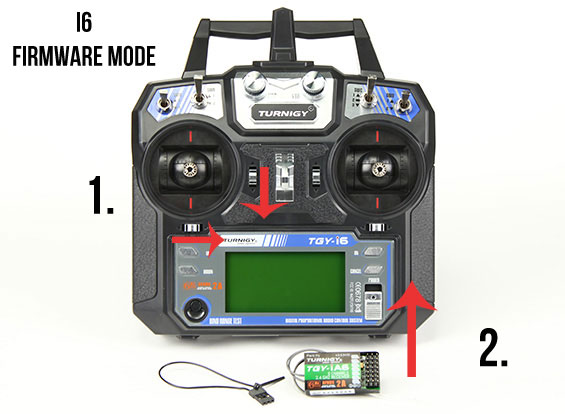 :
:
For all people with this issue - I was fighting with this all day. The solution that worked for me - and you have to know that I tried almost every other metod that is allready aviable online - was to plug FlySky to my friend's computer with Windows 8.1. I was trying several programs, hex files, versions, drivers. Solution was just to plug my FTDI adapter do another machine with different OS (mine is working on Windows 10). Drivers were automatically downloaded by Windows after plugging. Then I connected radio in "firmware mode" (trims and power), opened same program I was using that earilier bricked my radio (10ch mod v1.5 etc). Clicked "open port", FlySky 0.0 showed up, thent clicked "Program" and voilla! My radio is back, fully functional with additional aux channels.
As far as I know those 10ch mods are designed for beeing flashed on stock firmware (1.1 or sth). So when you try to flash this mod on allready updated version it can cause some issues.
Give it a try, maybe it would work on virtual machine too. Cheers!
