

 belav
belav
CSharpier keeps asking to be installed even though it already is
Hey! Good morning 😄
I've installed the tool globally and the Rider extension for it. However, when i open Rider, it keeps asking for me to install it anyways. When i click to install it globally, it seems for me like nothing happens really.
It only starts working when i click to install Locally, then it creates the file /.config/dotnet-tools.json
{
  "version": 1,
  "isRoot": true,
  "tools": {
    "csharpier": {
      "version": "0.19.0",
      "commands": [
        "dotnet-csharpier"
      ]
    }
  }
}
How can i make it work globally? Do it always need to have this file?
some commands outputs, idk if it can help:
dotnet tool list -g
dotnet tool list -g
ID do Pacote      Versão      Comandos
----------------------------------------------
csharpier         0.19.0      dotnet-csharpier
dotnet-ef         6.0.8       dotnet-ef
cat .zprofile (it had asked me to run a command to have this in my zsh profile when i installed it globally)
eval "$(/opt/homebrew/bin/brew shellenv)"
# Add .NET Core SDK tools
export PATH="$PATH:/Users/marcoantonioparente/.dotnet/tools"

I'm also facing a similar issue, I've installed CSharpier locally and from time to time Rider asks me to install CSharpier globally when I switch between files.
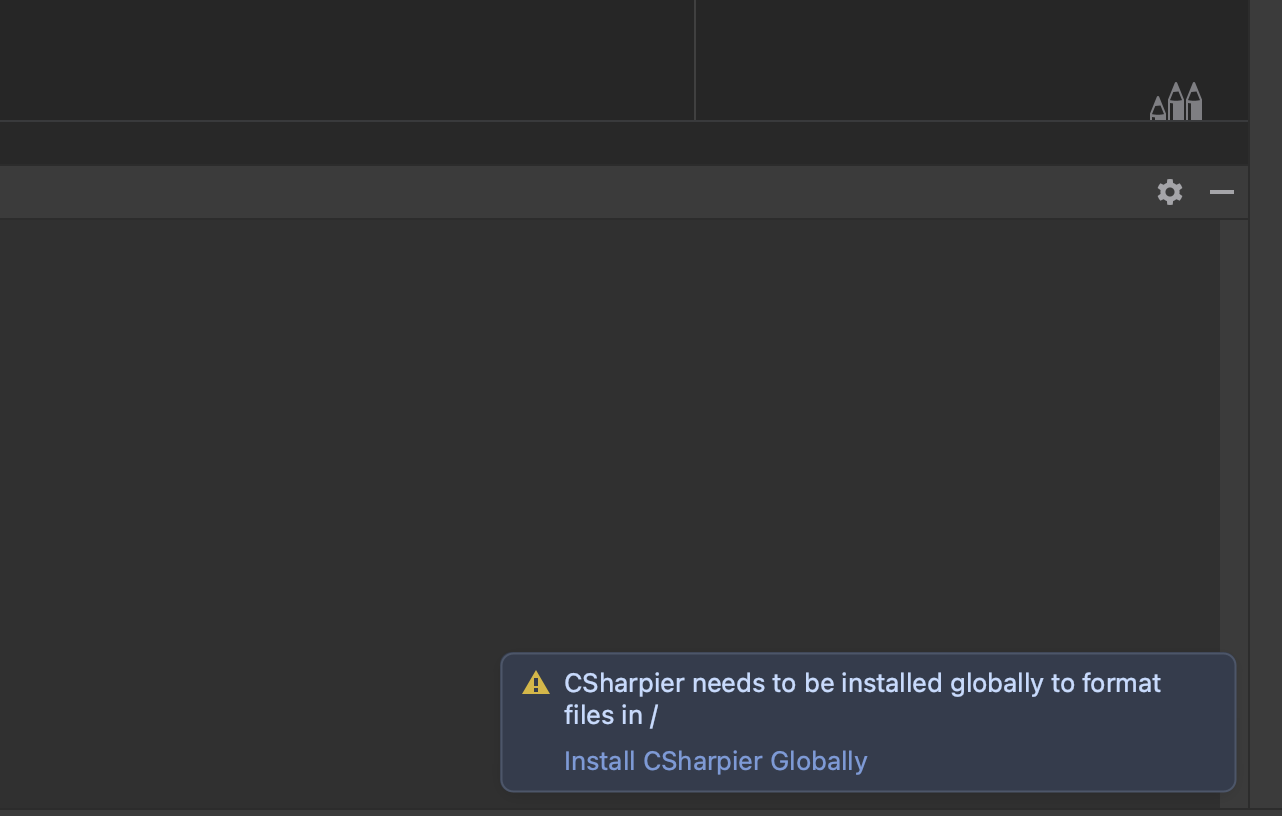
Even if I install CShapier globally, I still see this message from time to time.
Environment: OS: Mac Rider: 2022.2.1 Run on Save: yes
.config/dotnet-tools.json
{
  "version": 1,
  "isRoot": true,
  "tools": {
    "csharpier": {
      "version": "0.19.0",
      "commands": [
        "dotnet-csharpier"
      ]
    }
}

@Marco-Parente could you follow the steps here to get the log output https://github.com/belav/csharpier/tree/master/Src/CSharpier.Rider#troubleshooting
If the message is CSharpier needs to be installed globally to format files in / then it could be the same issue @viniciuschiele is seeing, and that I've also seen now and then. I thought I made some changes to fix the issue but it doesn't appear that way. I'll remove my global version to see if I can get the message to pop up and get my own logs to try tracking it down. I don't think I have seen the message for a while now.

This is my log out: https://pastebin.com/KT1M3riT
I had just opened Rider, the pop-up showed up at 16:13
these are my logs: csharpierlogs.txt
The times it worked and formatted my code was only after the times i installed it locally, but then it starts failing again if i delete the dotnet-tools.json file
@Marco-Parente it doesn't look like you have the debug logs turned on for csharpier. They would provide more context around why it isn't finding csharpier.
The steps to turn it on Use the action "Debug Log Settings" Add entry for "#com.intellij.csharpier.CSharpierLogger" Restart Rider
My guess is that the code to detect that it is installed globally may not be working correctly. It is essentially running the following command with DOTNET_NOLOGO=0 as an environment variable in the directory that contains the file to format.
dotnet csharpier --version
The debug version of the logs would contain messages about running that command and what the output of the command is. The output from dotnet tool list -g looks normal as far as I can tell.
And which OS are you using? I tested this on ubuntu, and someone else helped get is working on OSX. Normally I use windows.
@viniciuschiele your logs don't give me much to go off of, but I did see the popup at least once today. I believe I should be able to recreate it if I'm paying more attention the next time that it happens.
@belav oh, sorry 😅 These are my logs i had today after opening the project with the debug logging on: csharpierlogs.txt
I saw it said one time that "Não foi possível executar porque o comando ou o arquivo especificado não foi encontrado." which means it didn't find the command, and also logged that the output was null. However, when i run that command inside the folder it was giving the error i could get the version normally:
marcoantonioparente@MacBook-Pro-de-Marco Anuncios % export | grep DOTNET
DOTNET_NOLOGO=0
marcoantonioparente@MacBook-Pro-de-Marco Anuncios % dotnet csharpier --version
0.19.0
My OS is MacOS Monterey 12.5
@Marco-Parente could this be related to users somehow? Meaning, is the rider process running in a different user context, and for that user "dotnet csharpier --version" doesn't work. However, if you click the global install action in rider, then I assume the global install action would install it under that different user context.... so maybe that doesn't make sense. Although you did say the global install doesn't seem to do anything. I'm curious if there is anything in the logs when you do a global install that would help troubleshoot. Some logs when you do the local install + local format could help too. They would show what is considered HOME when csharpier installs itself.
One benefit to the local file, is that it ties your code to a specific version of csharpier formatting. That's important if working in a team so you don't have different people formatting files back and forth between versions. But when working alone it isn't that big of a deal.
@viniciuschiele I did release an update to the rider plugin that hides the "install globally" for "/" and files that rider has decompiled. I wasn't able to track down what it considers to be in "/" but it seemed safe to just suppress the warning for it.
edit: it takes a day or two for jetbrains to approve the release
I wasn't able to track down what it considers to be in "/" but it seemed safe to just suppress the warning for it.
Yeah, I can't imagine anyone putting their source code in the root of their filesystem, so it's unlikely for that suppression to cause any issues. :smile:

still exists for csharpier v0.24.1 + rider plugin v1.3.7 + macOS + globally installed tool.
since it's hard to set PATH environment variable for macOS GUI apps, the PATH env is default and does not contain dotnet tools install -g dir. ~/.dotnet/tools/
$ which dotnet-csharpier
/Users/magicdawn/.dotnet/tools/dotnet-csharpier
suggestions:
- replace
dotnet csharpier --versionwithsh -c "dotnet csharpier --version"on posix systems (unix & macOS), let shell loadsPATHfrom.bash_profile/.zshenvetc - add search support for
~/.dotnet/tools, since it's the default global install location. see https://learn.microsoft.com/en-us/dotnet/core/tools/dotnet-tool-install#description
https://github.com/belav/csharpier/blob/rider-1.3.7/Src/CSharpier.Rider/src/main/java/com/intellij/csharpier/CSharpierProcessProvider.java#L161
And a note for other macOS users want to set PATH for GUI apps
launchctl config user path "xxxx1:xxxx2:xxxx3", requires reboot
see https://github.com/hschmidt/EnvPane#why-cant-i-set-path-with-envpane
