
ios-widget-global-calendar
 ios-widget-global-calendar copied to clipboard
 behnammodi
Global Calendar iOS Widget

iOS Widget Global Calendar
Global Calendar iOS Widget represents US English (en-US), British English (en-GB), Korean (ko-KR), Persian (fa-IR), Arabic (ar-EG), and Japanese (ja-JP-u-ca-japanese) calendar, default calendar is Persian.
How Use
1- Install Scriptable App from App Store https://apps.apple.com/us/app/scriptable/id1405459188
2- Open Scriptable and Add new script
3- Open script.js and Copy All and past into Scriptable
4- Go to Homepage of iOS and add Scriptable Widget
5- Tap on Scriptable Widget and select Edit Widget
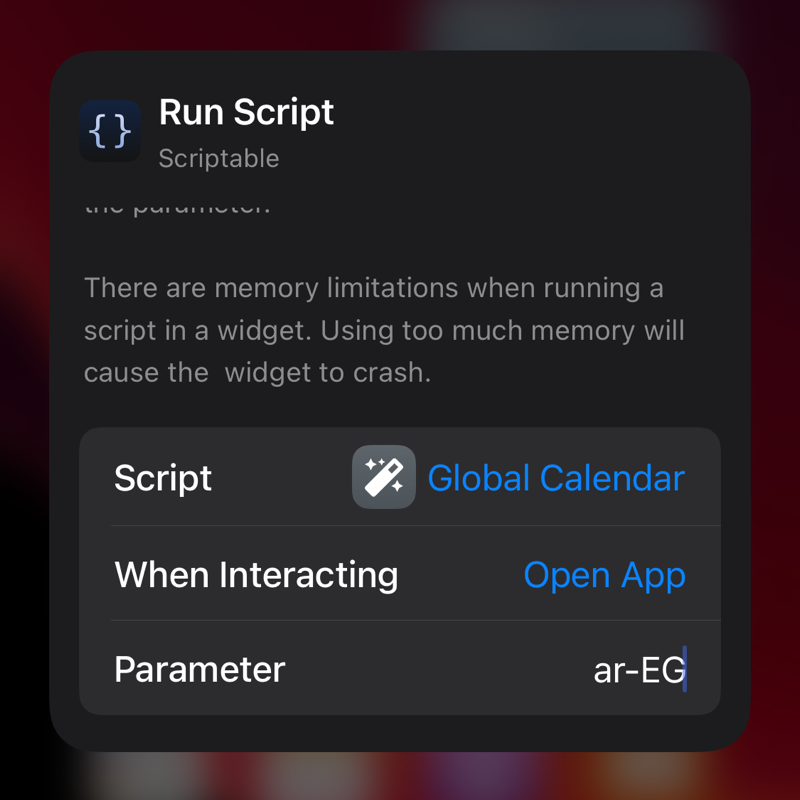
6- Select Script and send Parameter for Calendar type ex: fa-IR, en-US ...
How Change Calendar Type
You can send calendar type by widget parameter. for example for the Arabic calendar, you must send ar-EG.
 behnammodi