

 beakerbrowser
Folder Sync Hangs
Describe the Bug
The folder sync functionality seems to stop when I add new files to a folder. If I click the folder sync icon on the address bar, the dialog never progresses past the "loading" icon. Both the "Start Autosync" and "Sync" buttons become unresponsive. The problem remains even if restart Beaker and the computer itself.
To Reproduce
- Create a new drive from local folder
- Click on 'Sync'
- After new drive loads, add more files to the local folder being synced.
- Click the folder sync icon.
Expected Behavior
The folder sync dialog should show either "folder synced" or provide a list of files to sync if Autosync is not turned on.
Screenshots
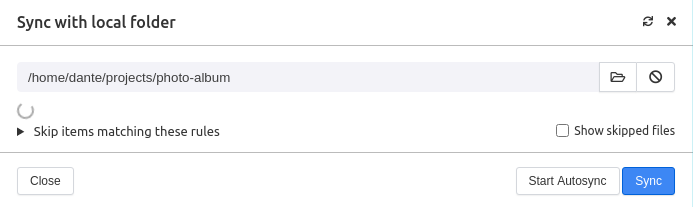
Environment
- OS: Windows 10 and Linux Mint 20
- Beaker Version: 1.0.0-prerelease.7 in both
Additional Context I am putting together a photo album, which right now contains over 500 items adding up to over 800MB. I load images and thumbnails through a file explorer outside of Beaker, and then reload the hyperdrive in Beaker. It's usually when I get to the few hundred files that the folder sync feature stops working.
I'm hoping Beaker can support hyperdrives larger than 10GB :smile:

I've experienced a similar thing when I sync with a folder that contains a lot of files. In my case, the synced folder had a node_modules folder. Even with node_modules listed in the "Skip items matching these rules" control, it still hanged up. Syncing still worked, but the list of diff files would never display and the loading indicator just continued indefinitely. I got around the issue by reworking the folder I was syncing so that node_modules was not part of it. I'd imagine any syncing folder with lots of files will experience a similar issue.

I plan to add some transparency to the sync process so it'll be a little more obvious what's going on/wrong
