

 bdlukaa
Rework split buttons
SplitButton
Is your feature request related to a problem? Please describe. The current implementation of Fluent's Split Button is very... verbose. It takes so much lines of code to make a simple split button.
Describe the solution you'd like According to the native documentation:
A SplitButton control has two parts that can be invoked separately. One part behaves like a standard button and invokes an immediate action. The other part invokes a flyout that contains additional options that the user can choose from.
Which means SplitButtonBar should not take Button as an argument in the children list. Instead, there should be parameters that makes the configuration of both buttons (such as onPressed, style) and the flyout (such as content, openMode, position).
The focus should be handled by the SplitButton.
Describe alternatives you've considered N/A
Additional context
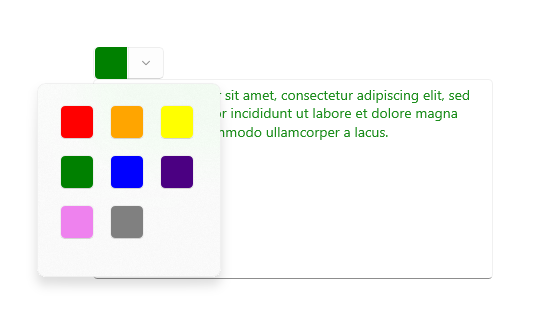
ToggleSplitButton
A ToggleSplitButton control has two parts that can be invoked separately. One part behaves like a toggle button that can be on or off. The other part invokes a flyout that contains additional options that the user can choose from.
Basically, it'd be a SplitButton with accent style applied to it, when on.
Additional context
- https://docs.microsoft.com/en-us/windows/apps/design/controls/buttons#create-a-toggle-split-button

