

 bbepis
textmesh pro fonts do not work correctly
I actually have this problem: every time you start the game, the game seems to skip random parts of the font, so after the restart, completely different letters may not be displayed
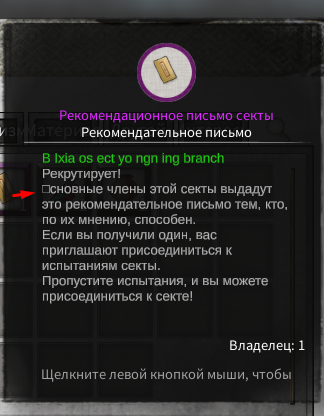
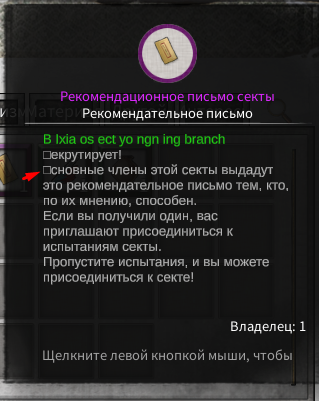
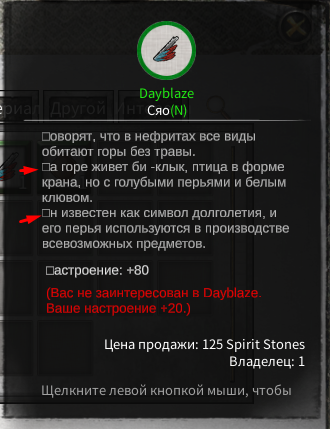
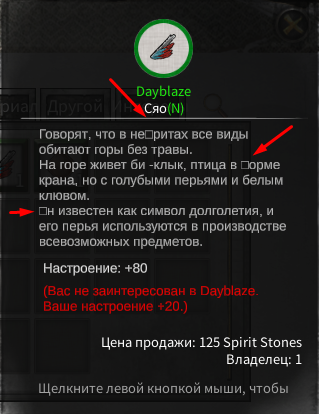
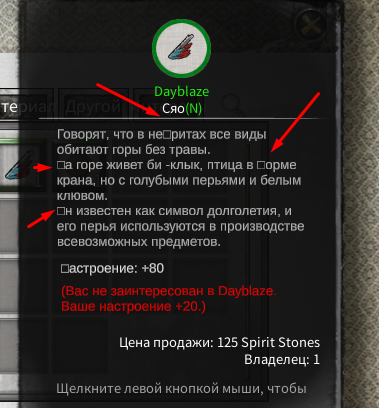
there are still problems with displaying the interface of the translator itself ... I understand that in this game there are no standard assets for the old interface. but it's not important, it's more important to fix the problem above, can you help in any way?
I'll add the logs, maybe it will clear up the situation somehow MelonLoader_22-05-29_12-03-08.435.log MelonLoader_22-05-29_06-49-01.495.log MelonLoader_22-05-29_06-47-03.465.log MelonLoader_22-05-29_06-45-42.145.log MelonLoader_22-05-29_06-44-02.757.log MelonLoader_22-05-29_06-31-46.326.log MelonLoader_22-05-29_06-28-46.048.log MelonLoader_22-05-29_06-26-52.177.log MelonLoader_22-05-29_12-07-28.547.log MelonLoader_22-05-29_12-06-02.021.log
the situation with BepInEx is even worse the combination still doesn't work CTRL + ALT + NP6: Print out entire GameObject hierarchy to file hierarchy.txt crash game I need this file to set up resizes

Here is some more info about where the problem occurs
[12:46:29.972] Setting text on 'TMPro.TextMeshProUGUI' to '<color=#21E713>B Ixia os ect yo ngn ing branch Рекрутирует! Основные члены этой секты выдадут это рекомендательное письмо тем, кто, по их мнению, способен. Если вы получили один, вас приглашают присоединиться к испытаниям секты. Пропустите испытания, и вы можете присоединиться к секте!' [12:46:29.974] Path : /Game/UIRoot/Canvas/Root/UI/PropInfo/G:goRoot/G:imgBG/Grid/G:goText/G:ptextInfo
temporary solution
found in the Internet mod on Melon Loader
he helped me to fix
the font for this game
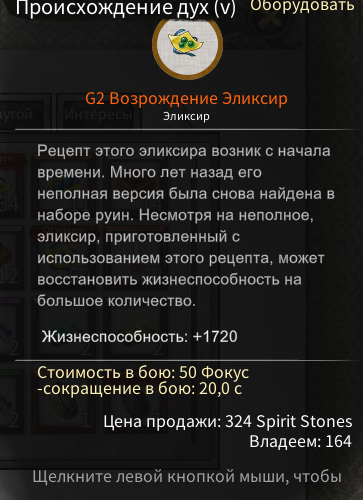
game build in IL2CPP
you need
MelonLoader IL2CPP
to use this mod
https://mega.nz/file/fFZTyYzC#ZkoAh03U3A4aC8t8h2mV4vbNFYe5mqe5AOW3M7TqG7s
https://mega.nz/file/SNhUgbwD#ROrG7LTMSCKNrEqYnJB0mY-tOYYCDBYaHD2FOfPu8Pk
mono version https://mega.nz/file/HRwHXQKY#0DL29dfIT0b7o4WbjLak5EQfLRKy2XMFG_snJotWs5Y
or try mono this https://mega.nz/file/XEBGGDTa#d3AAcAnhe9iHGzkCvZkCQVH07XdCvyW00rJVqMgwVWE
https://github.com/bbepis/XUnity.AutoTranslator/files/11554647/FontOverride_fix.zip
i just dont know how to add font in the config folder, i tried using the path of the file with the file name but no work for me. still sqaures

i just dont know how to add font in the config folder, i tried using the path of the file with the file name but no work for me. still sqaures
just don’t add the font to the game, you need to make an asset or use dynamic font generation during the game (loads a little processor) - for this, install the mod using the links above, try it, whatever version suits you
i just dont know how to add font in the config folder, i tried using the path of the file with the file name but no work for me. still sqaures
just don’t add the font to the game, you need to make an asset or use dynamic font generation during the game (loads a little processor) - for this, install the mod using the links above, try it, whatever version suits you
never mind i managed to make an asset bundle and it works great now, am just facing text direction:
Arabic Letters orders. It's like reading "Hello" as "olleH". السلام is displayed as: م ا ل س ل ا Arabic Letters connectivity. As seen here: “السلام is displayed (in-game) as: م ا ل س ل ا” the letters are no disconnected.
i just dont know how to add font in the config folder, i tried using the path of the file with the file name but no work for me. still sqaures
just don’t add the font to the game, you need to make an asset or use dynamic font generation during the game (loads a little processor) - for this, install the mod using the links above, try it, whatever version suits you
I got this error:
[16:34:51.810] [ERROR] System.TypeLoadException: Could not load type 'System.Runtime.Versioning.TargetFrameworkAttribute' from assembly 'FontOverride'.
at (wrapper managed-to-native) System.MonoCustomAttrs:GetCustomAttributesInternal (System.Reflection.ICustomAttributeProvider,System.Type,bool)
at System.MonoCustomAttrs.GetCustomAttributesBase (ICustomAttributeProvider obj, System.Type attributeType) [0x00000] in
