

 bbcmicrobit
How to make a Frozen module under current master branch
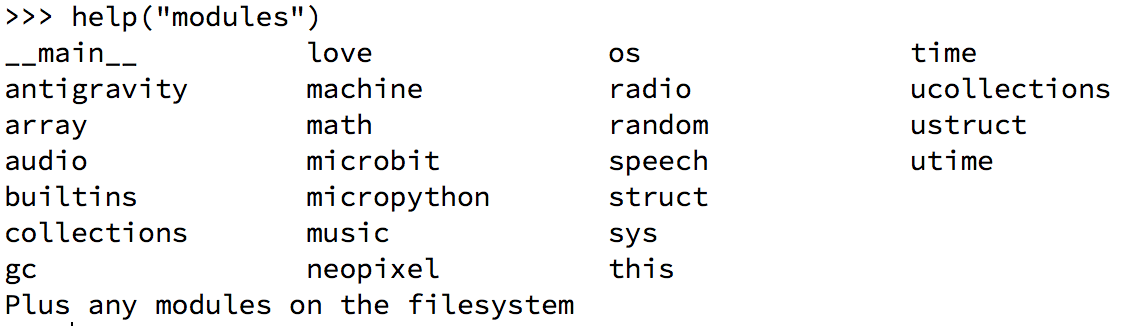
Hi there, After read this issue #347 , I began to freeze my module into the hex file. Although it creates a hex file successfully, but when I flashed it in my micro:bit and tried to import it, no module was found. I have tried help('modules') in REPL, my module is just not there.
I have followed the instruction of Simon Cragg.
- Use micropython v1.7 's make-frozen.py to freeze my module to a .c file. (I put a .py file in a folder with same name and freeze the folder)
- Add this .c file to micropython/source/py
- Add
#define MICROPY_MODULE_FROZEN (1)to micropython/inc/microbit/mpconfigport.h -
yotta buildwhich returns me a microbit-micropython.hex
This is what in my build/bbc-microbit-classic-gcc-nosd/source/microbit-micropython.map file.
It seems that my c module file ttt.c has been compiled
.text          0x0000000000000000        0x0 source/CMakeFiles/microbit-micropython.dir/home/pd/Downloads/bbc/source/py/ttt.c.o
 .data          0x0000000000000000        0x0 source/CMakeFiles/microbit-micropython.dir/home/pd/Downloads/bbc/source/py/ttt.c.o
 .bss           0x0000000000000000        0x0 source/CMakeFiles/microbit-micropython.dir/home/pd/Downloads/bbc/source/py/ttt.c.o
 .rodata.mp_frozen_content
                0x0000000000000000       0x75 source/CMakeFiles/microbit-micropython.dir/home/pd/Downloads/bbc/source/py/ttt.c.o
 .rodata.mp_frozen_names
                0x0000000000000000        0x6 source/CMakeFiles/microbit-micropython.dir/home/pd/Downloads/bbc/source/py/ttt.c.o
 .rodata.mp_frozen_sizes
                0x0000000000000000        0x4 source/CMakeFiles/microbit-micropython.dir/home/pd/Downloads/bbc/source/py/ttt.c.o
 .debug_info    0x0000000000000000      0x103 source/CMakeFiles/microbit-micropython.dir/home/pd/Downloads/bbc/source/py/ttt.c.o
 .debug_abbrev  0x0000000000000000       0x5b source/CMakeFiles/microbit-micropython.dir/home/pd/Downloads/bbc/source/py/ttt.c.o
 .debug_aranges
                0x0000000000000000       0x18 source/CMakeFiles/microbit-micropython.dir/home/pd/Downloads/bbc/source/py/ttt.c.o
 .debug_line    0x0000000000000000       0x9c source/CMakeFiles/microbit-micropython.dir/home/pd/Downloads/bbc/source/py/ttt.c.o
 .debug_str     0x0000000000000000      0x18f source/CMakeFiles/microbit-micropython.dir/home/pd/Downloads/bbc/source/py/ttt.c.o
 .comment       0x0000000000000000       0x32 source/CMakeFiles/microbit-micropython.dir/home/pd/Downloads/bbc/source/py/ttt.c.o
 .ARM.attributes
                0x0000000000000000       0x31 source/CMakeFiles/microbit-micropython.dir/home/pd/Downloads/bbc/source/py/ttt.c.o
 ttt is not in hex file, I guess.
I'm using the code on master branch. Below is the ttt.py content. I compile the code on ubuntu.
class say:
    def __init__(self, words):
        self.words = words

    def say(self):
        print(self.words)
Please Could someone give me some advise? I have totally no idea about it. Many Thanks to you ! Pye

This is what ttt.c looks like
#include <stdint.h>
const char mp_frozen_names[] = {
"tet\0"
"\0"};
const uint32_t mp_frozen_sizes[] = {
115,
};
const char mp_frozen_content[] = {
"class say:\n    def __init__(self, words):\n        self.words = words\n\n    def say(self):\n        print(self.words)\n\0"
};
How to insert your frozen-module into the .hex file
I think I have found the solution. It turns out, the output of compile contains nothing about the frozen module, which is because I use the old version of make-frozen.py (of the v1.7 of micropython).
The whole procedure to make your own frozen module should be like this:
- Get the micropython/micropython
- In its tool folder, find the make-frozen.py. Make sure you are on the master branch, not some old version of it.
- Write your own .py file and put it in a folder
- Transform .py to .c,
python make-frozen.py your_folder_path > frozen_module.c - Open
frozen_module.cand check its the module name, you could probably change the module name in the file. - Put your
frozen_module.cto themicropython/source/py - Find the
mpconfigport.hinmicropython/inc/microbit/, open it and add 2 lines at line 30.
#define MICROPY_MODULE_FROZEN  (1)
#define MICROPY_MODULE_FROZEN_STR  (1)
- Build your compile tool chain. But with a few tricks, if you are on ubuntu. Thank you shenki for analyse the issue and dpgeorge, rojer, and especially temporaryaccount for cracking the nut. In case you can't find it. This is the solution given by temporaryaccount.
You could try to install the version of libnewlib-arm-* from Ubuntu cosmic? Yes, I can confirm fixing the issue by installing the newer packages. Just get the libnewlib-dev (2.4.0.20160527-4) and libnewlib-arm-none-eabi (2.4.0.20160527-4) *.deb files, then install them:
sudo dpkg -i libnewlib-dev_2.4.0.20160527-4_all.deb libnewlib-arm-none-eabi_2.4.0.20160527-4_all.deb
I think on mac, I've met the same problem(not so sure, the similar part is success on compiling but fail on linking). If you have any solution to it, please please give a hint. Thank you!
-
Follow front page README.md to compile the project. If no ['ninja' error] occurs, then you made it.
-
Find your .hex file in
micropython/build/xxxxxxxxxx/source/ -
Send it to microbit. Then open the REPL and type:
help('modules'), you should see your module listed below if you do it right. -
Cheers!
For anyone still having issues I added some steps to @pyeprog amazing original tutorial with a complete example. It is important that educations have tools like this to build custom modules into their curriculum. I intend to create a custom friend module that will act as a simple chat bot using the speech module for example. LINK TO TUTORIAL
