

 bb-qq
bb-qq
No 5G Sync on Synology RS3614XS
Description of the problem
Cannot sync more than 1GBps on synology RS3614XS.
This same interface worked with 5GBps on that same synology with DSM 6.1 After a reboot, impossible to resync at more than 1GBPs. Updated DSM to get access to stock drivers from synology AQC111 package.
All looks good. Except sync speed. I tried all 4 ports and 2 different NIC Adaptors.
Description of your products
- Synology 3614XS
- and output of
uname -aLinux DS 3.10.105 #25556 SMP Sat Aug 28 02:14:22 CST 2021 x86_64 GNU/Linux synology_bromolow_rs3614xs- DSM 6.2.4-25556 Update 5
- the product name of the ethernet dongle : (Aquantia Aquantia 5G USB Ethernet Adapter 0000003K) (US5GA30)
Description of your environment
- connect using a hub
- PC: NIC model name or chipset name
- Hub: QNap
- cable category (Cat.5e or Cat.6 or Cat.7)
Output of dmesg command
(paste output here)
Output of lsusb command
|__usb1          1d6b:0002:0310 09  2.00  480MBit/s 0mA 1IF  (ehci_hcd 0000:00:1a.0) hub
  |__1-1         8087:8008:0005 09  2.00  480MBit/s 0mA 1IF  ( ffffffd1ffffffb2ffffffdbffffffad) hub
|__usb2          1d6b:0002:0310 09  2.00  480MBit/s 0mA 1IF  (ehci_hcd 0000:00:1d.0) hub
  |__2-1         8087:8000:0005 09  2.00  480MBit/s 0mA 1IF  ( ffffffd1ffffffb2ffffffdbffffffa0) hub
    |__2-1.3     f400:f400:0100 00  2.00  480MBit/s 200mA 1IF  (Synology DiskStation 6500456D8D915266)
|__usb3          1d6b:0002:0310 09  2.00  480MBit/s 0mA 1IF  (xhci_hcd 0000:00:14.0) hub
|__usb4          1d6b:0003:0310 09  3.00 5000MBit/s 0mA 1IF  (xhci_hcd 0000:00:14.0) hub
  |__4-1         2eca:c101:0101 00  3.20 5000MBit/s 896mA 1IF  (Aquantia Aquantia 5G USB Ethernet Adapter 0000003K)
Output of ifconfig -a command
eth0      Link encap:Ethernet  HWaddr 00:11:32:32:DD:71
          inet addr:10.32.11.249  Bcast:10.32.255.255  Mask:255.255.0.0
          UP BROADCAST RUNNING MULTICAST  MTU:1500  Metric:1
          RX packets:1758284 errors:0 dropped:0 overruns:0 frame:0
          TX packets:5415353 errors:0 dropped:0 overruns:0 carrier:0
          collisions:0 txqueuelen:1000
          RX bytes:811264964 (773.6 MiB)  TX bytes:7775908556 (7.2 GiB)

eth1      Link encap:Ethernet  HWaddr 00:11:32:32:DD:72
          inet addr:10.32.9.249  Bcast:10.32.255.255  Mask:255.255.0.0
          inet6 addr: fe80::211:32ff:fe32:dd72/64 Scope:Link
          UP BROADCAST RUNNING MULTICAST  MTU:1500  Metric:1
          RX packets:544170 errors:0 dropped:0 overruns:0 frame:0
          TX packets:575278 errors:0 dropped:0 overruns:0 carrier:0
          collisions:0 txqueuelen:1000
          RX bytes:76372393 (72.8 MiB)  TX bytes:842253246 (803.2 MiB)

eth2      Link encap:Ethernet  HWaddr 00:11:32:32:DD:73
          inet addr:10.32.9.248  Bcast:10.32.255.255  Mask:255.255.0.0
          inet6 addr: fe80::211:32ff:fe32:dd73/64 Scope:Link
          UP BROADCAST RUNNING MULTICAST  MTU:1500  Metric:1
          RX packets:378158 errors:0 dropped:0 overruns:0 frame:0
          TX packets:52198 errors:0 dropped:0 overruns:0 carrier:0
          collisions:0 txqueuelen:1000
          RX bytes:52153672 (49.7 MiB)  TX bytes:54017344 (51.5 MiB)

eth3      Link encap:Ethernet  HWaddr 00:11:32:32:DD:74
          inet addr:169.254.21.235  Bcast:169.254.255.255  Mask:255.255.0.0
          UP BROADCAST MULTICAST  MTU:1500  Metric:1
          RX packets:0 errors:0 dropped:0 overruns:0 frame:0
          TX packets:0 errors:0 dropped:0 overruns:0 carrier:0
          collisions:0 txqueuelen:1000
          RX bytes:0 (0.0 B)  TX bytes:0 (0.0 B)

eth4      Link encap:Ethernet  HWaddr 00:0A:CD:3B:76:AF
          inet addr:10.32.11.248  Bcast:10.32.255.255  Mask:255.255.0.0
          inet6 addr: fe80::20a:cdff:fe3b:76af/64 Scope:Link
          UP BROADCAST RUNNING MULTICAST  MTU:9000  Metric:1
          RX packets:28234 errors:1 dropped:0 overruns:0 frame:0
          TX packets:0 errors:0 dropped:0 overruns:0 carrier:0
          collisions:0 txqueuelen:1000
          RX bytes:3510966 (3.3 MiB)  TX bytes:113000 (110.3 KiB)

lo        Link encap:Local Loopback
          inet addr:127.0.0.1  Mask:255.0.0.0
          inet6 addr: ::1/128 Scope:Host
          UP LOOPBACK RUNNING  MTU:65536  Metric:1
          RX packets:62020 errors:0 dropped:0 overruns:0 frame:0
          TX packets:62020 errors:0 dropped:0 overruns:0 carrier:0
          collisions:0 txqueuelen:0
          RX bytes:8434143 (8.0 MiB)  TX bytes:8434143 (8.0 MiB)

sit0      Link encap:IPv6-in-IPv4
          NOARP  MTU:1480  Metric:1
          RX packets:0 errors:0 dropped:0 overruns:0 frame:0
          TX packets:0 errors:0 dropped:0 overruns:0 carrier:0
          collisions:0 txqueuelen:0
          RX bytes:0 (0.0 B)  TX bytes:0 (0.0 B)

What does "No 5G Sync" mean? Does it mean that you measured the speed with something and it is not performing as expected? What speeds are being obtained on the up and down?

No 5g(bps) sync means:
- switch connected to aqc111 on syno has orange led (1g) while aqc connected from windows laptop has green led (5g)
- File transfer tops at 110MBytes / s
See my post here: https://github.com/bb-qq/aqc111/issues/65 Same thing happening on 2 my two Synology systems. I'm running DSM7, you're running 6 and we're both seeing everything being capped at 1Gbe... I'm suspect Synology did something in their latest update.

Could you assign a different subnet for eth4? (I guess this is the AQC111 device) I would like to isolate the problem, as using the same subnet may not route traffic properly.
Hello,
I just tried this :
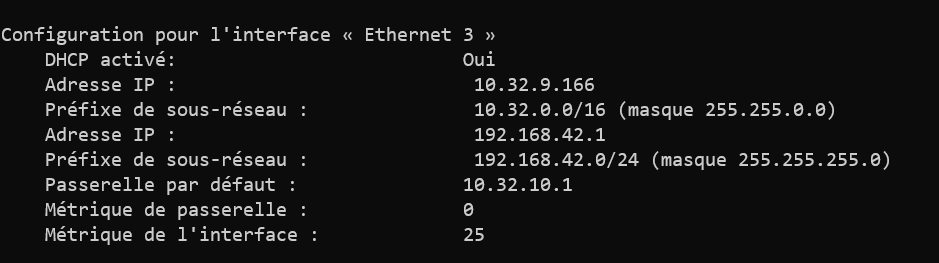
- Changed my AQC-111 lan IP to 192.168.42.1 on my windows 10 laptop
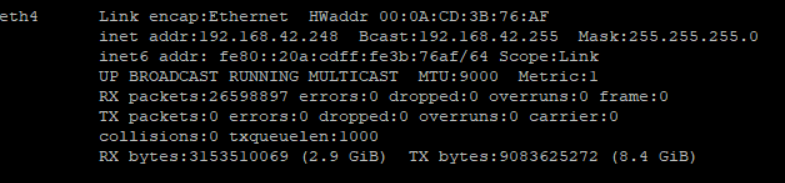
- Changed AQC-111 IP to 192.168.42.248 on Synology
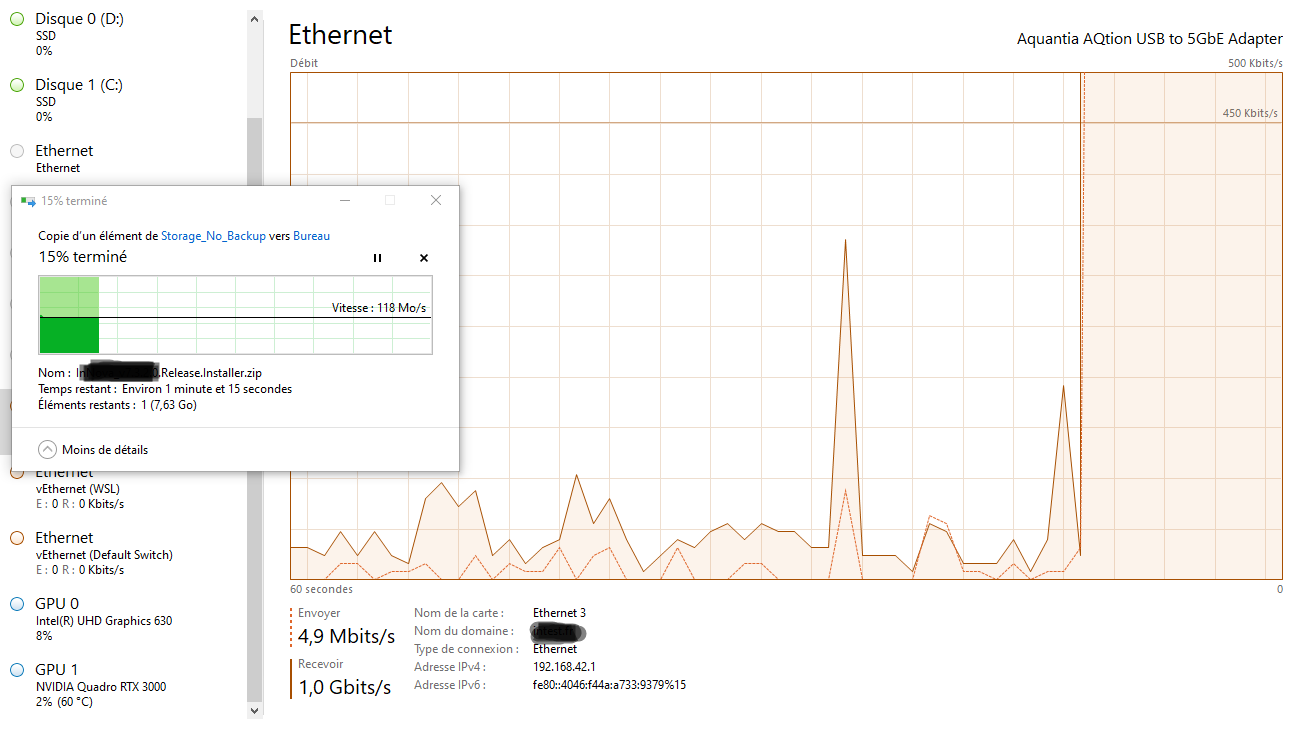
Windows file copy bandwidth topped at 1GBPs.
Same issue here. DSM412+ (cedarview)
[19474502.332227] usbcore: registered new interface driver aqc111
[19474502.349944] aqc111 7-1:1.0 eth2: register 'aqc111' at usb-0000:04:00.0-1, Aquantia AQtion USB to 5GbE Controller, 00:24:27:88:19:77
[19475037.520227] aqc111 7-1:1.0 eth2: Link Speed 1000, USB 2
[19475212.285149] aqc111 7-1:1.0 eth2: Link Speed 1000, USB 2
[19476181.679215] aqc111 7-1:1.0 eth2: Link Speed 1000, USB 2
root@DiskStation:~# ethtool eth2
Settings for eth2:
	Supported ports: [ TP MII ]
	Supported link modes:   100baseT/Full
	                        1000baseT/Full
	Supported pause frame use: No
	Supports auto-negotiation: Yes
	Advertised link modes:  100baseT/Full
	                        1000baseT/Full
	Advertised pause frame use: No
	Advertised auto-negotiation: Yes
	Speed: 1000Mb/s
	Duplex: Full
	Port: MII
	PHYAD: 0
	Transceiver: internal
	Auto-negotiation: on
	Supports Wake-on: g
	Wake-on: d
	Current message level: 0x00000007 (7)
			       drv probe link
	Link detected: yes
|__usb7          1d6b:0002:0310 09  2.00  480MBit/s 0mA 1IF  (Linux 3.10.105 etxhci_hcd-170202 Etron xHCI Host Controller 0000:04:00.0) hub
  |__7-1         2eca:c101:0101 00  2.10  480MBit/s 500mA 1IF  (Aquantia Sabrent 2.5G Network Adapter 0000000I)
  |__7-2         0781:558c:1012 00  2.10  480MBit/s 500mA 1IF  (SanDisk Extreme SSD 313834313237343031353230)
Connection:
- Sabrent 5Gbe -> short run of cat6 -> spf+ 10Gbe copper in a CRS305-1G-4S+IN
Tried two different ethernet cables.

I also have another aqc111 adapter:
|__8-1 20f4:e05a:0101 00 3.20 5000MBit/s 896mA 1IF (TRENDnet TRENDnet USB 5G Adapter 00000043)
It works! Speed: 5000Mb/s
So, the 5Gbe is failing to negotiate on only the 2eca:c101 Aquantia Sabrent 2.5G Network Adapter
Regarding that MikroTik switch, there is a report of compatibility problems with the RJ45 module. Perhaps the cause may be different.
https://github.com/bb-qq/r8152/issues/215