

 bazelbuild
" File->Open" does not detect that a project is a bazel project
To help people get started quickly, it's not uncommon for people to check in .ijwb/.bazelproject files. However, once this is done, there's no way to actually use this:
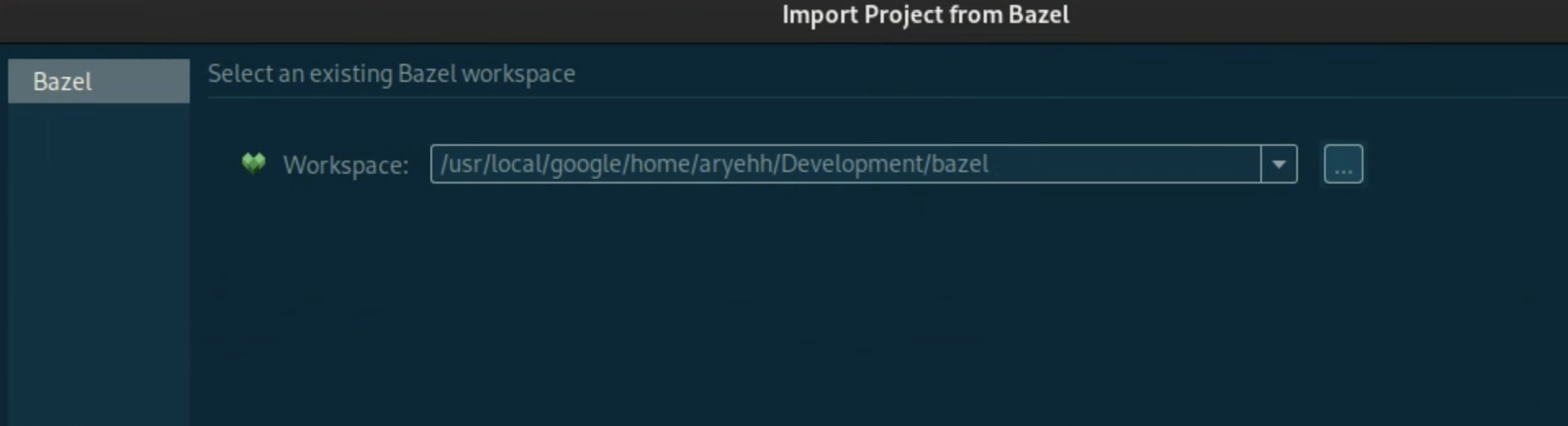
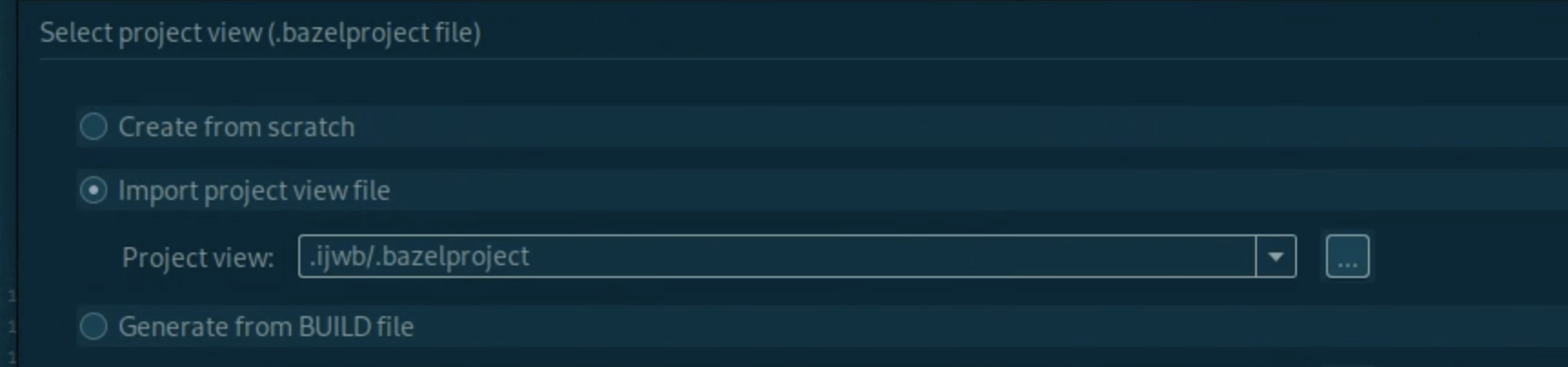
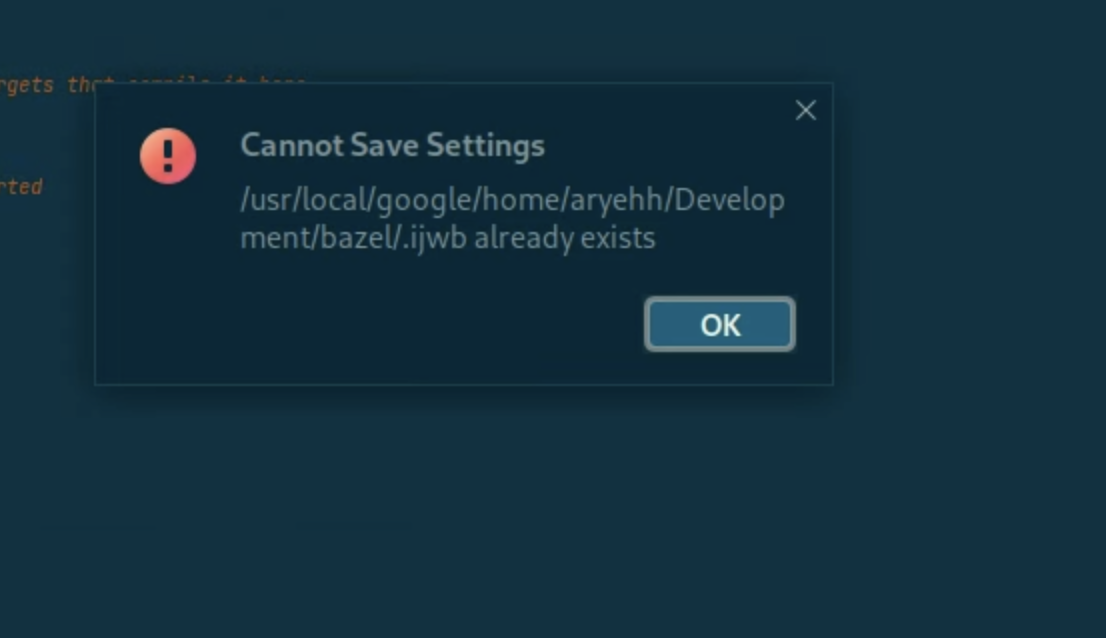
- "Bazel import project" will complain that the file already exists
- "File->Open..." doesn't detect that this is a bazel project, so the plugin isn't enabled
- "File->Import Project" doesn't list "Bazel" as an external model.
It seems clunky to check in the project config to a different location and then tell people to point to that.

The option to overwrite the existing config would help get us over this hump.
It seems clunky to check in the project config to a different location and then tell people to point to that.
That's exactly what we do. The copy we keep in the .ijwb/.bazelproject directory is the local config and is meant to be used for local edits.
You could also check in the other files in the .ijwb/.idea directory so File -> Open works.

It's not clear that the .ijwb/.bazelproject is user-specific, or that the .idea files need to be checked in (presumably the libraries directory isn't necessary?) It would be very helpful to have the "right thing to do" documented somewhere.
It's documented in the link in https://github.com/bazelbuild/intellij/issues/1159#issuecomment-530442324. Checking in a project is a general IntelliJ thing.
Though for bazel projects I would recommend keeping a .bazelproject file elsewhere and importing that.
Though for bazel projects I would recommend keeping a .bazelproject file elsewhere and importing that.
Also see https://github.com/bazelbuild/intellij/blob/master/ijwb/ijwb.bazelproject and https://github.com/bazelbuild/bazel/blob/master/scripts/ij.bazelproject for examples.

I'm trying to work out myself how to best share project settings etc with other users. I've read this thread a number of times, and I'm bewildered. I'm used to "knowing" (with IDE support) which files in .idea should be checked in. But of the other files, I have no idea:
- There are files in
.ideaat the root. Presumably I should ignore the usual suspects in here? - There are files in
.clwb/.ideaand.ijwb/.ideatoo. Ditto? - What about
.clwb/.bazelprojectand.ijwb/.bazelproject? - Ditto
.clwb/.blaze,.ijwb/.blaze? The latter are market orange in the IDE, but the CLion ones aren't.
Any insights welcomed: thanks!

@mattgodbolt I'm working on a blogpost to demystify some of these: https://github.com/bazelbuild/bazel-blog/pull/200
We'll probably surface this in documentation soon as well.
@shs96c (hi mate!)
It seems clunky to check in the project config to a different location and then tell people to point to that.
What does this even mean? You'd have a separate git repo with just that one file in it? And then how does it relate to the real repository? Would you mind explaining this: I can't seem to find any way to load an existing repository short of rm -rf-ing all the .iw* files and re-importing each time. Which is tiresome :)
What does this even mean? You'd have a separate git repo with just that one file in it? And then how does it relate to the real repository?
It's in the same repository as the code. Look at this project for example: https://github.com/bazelbuild/intellij/blob/master/ijwb/ijwb.bazelproject
You just import that file and you can edit the project.
I can't seem to find any way to load an existing repository short of
rm -rf-ing all the .iw* files and re-importing each time.
If you don't check in the .ijwb directory, but keep a separate .bazelproject file in your source directory, then you don't need to rm -rf them on a fresh checkout, you just import once and it's done.
If you do check in the .ijwb directory, then make sure you check in everything necessary to open the project, including everything under .idea that you would normally check in..
This is only a problem if you check in part of the directory (in this case he only checked in the local .bazelproject file).
Thanks @chaoren . We like to share project configuration information, debug configurations etc, so ideally we'd like to check in .ijwb and .clwb. It seems the trick is to not check in the .bazelproject file, but then check in the normal files in .jiwb/.idea etc?
If so, how does one open the project the first time? When I tried, CLion tried to open the directory as a new project, creating a top-level .idea directory (which confused me). Thanks again
It seems the trick is to not check in the .bazelproject file, but then check in the normal files in .jiwb/.idea etc?
No you do need the .bazelproject file. You also need all of .ijwb/.blaze.
BlazeImportSettings from .ijwb/.idea/workspace.xml is required for the project to be identified as a bazel project, but unfortunately workspace.xml is one of the files you usually don't want to share because it contains user specific stuff.
If all you need to share is debug configurations, we have a way of sharing that via the .bazelproject file.
I think the trick is the exact opposite: check in the .bazelproject as an example, and have people load that. That way, you don't need any of the .ijwb or similar files. You can also keep the .idea directory to a minimum too.
Yeah, sorry for the confusion. See the two options given in https://github.com/bazelbuild/intellij/issues/1159#issuecomment-534623904
I was responding to this:
ideally we'd like to check in
.ijwband.clwb. It seems the trick is to not check in the.bazelprojectfile
If he wants to check in .ijwb then he needs to keep the .bazelproject file under it.
We do recommend not checking in .ijwb at all though. All project configuration should be shareable via a separate .bazelproject file checked in elsewhere in your source, and you just import that when you open the project.
Two thoughts:
- I think (and have advocated for it in a different issue) that import bazel project should check to see if a
ijwb/ijwb.bazelprojectexists and if so then it shoudl default to the radio button of "Import project view file" with this value. This is to ease and promote this pattern of working together. The default filename can of course be different but it needs to be one and documented. - Additionally I think the original problem the OP describes is still a big issue when you want to open an project you've opened before (and so you have
.ijwbfolder for it) but it's no longer in your recently opened (because you work with many workspaces). Because you can't use "File->Open" then you have torm -rf .ijwband then import from scratch. This is a problem.

Nowhere here or in the corresponding blog post mentioned (https://blog.bazel.build/2019/09/29/intellij-bazel-sync.html) do I see @mattgodbolt's question answered.
If we wish to share .idea/codeStyles what is the recommended way of doing so? From what I've gathered it is impossible to share them in .ijwb/.idea because then opening a Bazel project for the first time will not be recognized as a Bazel project.
So then the solution is putting a top level .idea directory under version control and having other developers manually import these into their .ijwb directory?

I've struggled with putting IDE configuration for Bazel projects under version control as well. I'll get into my workarounds, although I don't think they're great.
The Exploring the IntelliJ Bazel Plugin's Sync Process blog post mentioned above has this to say:
The
.ijwbdirectory is not completely portable. Files like.bazelprojectandcodeStyleConfig.xmlcan be shared project-wide, butworkspace.xmland.workspace.imlshould be user-specific.In general, extract
.bazelprojectfile out of.ijwb/to version control it, and follow JetBrains' recommendations on checking in specific files in the.ideadirectory.
For the .bazelproject file, it's somewhat reasonable to put that somewhere else such as ijwb/ijwb.bazelproject, similar to this repo.
For the IntelliJ configuration files, though, I don't believe anything under .idea/ is going to be used, only directories such as .ijwb/.idea/. I have two approaches, neither of which I think is ideal:
1. Keep IDEA config in .ijwb/.idea/ and check that into version control
You have to instruct people setting themselves up on a repo the first time to
- Run
rm -rf .ijwb/(!!!) - Open IDEA and go through Bazel project import using the existing project view file
ijwb/ijwb.bazelproject - Close IDEA
- Run
git checkout .ijwb/to restore the deleted config files you've kept under version control - Reopen IDEA
The upshot is that once they're set up their IDE configuration will stay consistent with upstream.
2. Put IDEA config somewhere else like .idea/
Again you need to provide some user instructions:
- Open IDEA and go through Bazel project import like in the first approach
- Close IDEA
- Run
git ls-files .idea | while read -r file; do mkdir -p .ijwb/$(dirname $file) && cp $file .ijwb/$file; done(or put that in a script and have them run it) - Reopen IDEA
While at least you aren't telling users to delete a directory, the downside of this approach is that the configuration under .ijwb/.idea/ won't stay in sync with upstream, so configuration can drift.
All in all, I think approach 1 is the most workable, but it's obviously not ideal.

@jin it looks like you wrote the blogpost. Are @brymck's workarounds the best recommended ways to achieve this?
If they are, then it looks like the blog post is wrong / misleading - it implies checking in files inside .idea should "just work". Would a PR to update the blog be reviewed/accepted?

The blogpost was written years ago, and I've lost the context (and no longer work on the IDE plugin) to make recommendations on this.
@alice-ks Are there documentation for current best practices to sync config directories?
I am so confused as to how to "just open" a project with an existing view file and .ijwb path. Is this documented?

Contextual help could be improved too -- i.e. using the error dialog in the last screenshot to help the user understand how to properly import an existing project.

Thank you for contributing to the IntelliJ repository! This issue has been marked as stale since it has not had any activity in the last 6 months. It will be closed in the next 14 days unless any other activity occurs or one of the following labels is added: "not stale", "awaiting-maintainer". Please reach out to the triage team (@bazelbuild/triage) if you think this issue is still relevant or you are interested in getting the issue resolved.
![github-actions[bot] avatar](https://avatars.githubusercontent.com/in/15368?v=4 "Published by a pub.dev verified publisher")
Should be listed as awaiting maintainer
On Thu, Jan 4, 2024 at 17:55 github-actions[bot] @.***> wrote:
Thank you for contributing to the IntelliJ repository! This issue has been marked as stale since it has not had any activity in the last 6 months. It will be closed in the next 14 days unless any other activity occurs or one of the following labels is added: "not stale", "awaiting-maintainer". Please reach out to the triage team @.***/triage) if you think this issue is still relevant or you are interested in getting the issue resolved.
— Reply to this email directly, view it on GitHub https://github.com/bazelbuild/intellij/issues/1159#issuecomment-1878004208, or unsubscribe https://github.com/notifications/unsubscribe-auth/AAEAQT4D4WBOB74BSVHPPO3YM5MPTAVCNFSM4IVR6NOKU5DIOJSWCZC7NNSXTN2JONZXKZKDN5WW2ZLOOQ5TCOBXHAYDANBSGA4A . You are receiving this because you commented.Message ID: @.***>
Thank you for contributing to the IntelliJ repository! This issue has been marked as stale since it has not had any activity in the last 6 months. It will be closed in the next 14 days unless any other activity occurs. If you think this issue is still relevant and should stay open, please post any comment here and the issue will no longer be marked as stale.
What evidence do you have that it’s been resolved? I don’t see any PRs tagged against this issue? These bots are big eff yous to your users.
On Sat, Jul 6, 2024 at 19:06 github-actions[bot] @.***> wrote:
Thank you for contributing to the IntelliJ repository! This issue has been marked as stale since it has not had any activity in the last 6 months. It will be closed in the next 14 days unless any other activity occurs. If you think this issue is still relevant and should stay open, please post any comment here and the issue will no longer be marked as stale.
— Reply to this email directly, view it on GitHub https://github.com/bazelbuild/intellij/issues/1159#issuecomment-2212267623, or unsubscribe https://github.com/notifications/unsubscribe-auth/AAEAQTZ2V444TEVBIYGOTXDZLCPCPAVCNFSM4IVR6NOKU5DIOJSWCZC7NNSXTN2JONZXKZKDN5WW2ZLOOQ5TEMRRGIZDMNZWGIZQ . You are receiving this because you commented.Message ID: @.***>
When this happened 6 months ago, I noted that this issue is labeled incorrectly and should be tagged awaiting-maintainer so that it won't get auto-closed. I tried @bazelbuild/triage last time, maybe @mai93 can do it/
Thank you for contributing to the IntelliJ repository! This issue has been marked as stale since it has not had any activity in the last 6 months. It will be closed in the next 14 days unless any other activity occurs. If you think this issue is still relevant and should stay open, please post any comment here and the issue will no longer be marked as stale.