

 bazelbuild
Error occur when Install Bazel on Mac
Please help! Following is the error messages from the screen:
tsung@yoda:verible$ brew install bazelbuild/tap/bazel ==> Installing bazel from bazelbuild/tap ==> Downloading https://releases.bazel.build/3.0.0/release/bazel-3.0.0-installer-darwin-x86_64.sh ######################################################################## 100.0% ==> ./bazel-3.0.0-installer-darwin-x86_64.sh --prefix=/tmp/bazel-20200417-5893-d156a8 Last 15 lines from /import/home/tsung/.cache/Homebrew/Logs/bazel/01.bazel-3.0.0-installer-darwin-x86_64.sh:
./bazel-3.0.0-installer-darwin-x86_64.sh --prefix=/tmp/bazel-20200417-5893-d156a8
Bazel installer
Bazel is bundled with software licensed under the GPLv2 with Classpath exception. You can find the sources next to the installer on our release page: https://github.com/bazelbuild/bazel/releases
Binary package at HEAD (@eea58d1afb)
- Commit Uncompressing....../tmp/bazel-20200417-5893-d156a8/bin/bazel: line 220: /tmp/bazel-20200417-5893-d156a8/lib/bazel/bin/bazel-real: cannot execute binary file: Exec format error /tmp/bazel-20200417-5893-d156a8/bin/bazel: line 220: /tmp/bazel-20200417-5893-d156a8/lib/bazel/bin/bazel-real: Success
If reporting this issue please do so at (not Homebrew/brew or Homebrew/core): https://github.com/bazelbuild/homebrew-tap/issues
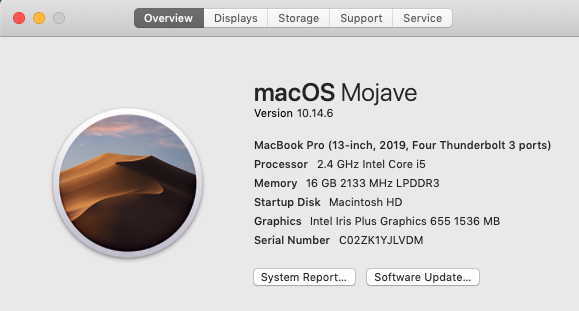
Following is the Mac I am using:

Do you need the specific version 3.0.0? If not, you can install Bazel package from homebrew core by executing brew install bazel.
https://docs.bazel.build/versions/master/install-os-x.html#install-on-mac-os-x-homebrew
