
react-native-circular-progress
 react-native-circular-progress copied to clipboard
 bartgryszko
RenderCap circle clips at the top of the circle, even with padding
First of all, incredible library! SO easy to use!
My issues is whenever I render a cap and then add some padding directly to the component, the cap circle is clipped off. The progress bar is a semi circle and when the cap is rendered either at the beginning, end, or middle, it would clip when the padding prop wasn't being used. After adding padding, it stopped clipping at the beginning and end but not the middle.
Am I perhaps missing something?
Here's some code!
 <AnimatedCircularProgress
        size={350}
        width={13}
        fill={fillAmount()}
        tintColor={Colors.PRIMARY_WHITE}
        onAnimationComplete={() => console.log('onAnimationComplete')}
        backgroundColor="#96CBDF"
        arcSweepAngle={180}
        renderCap={({ center }) => (
          <Circle
            cx={center.x}
            cy={center.y}
            r="13"
            fill={Colors.PRIMARY_WHITE}
          />
        )}
        padding={10}
        rotation={-90}>
        {renderFillAmount}
      </AnimatedCircularProgress>
Here's some screenshots!
Padding fixed this clipping issue ~
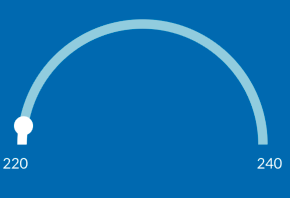
But not this one :( ~


The problem comes from the line
<G rotation={rotation} originX={size / 2} originY={size / 2}> in CircularProgress.js, which does not respect to the size of outer <Svg width={ size + padding } height={ size + padding }>.
simply change it to
<G rotation={rotation} originX={(size + padding) / 2} originY={(size + padding) / 2}>
to give the correct center location of <G> inside <Svg>

@AndresTIY is not working its give me error element type is invalid expected a string


how can i drop a shadow to renderCap plz guide me. I am facing issue as I am not able to drop a shadow to my Cricle in renderCap
