

 bardsoftware
Add »Named« Zoom Levels
In order to get the best output for e.g. a rastered image or PDF, it would be great, if GP would have »named« zoom levels, which could be chosen from a drop down in the UI, e.g.: 1, 2, 3, etc. or 25%, 50%, 75%, 100%, 125%, etc.
This way, one could zoom in and out and come back to a specific zoom level.
Thanks, Tobias

You can zoom in and zoom out using corresponding buttons in the small toolbar above the chart area. It works for export as well (export uses zooming level which is currently set in the chart area). So, I'd like to clarify what this issue is about.
Is it about arranging zooming levels into dropdown in the chart area? Or about adding zoom level change controls to the export wizard? Or something else?

Thanks for thinking about my issue!
Yes, I know the buttons and that the output regards the zoom level, which is actually set in the project. And exactly this is my point: When working with the project files I often change the zoom level by hitting the »Zoom In« or »Zoom Out« button in order to get the best zoom for what I have to do with the project file.
When I have to export the project, for some purposes I need a definite zoom level. As zoom levels have no »name«, I have to try out, which is the right zoom level for the desired output.
If we could have »named« zoom levels, I could define: »Zoom –1« is the regular output zoom level for all views, that go to the customer, and »Zoom +1« perfectly fits our printer for the whiteboard print, etc.:
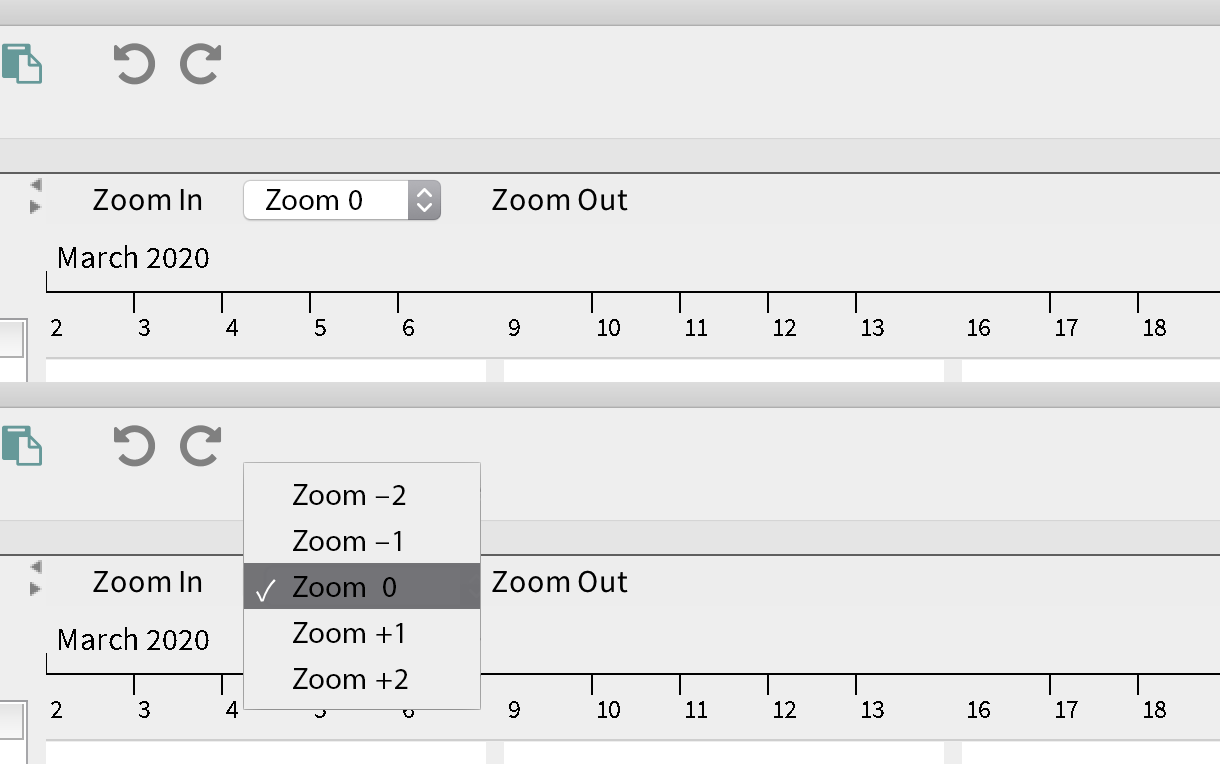
The idea of adding controls only to the export wizard is very nice!, since I don’t desperately need them in the chart area (although they wouldn’t hurt).