

 barbeau
Show intro dialog when opening logging preferences
Separate Settings for Logging, Android Studio Under the heading Android Monitor Output, we see (4) boxes, and that when these boxes are all checked, it's unclear what, if anything, is going on.
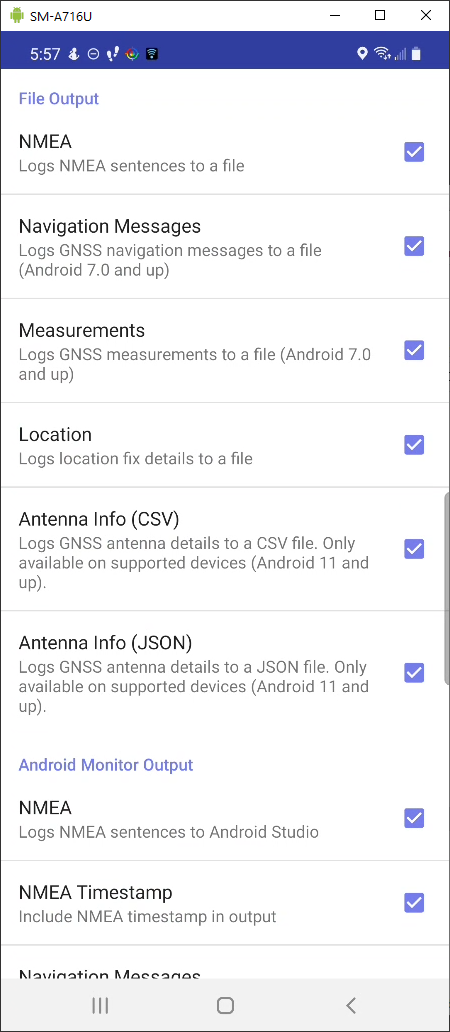
Android Studio settings (keep under main menu, Settings) ought to be separate and apart from Logging Settings.

I think a brief explanation in a dialog of what these settings are would be helpful here, along with a link to https://github.com/barbeau/gpstest/blob/master/LOGGING.md - they are both logging, the Android Studio option is just more relevant to developers. I'm going to change this issue to focus on that, which should mitigate the problem.
Also include explicit text about logging to single CSV/JSON files here (https://github.com/barbeau/gpstest/issues/508).

This issue has been automatically marked as stale because it has not had recent activity. Please comment here if it is still valid so that we can reprioritize. Thank you!
![stale[bot] avatar](https://avatars.githubusercontent.com/in/1724?v=4 "Published by a pub.dev verified publisher")
This issue has been automatically marked as stale because it has not had recent activity. Please comment here if it is still valid so that we can reprioritize. Thank you!
Closing this. Please reopen if you believe it should be addressed. Thank you for your contribution.