

 balena-io
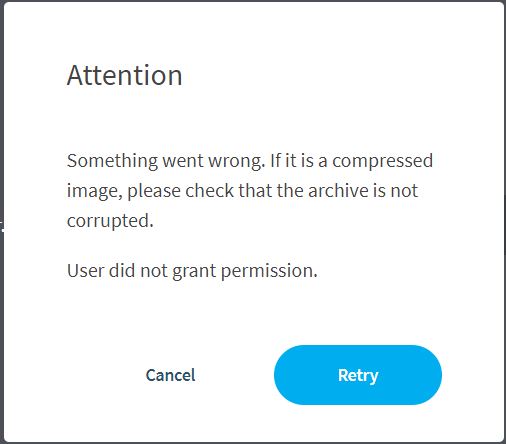
Error: User did not grant permission
- **Etcher version:1.5.122
- **Operating system and architecture: window 10
- **Image flashed: 2020-12-13-qut-v35-raspbian-buster
- **Do you see any meaningful error information in the DevTools? I cant flash the img to the sd card


 )
)
getting the same refusal. elevated Etcher, shared USB device to Everyone, tried different ISO images, ran out of imaginative things to do.

Have you checked that you have Controlled Folder Access disabled or put Etcher in whitelist?

Add these 2 items back to your Path environment variable
C:\Windows\System32\WindowsPowerShell\v1.0
C:\Windows\System32
Courtesy of: https://forums.balena.io/t/win-10-user-did-not-grant-permission/207435/57

liqdfire, thanks man, you just saved me! i was triyng to install linux mint in my usb, i got stuck with that error hours ago.

liqdfire thanks a lot. I was trying to flash on system drive, don't know if that was the issue, but with your solution it worked

@liqdfire I've added the items into path environment variable, but I still have the same problem.
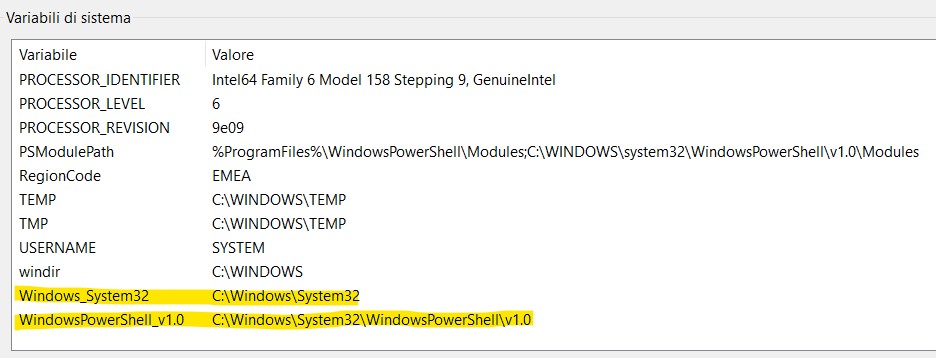
I'm trying to flash ubuntu-22.04.2 and balenaEtcher's version is 1.18.4.

@MaxRondelli Rather than add those values as new variables, I believe the suggestion is to add them to the existing PATH variable? i.e. you'd want to append
;C:\Windows\System32\WindowsPowerShell\v1.0;C:\Windows\System32
onto the end of the values for PATH?
(although it's been a long time since I've used Windows myself, so be careful when changing these system-variables)

C:\Windows\System32\WindowsPowerShell\v1.0
uff this helped finally its flashing

@liqdfire bro thankyou vey much i tried yourube for an hr and finnakly got solution

Add these 2 items back to your Path environment variable
C:\Windows\System32\WindowsPowerShell\v1.0
C:\Windows\System32
Courtesy of: https://forums.balena.io/t/win-10-user-did-not-grant-permission/207435/57
This helped me. Also if you have this problem, run the app as an administrator.
