

 bake-bake-bake
Each build I make on Windows 10 prints "The system cannot find the path specified." when ran
Just started trying to use bakeware, and each project I try to build prints "The system cannot find the path specified." up to three times, and does not progress
Has this been observed before? I tried using procmon to see which fpath it was failing to find, with no luck.

Could you confirm that you followed https://github.com/bake-bake-bake/bakeware#building-on-windows?

I did, however I already had elixir installed on my machine. Does it require the choco installed version? (Since I skipped installing Elixir via chocolaty)
Switched to the chocolaty installed versions and I have the same error unfortunately (Rebooted, removed builds / deps, rebuilt)
Also, it might be relevent, but Within VS Code I get
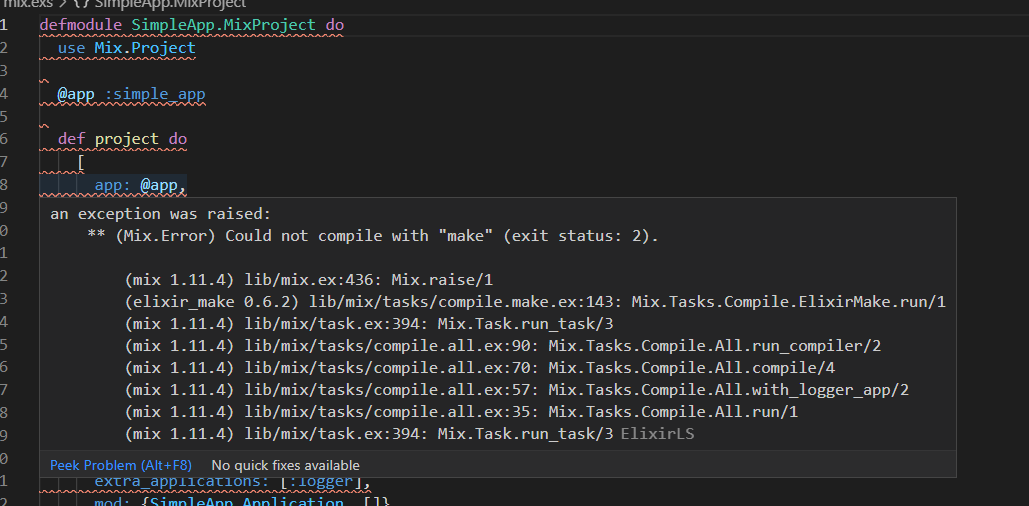
Which might be a part of the issue (Although the mix release runs fine, so I think this is just some VS Code weirdness)
I'm also having issues building on windows. First, the readme has a minor issue. It should use set/setx for setting make and CC instead of export. Pretty sure export is linux only. After following the instructions in the readme, I get:
process_begin: CreateProcess(NULL, mkdir -p c:/Users/johnd/Downloads/elixtron_agent/_build/dev/lib/bakeware/obj, ...) failed.
make (e=2): The system cannot find the file specified.
make: *** [Makefile:69: c:/Users/johnd/Downloads/elixtron_agent/_build/dev/lib/bakeware/obj] Error 2
could not compile dependency :bakeware, "mix compile" failed. You can recompile this dependency with "mix deps.compile bakeware", update it with "mix deps.update bakeware" or clean it with "mix deps.clean bakeware"
==> elixtron_agent
** (Mix) Could not compile with "make" (exit status: 2).

@JayPeet @johns10 Please let me elaborate on the environment that I have used to successfully build windows binaries.
I have installed Git for Windows. This gives me a working mingw64 environment and, of course, git as well. In the Git Bash I have access to all the choco packages which I have already installed following the install instructions on chocolatey's website. You can verify that you have make, gcc, iex, mix all callable in this mingw64 environment. Since this is a mingw64 env, it gives you some unix like programs like export, mkdir with p option.
process_begin: CreateProcess(NULL, mkdir -p c:/Users/johnd/Downloads/elixtron_agent/_build/dev/lib/bakeware/obj, ...) failed. make (e=2): The system cannot find the file specified.
This tells me that you are trying to build from a powershell. Perhaps, It should be made clear on the readme itself that powershell cannot be used to build this, only a mingw shell would succeed.
I have created a sample app which I know builds successfully for me on all the platforms. Please try to test by building that first to verify the sanity of your environment.
First install chocolatey and choco install sudo mingw make elixir zstandard from elevated powershell or admin cmd prompt
Once you have sudo installed, you can installed any other choco packages from Git Bash itself. (sudo choco install Git Bash
git clone https://github.com/kritarthh/bakeware_example
cd bakeware_example
mix deps.get
export CC=gcc
export MAKE=make
mix release demo
running _build/dev/rel/bakeware/demo.exe should print hello world
As far as the IDE is concerned, I really have no clue how to fix the VS Code errors. Hope this helps :smile:

Thanks for the writeup @kritarthh :)
Following the instructions, The demo.exe was compiled and built. However, when running the exe it prints
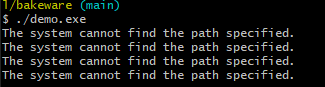
I'll do some more investigating when I have a bit more time to invest. This was the case for me on two separate computers.
I'm really close now. I'm getting:
10:32:45.151 [info]  Application elixtron_agent exited: exited in: BakewareExample.Main.start(:normal, [])
    ** (EXIT) an exception was raised:
        ** (UndefinedFunctionError) function BakewareExample.Main.start/2 is undefined (module BakewareExample.Main is not available)
            BakewareExample.Main.start(:normal, [])
            (kernel 6.5.2) application_master.erl:277: :application_master.start_it_old/4
{"Kernel pid terminated",application_controller,"{application_start_failure,elixtron_agent,{bad_return,{{'Elixir.BakewareExample.Main',start,[normal,[]]},{'EXIT',{undef,[{'Elixir.BakewareExample.Main',start,[normal,[]],[]},{application_master,start_it_old,4,[{file,\"application_master.erl\"},{line,277}]}]}}}}}"}
Kernel pid terminated (application_controller) ({application_start_failure,elixtron_agent,{bad_return,{{'Elixir.BakewareExample.Main',start,[normal,[]]},{'EXIT',{undef,[{'Elixir.BakewareExample.Main',

Crash dump is being written to: erl_crash.dump...done
I did add a start function to BakewareExample.Main, like:
  def start(arg1, arg2) do
    IO.puts("Hello, World!")
    IO.inspect(arg1)
    IO.inspect(arg2)
    0
  end
I have a few fundamental misunderstandings on how this is supposed to work. I'm assuming that start is unnecessary as it's covered in Bakeware.Script.
I'm afraid I didn't pass the stupid test today. I was running it in the wrong project. Got this working now. Thanks so much for the tip on git bash!!
Maybe worth mentioning ... I'm not sure WHAT I did, but mix release now runs in the normal command prompt, but the resulting binary is not executable in windows.