
amis

amis copied to clipboard
 baidu
baidu
dialog 中设置了 menuTpl 和 searchable 的 select 无法选中
描述问题:
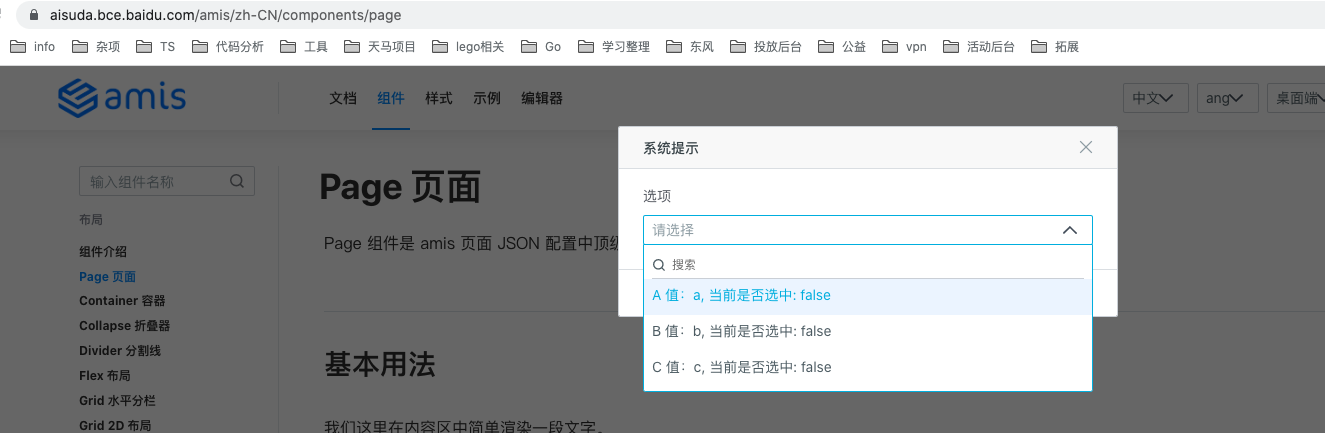
dialog 中设置了 menuTpl 和 searchable 的 select 无法直接选中
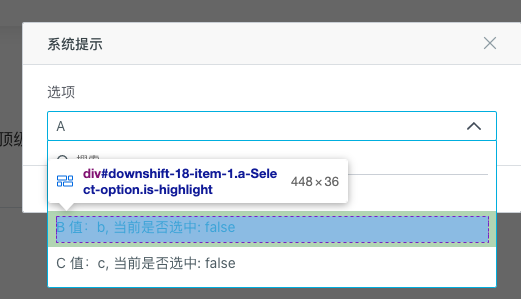
但是点击对应选项的 padding 的话,是可以选中的
如何复现(请务必完整填写下面内容):
-
你是如何使用 amis 的?
npm -
amis 版本是什么?请先在最新 beta 版本测试问题是否存在 最新 amis,可直接在官网文档中复现:https://aisuda.bce.baidu.com/amis/zh-CN/components/page
-
粘贴有问题的完整
amis schema代码:
{
  "type": "page",
  "body": [
    {
      "type": "form",
      "body": [
        {
          "type": "button",
          "label": "按钮",
          "actionType": "dialog",
          "dialog": {
            "title": "系统提示",
            "body": [
              {
                "type": "select",
                "label": "选项",
                "name": "select",
                "menuTpl": "<div>${label} 值:${value}, 当前是否选中: ${checked}</div>",
                "options": [
                  {
                    "label": "A",
                    "value": "a"
                  },
                  {
                    "label": "B",
                    "value": "b"
                  },
                  {
                    "label": "C",
                    "value": "c"
                  }
                ],
                "searchable": true
              }
            ],
            "type": "dialog"
          }
        }
      ]
    }
  ]
}
- 操作步骤 直接点击选项 content 是无法选中的,点击选项的 padding 区域可以选中

