

 backdrop
Field Type - text long - an extra empty field gets added with every save.
Description of the bug
When creating a content type and adding a "Text (long) Field multi-row" -
If these fields are set as follows...
- Text processing - filtered
- Row count is changed to 10 for example
- field is set to an unlimited number of values
When adding content, an empty field is saved which can not be deleted. If the same content is edited again and saved, another empty field is created.
This also happens with Unlimited "Text Short"
Steps To Reproduce
To reproduce the behavior:
- Create a new content type: Structure->Content Type->Add content type
- name: test
- Save and add fields
- Add new field: Label: anything
- Field type: Text (long)
- Widget: text area (multiple rows)
- Change Text Processing to Filtered
- Global settings->number of values: change to unlimited
- save settings
- add content....
- Content->add content->[content just created above]
- Enter a title
- Save
- Edit the content again
- Do not change anything...
- Save the content
- Edit the content again
- Repeating will add another empty text field
Expected behavior
Only adding new text areas when clicking on the "Add another item"
Additional information
Add any other information that could help, such as:
- Backdrop CMS version: 1.19.2 & 1.19.3
- Web server and its version: Shared hosting
- Operating System and its version:
- Browser(s) and their versions: Chrome 92.0.4515.131 (Official Build) (64-bit)

Thinking about the problem... (being new I could be way off the mark)
This is how I think the form would render... for "create new content" the form renderer should add empty fields so the user can fill them in... or set the default value.
But when existing content is being edited, the form renderer isn't checking to see if it's a new or existing node, so the renderer is adding an empty field regardless, which then gets saved.
When editing existing content an empty field should be added when "Add another item" is clicked.
If it's about the empty field getting saved - that's by design, so the format is saved properly. Otherwise the format would get lost.
Might be related to https://github.com/backdrop/backdrop-issues/issues/3378.

@indigoxela no, it keeps adding more empty fields.
I was going to look at the Paragraph module to see how it renders those, it has a delete function as well... I was going to compare the two... if I could find where the fields get rendered in core lol :-)
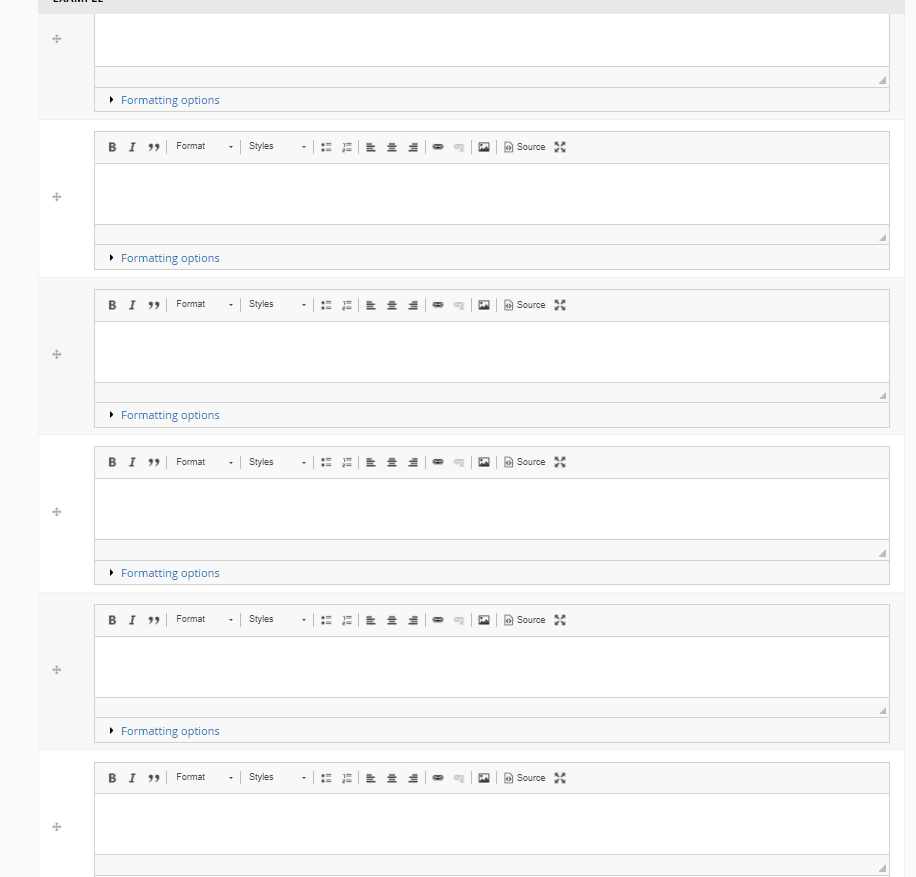
Oh, now I get it. I'm afraid that is related to this issue.
As we need a db table entry to keep the currently selected format, an empty body gets saved. As that field delta already exists and the (body) field has an unlimited field setting, a new field gets saved (empty to keep the format setting). Next time you save that node, another body field gets added, and so on and so on...
Seems tricky.
@albanycomputers do you see any chance to make your textfield limited to one?
It's not the Body field that keeps getting added... it's the Text (xxx) field... It seems to be happening with all Text fields if set to unlimited.
It's not the Body field that keeps getting added... it's the Text (xxx) field... It seems to be happening with all Text fields if set to unlimited.
Yes, sure, it doesn't matter if it's the body or any other field with a format, all fields with formats are affected, all of them increase even if empty. As soon as you turn the filter format off (plain textarea), the increase stops.
@indigoxela " do you see any chance to make your textfield limited to one?" changing back to one works as expected but the added fields never get removed from the database... if you then change the value back to unlimited, the extra fields reappear.
I've also run Cron to see if the records were queued for deletion but appears not, they were not removed.
changing back to one works as expected but the added fields never get removed from the database...
Hm, I'd actually expect them to get deleted on cron runs. What's the value of their "deleted" column in the database table?
That the body (or actually any text) field has no delete button is definitely odd. Even if the increase weren't a bug, the inability to delete an individual field item for sure is. Or at least it's bad user experience.
Ah, OK, the trick is to empty the text (only works with unfiltered text). Still odd.
This issue still exists.
Oh, now I get it. I'm afraid that is related to https://github.com/backdrop/backdrop-issues/issues/3378.
Actually that's not accurate. That PR was merged, and then reverted to the original code in 2019 in #3873. But this last PR added some code to save the empty field "regardless of empty value to keep the format". I'm not sure I understand the rationale here.
To me, empty fields being saved to the database seems like a bug.

To me, empty fields being saved to the database seems like a bug.
This text field format thing has caused some trouble. Fixing is tricky, though, without introducing another regression.
@argiepiano want to give it a try? Maybe further tweak text_field_is_empty()?
This issue is currently plaguing me... I think I understand the logic behind saving a "next instance" (though blank) array entry—for the sake of maintaining a user's desired "default" text format for subsequent inputs. (Somebody correct me if I've got that rationale wrong).
However, it seems a pretty simple task to add to the Node-Save logic the following procedure:
- Traverse the array in reverse (starting at the end), pushing each non-empty item onto a temporary stack.
- Clear the array, setting its size to zero.
- Pop each item off the stack and load it into the array.
- Add one more empty item (if you feel you must), leaving the appropriate text format attached.
Personally, I would rather leave the empty item off entirely (by skipping step 4, forcing the user to click the "Add Another" button if he wants to Add Another. That seems cleanest and most concise.
This would eliminate extraneous empty fields, while providing a means for the user to delete entries that are between the top and bottom of the list (by simply deleting all the text from them). If the user wants to keep any number of "empty" item(s), he can just leave a couple spaces in there.
Of course there's the issue of making the database look like the results of the above procedure, which might be a whole 'nother can of worms—I dunno—but that's just another twenty minutes of coding, right? ;-)

However, it seems a pretty simple task to add to the Node-Save logic ... just another twenty minutes of coding
Sounds great! Mind to give it a try? We're just waiting for a PR here. :wink:
This bug keeps biting innocent bystanders: https://forum.backdropcms.org/forum/strange-behavior-node-edits
Someone needs to try to tackle this - I could try it but not for a couple of months... just too busy at the moment.
As a temporary fix to that forum post, I suggested "you may want to use hook_form_alter() to add a custom submit handler, and basically remove the extra elements from that field array, or implement hook_node_presave() to do the same thing before the node is saved." Posting here in case someone else runs into this ancient bug.
I think we should remove the code in text_field_is_empty() that returns false if an empty field has a format. Thats not logical. Its empty, the function should return true. And whatever benefit that is meant to bring (I cant quite figure the benefit either) must surely not be worth this mess of spawning empty fields.

I think there may be some unwanted regressions if that text_field_is_empty() is modified that way (I believe that's what's keeping people from fixing this... @indigoxela can explain perhaps).
In the meantime, while this is being discussed, I've created a small module that implements hook_node_presave() that removes the last empty item from long text fields with unlimited cardinality. Simply by removing the last empty item, the empty items are not saved.
I called it "Long-text tribbles" in honor of the self-multiplying, annoying tiny creatures from the original Start Trek Series 😄
It's in my repo. I can move to backdrop-contrib if people find it helpful.
https://github.com/argiepiano/long_text_tribbles
I called it "Long-text tribbles" in honor of the self-multiplying, annoying tiny creatures
@argiepiano you made my day! :rofl:
A PR is available for discussion, testing and review. The idea behind it: if the text format is the default, anyway, still consider the field as being empty. That way specific text formats still get saved, but empty values with default format won't.

Thanks everyone! I merged https://github.com/backdrop/backdrop/pull/4671 into 1.x and 1.27.x.
