
backdrop-issues
 backdrop-issues copied to clipboard
 backdrop
When user cannot access the default text format on a Filtered text field, the field appears as locked
Description of the bug
If a user does not have access to use the text format that was provided as a default value for a filtered text field, the field loads on the page with the placeholder text This field has been disabled because you do not have sufficient permissions to edit it.
For fields that already contain data, this is the expected result. However, for empty fields, the format is supposed to switch back to one that the user does have permission to use.
Steps To Reproduce
To reproduce the behavior:
- Install Backdrop
- Adjust permissions:
- Grant the
Post: Create new contentpermissions for Anonymous - Remove the
Use the Filtered HTML text formatpermission for Anonymous
- Navigate to admin/structure/types/manage/post/fields/body and save the page (make no changes, this will set the default text format to Filtered HTML)
- CLEAR ALL CACHES (if you don't to this you'll see a cached version of the node/add page in the next step)
- In an incognito browser window, attempt to create a Post
Here's what you should see:
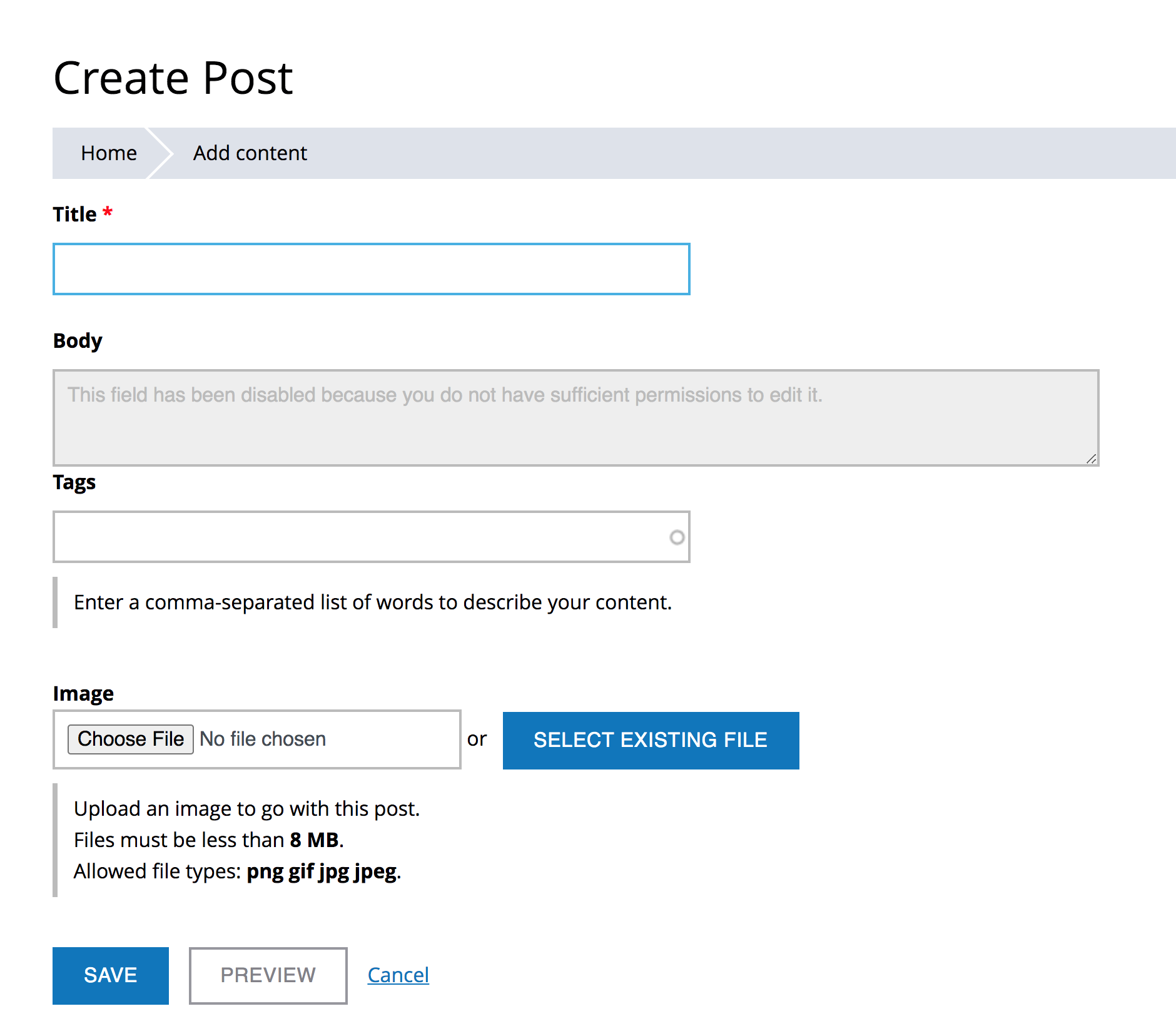
Actual behavior
The body field will show "This field has been disabled because you do not have sufficient permissions to edit it."
Expected behavior
If a user does not have access to use the text format that was provided as a default value, the format should fall back to the next one the user can access. In some cases, this will mean switching to the fallback format plain_text in the case that the user cannot access any of the available formats.
Additional information
I expect this bug was introduced when we "fixed" filtered text fields so that a default value for the text format could be set.
Add any other information that could help, such as:
- Backdrop CMS version: 1.19.x

@jenlampton - I was unable to recreate this problem. I tried twice, once using a Tugboat Sandbox with exactly the instructions that you provided.
I also spun up a local site (this time using dev branch of backdrop 1.20.x-dev) and used an authenticated user account as the test account.
I was able to edit posts with the Filtered HTML text format initially. When I removed the permission and tried again, the Filtered HTML text format was not there, but I was able to edit the node in plain text.

One more test, here are my exact steps:
- Spin up a Tugboat Demo site
- Give anonymous users the following permission -
Post: Create new content - Anonymous user was unable to create a new post, so I rebuilt permissions and they were able to create a new post using Filtered HTML.
- I removed permission for Anonymous users to
Use the Filtered HTML text format - I opened a new Private Window in Firefox and went to the node/add/post path and was still able to use the Filter HTML filter.
- I rebuilt permissions and refreshed my page in Firefox and the Filtered HTML text format was gone, but I was still able to add a new post using the plain text format.
Did I misunderstand the problem?
I am also not able to reproduce the problem. I've tried the steps provided by @jenlampton and did not need to rebuild permissions. Everything worked as expected for me: as anonymous, I was able to create a new post, with the body field switched to plain text in node/add/post.
🤷🏼

Oh, I have an idea. Maybe you need to set a default format on the field? That wouldn't happen on body, but would if another long text field was added. it might have also happened on my local site as I was poking at things.
On Sun, Aug 22, 2021, 3:00 AM Greg Netsas @.***> wrote:
I am also not able to reproduce the problem. I've tried the steps provided by @jenlampton https://github.com/jenlampton and did not need to rebuild permissions. Everything worked as expected for me: as anonymous, I was able to create a new post, with the body field switched to plain text in node/add/post.
🤷🏼
— You are receiving this because you were mentioned. Reply to this email directly, view it on GitHub https://github.com/backdrop/backdrop-issues/issues/5151#issuecomment-903243528, or unsubscribe https://github.com/notifications/unsubscribe-auth/AADBER3AYBRIQSI42J7XUQDT6DDDZANCNFSM5CEFSELQ . Triage notifications on the go with GitHub Mobile for iOS https://apps.apple.com/app/apple-store/id1477376905?ct=notification-email&mt=8&pt=524675 or Android https://play.google.com/store/apps/details?id=com.github.android&utm_campaign=notification-email .
Nope. Still can't reproduce this:
- vanilla Backdrop demo site
- edited the post content type and allowed anonymous to create such content
- edited the filtered text format, and removed anonymous from being able to use it
- removed the body field from the post content type
- added a new long text field to the post content type, and set the default "Text processing" to "Filtered text (user selects text format)"
- tried creating a post as anonymous -> plain text selected, and no errors 👍🏼 🤷🏼
@jenlampton - Thanks. With the STR, I was able to reproduce the problem. Will now test the PR.
Wanted to test this with fresh install, so I did:
- [email protected]:jenlampton/backdrop.git
- git checkout 5151-text-format-access
- Installed new site
- Followed same STR (steps to reproduce).
The PR solved the problem. In this test the unauthenticated user was able to create a new POST using the text only format.
Just for good measure, I also tested with an authenticated user and got the same positive results.
Adding to the next bugfix release milestone. https://backdropcms.org/user-guide/adding-milestones-to-issues

@jenlampton can we please get a rebase here, so to make sure that the tests pass?

@jenlampton and @stpaultim I just updated a Backdrop site which had the issue and was therefore patched with this PR: After updating the site from 1.24.2 to 1.26.2 I didn't need the patch anymore. Was this issue maybe fixed by another change in the meantime?
edit: Re text formats, there was this commit some time ago: https://github.com/backdrop/backdrop/commit/bdedf2a34f6baddc3dab74aa8201cda4bbe0f7b8
EDIT: Adding link to issue that might have addressed this - https://github.com/backdrop/backdrop-issues/issues/2615

I just ran through the STR and was unable to reproduce the problem (using a DEMO site on B.org), so maybe this is fixed by some other change.
@jenlampton It seems like you were applying this patch to Backdropcms.org. Is it still needed there? If not, we could close this issue.
Can at least one more person confirm that this is fixed?
I confirm that I cannot reproduce the issue with the original STR here. This is expected, looking at this diff:
-  // Disable this widget, if the user is not allowed to use the stored format,
-  // or if the stored format does not exist. The 'administer filters' permission
-  // only grants access to the filter administration, not to all formats.
+  // Disable this widget, if the user is not allowed to use the stored format,
+  // or if the stored format does not exist, and only if the field is not empty.
+  // The 'administer filters' permission only grants access to the filter
+  // administration, not to all formats.
The key difference above is the addition of Disable this widget ..., and only if the field is not empty. (and the associated logic added to the PHP code of course), which means that the field "locking" happens only when editing existing content - not when attempting to create new content.
So, if you want to reproduce this, you need to:
- either add some default text to the body field
- or give the
Post: Edit any contentpermission to the anonymous user, and then try to edit an existing Post piece of content, which had some text added to its body field using the "Filtered HTML" text format.
The above is expected behavior, as per @jenlampton's note in the issue summary:
For fields that already contain data, this is the expected result. However, for empty fields, the format is supposed to switch back to one that the user does have permission to use.
Thanks for testing @stpaultim and @klonos. I've also tested the steps from the issue description on a fresh site and wasn't able to reproduce the issue. Thanks also for your findings @klonos! Indeed, I was able to reproduce the (expected) deactivation of the body field after providing some default text to it.
I rebased the PR and did discover a conflict in text.module with the addition of allowed formats. It's likely that this bug was solved by that change. but I am seeing another new problem with formats. I'll make a separate issue.