

 backdrop
Form validation failure in image dialog can cause duplicate tabs to get rendered
Description of the bug
This popped up in an otherwise unrelated issue In an image dialog opened from CKEditor, a validation error causes the form to behave weird.
When entering an invalid url (e.g. with spaces), the tabs in the dialog get duplicated.
Steps To Reproduce
- Go to node/XXX/edit or node/add/whatever
- Click on the CKEditor image icon to open the dialog
- Switch to "select from library"
- Don't select an image, but enter non-url stuff into the text field for image src
Actual behavior
Duplicated tabs
Additional information
- Backdrop CMS version: latest stable + dev
Screenshot:
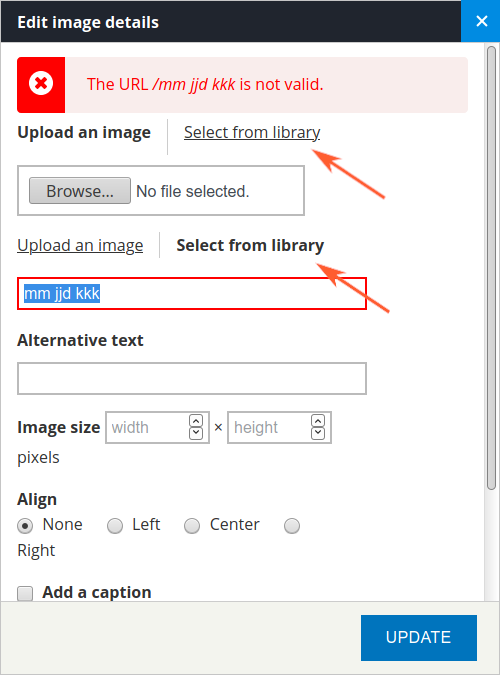

Another way to trigger the problem: enter a silly big number into the image size number field, like 99999999999999999999999. Same problem - duplicate tabs.
It seems that we'd need to prevent the toggle from being triggered when the modal is reloading. Not sure how at the moment.

The problem is that the behaviors js in the file filter.js (core module filter) is not processing the returned ajax form, to hide one or the other of the alternative input fields ("fid" or "src").
Probably needs an additional ajax command to trigger the behavior in the ajax commands returned from function filter_format_editor_dialog_save($form, &$form_state) in file filter.pages.inc
Will look to find an effective way to do this.
Note that clicking on either link will re-establish the correct behavior of the tabs.

I find that commenting out the ajax command to replace the form in the function filter_format_editor_dialog_save solves the problem in this instance. The question is what other effects does this have?
`function filter_format_editor_dialog_save($form, &$form_state) { $dialog_selector = '#backdrop-dialog'; if (isset($form_state['storage']['dialog_selector'])) { $dialog_selector = $form_state['storage']['dialog_selector']; }
$commands = array(); $errors = form_get_errors(); if (!empty($errors)) { $error_messages = theme('status_messages'); $rendered_form = backdrop_render($form); $commands[] = ajax_command_remove('.editor-dialog .messages'); //$commands[] = ajax_command_replace('.editor-dialog form', $rendered_form); $commands[] = ajax_command_prepend('.editor-dialog .ui-dialog-content', $error_messages); } else { $commands[] = array( 'command' => 'editorDialogSave', 'values' => $form_state['values'], ); $commands[] = ajax_command_close_dialog($dialog_selector); } return array( '#type' => 'ajax', '#commands' => $commands, ); }`
The function filter_format_editor_dialog_save() is an ajax callback function used in only two places
- the form generated by function filter_format_editor_image_form() which creates a form for inserting/editing an image
- the form generated by function filter_format_editor_link_form() which creates a form for inserting/editing a link or uploading a file
Both of these functions work correctly with the form replace command removed from the ajax return.
Pull request has been created.
Wow, cool! The hard part might now be to wait for someone, who's able and willing to do code review. (That's too "ajax" for me :smirk:)
I did some testing with the image and link dialog in the sandbox: it works! I don't know why, but the removal of that ajax command doesn't seem to have any side effects.
Maybe @docwilmot also wants to take a look?
The ajax command that I removed was returning a fresh copy of the rendered form, which was inserted into the DOM. This had the effect of decoupling the form from the Backdrop behaviors, causing both sets of tabs to be displayed. I tried to find a way to re-couple the behaviors to the replacement form, but my ajax/javascript skills are not good enough, so I then tried suppressing the form replacement, and everything seems to work just fine.
I looked into the equivalent code from D7, but there wan not a lot of help there as the Backdrop version of the code is substantially modified from the D7 origin, but I could not identify code in D7 that was generating a replacement form when an error was encountered.
If someone with better ajax/javascript knowledge can suggest a way to get the behaviors coupled to the replacement form, or confirm that removal of the replacement is a valid solution, then we can proceed.
After some head scratching my conclusion is: it never made sense to "replace" the form when errors occur. Removing the redundant backdrop_render() and ajax_command_replace() seems to be the right approach.
One request, as the PR's branch is 57 commits behind core: @jayelless can you rebase your branch, please? Then I'd mark it RTBC. And thank you so much for your patience! (Unfortunately, our review queue is quite long.)
@indigoxela No problems with the delay. I have not had time myself for the last month or so to look at these issues anyway. I have rebased the changes and pushed to the my clone. The revised pull request has not passed all tests.
Great, many thanks for the rebase, setting as RTBC now. :+1:
The revised pull request has not passed all tests.
That wasn't your fault, our previous setup for automated testing was too fragile. Everything's more reliable, now that we switched to Github Actions.
I find that commenting out the ajax command to replace the form in the function filter_format_editor_dialog_save solves the problem in this instance. The question is what other effects does this have?
Removing the re-rendering of the form does have a side-effect that the "form-error" class is not placed on the form fields that contain errors. See that in the original image above, the red border applied around the field that has the error:
But when re-rendering the form is removed, the fields are no longer highlighted:

I think instead of removing the re-rendering of the form, we should possibly add another ajax command that removes the previous tabs. Or we could render/replace a part of the form and leave the tabs in place. But in any case I think it's important that we re-render the form.

After looking more closely, it became apparent that the DOM element holding the form had a different CSS class so the the ajax replace command was not finding the correct element to replace. I have updated the ajax replace command to target the correct element via the changed CSS class, and it appears to work correctly now.
Thanks @jayelless! Though when testing the latest PR, I now get the toggle for Upload an Image/Select from Library duplicated.
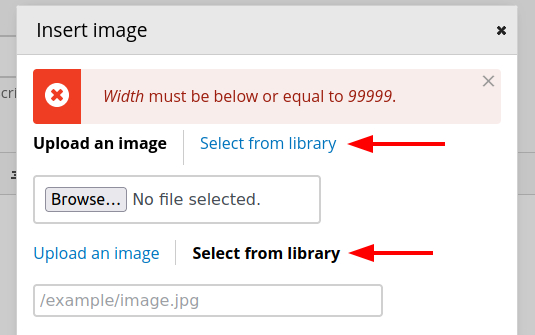
We might need to make an adjustment to the JS here too.
Hello @jayelless 👋🏼 ...do you still have capacity/motivation to work on this? Do you need any help?

Hi @klonos Thanks for the enquiry. I have spent some time on this issue over the last month and tried a couple of different approaches to solving it, but neither was totally successful. We are now into summer here in NZ, so my time for these activities has reduced. I can try to make progress on it over Christmas, but there are likely to be other competing demands on my time. If there is a need to get this resolved sooner rather than later, then I would be happy for someone else to pick it up.
A new fix which appears to correct the problem for all cases I have been able to test as now been created. I will generate a pull request for this change.
Welcome back from your summer break @jayelless 👋🏼
There is currently one failure with the php5 tests, which seems to be random. Can you please close the PR, wait 1-2 min, and then re-open it. That should trigger the tests to run again. Thanks.
No need to close/open the PR. There's a button to rerun the tests now. @klonos, @jayelless
There's a button to rerun the tests now.
Only for core committers, though. :wink: Not all members have that permission.
Tests are passing as expected.
In my initial test I uploaded an image that was too large. I got the error message but it showed the library tab instead of the upload tab, which I expected. I haven't tested this without this PR so I don't know if it's a regression.
Hmmm. I did not test with an oversize image, so I will check that condition.
Welcome back from your summer break @jayelless 👋🏼
There is currently one failure with the php5 tests, which seems to be random. Can you please close the PR, wait 1-2 min, and then re-open it. That should trigger the tests to run again. Thanks.
The process i follow is to run
git reset --soft HEAD~1
git commit -m "Same commit message"
git push -f
which forces a rebuild of the PR and a rerun of the tests. Is there a better way?
I am not able to upload an oversize image. The javascript validation in the browser rejects the selection before any attempt to upload can occur. @herbdool Can you please describe the steps you took to get an oversize image uploaded?
In my initial test I uploaded an image that was too large. I got the error message but it showed the library tab
Strange, I couldn't reproduce that in the sandbox. The tab is correct, also after the error occurred.
which forces a rebuild of the PR and a rerun of the tests. Is there a better way?
@jayelless you can close and open the PR, on /backdrop/backdrop/pull/3680 scroll down and hit the "Close pull request" button, wait some minutes, then re-open it.
@indigoxela Thanks for the hint re closing/re-opening a pull request to force a re-run of the tests.
I reviewed the PR at https://github.com/backdrop/backdrop/pull/3680 again and found there were a couple of small display issues. When a validation error was present, the message was showing up alongside the form in the modal instead of above it. Also the modal dialog was pushed over to one side instead of centered after a validation error.
I pushed an additional commit to fix these display issues. I'd like to have this modal code be less fragile but I think that would be a much larger overhaul. So I think https://github.com/backdrop/backdrop/pull/3680 is ready to go as-is.
I merged https://github.com/backdrop/backdrop/pull/3680 into 1.x and 1.26.x. Thank you @jayelless and @indigoxela for your work on this issue!