
backdrop-issues
 backdrop-issues copied to clipboard
 backdrop
Remove menu item when Dashboard layout (or module) is disabled
Description of the bug If a user disables the dashboard layout, the icon for the menu item disappears from the admin menu, but the dashboard menu remains without any logical destination.
Steps To Reproduce To reproduce the behavior:
- Go to '/admin/structure/layouts'
- Click on 'Disable Layout' for the Dashboard
- Note that the icon for the icon for the Dashboard in the admin menu disappears, but the menu item itself remains.
Turns out, the same thing happens when you disable the Dashboard module. If you disable the Dashboard module, the icon disappears but the menu remains.
Actual behavior
When you click on the Dashboard menu item AFTER disabling the layout, you get this:
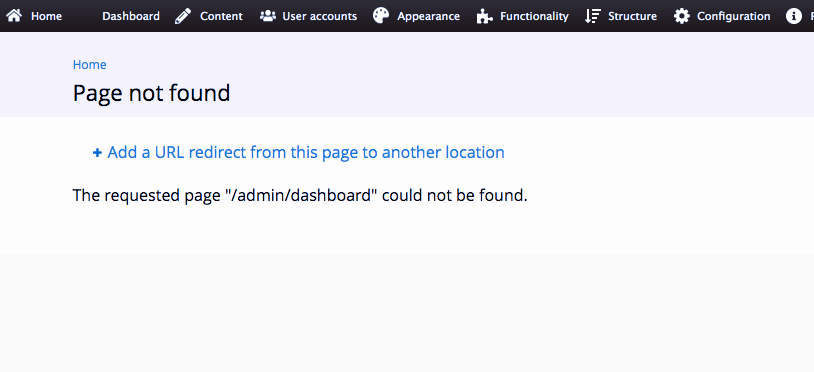
Expected behavior I guess I would expect that if I disabled the module or the layout for the Dashboard, that the menu would also disappear, since it is no longer relevant.
I would believe that this might be a difficult problem to solve, but the fact that the menu icon is going away suggests it should also be possible to make the menu item go away as well. Could the the menu item be dependent upon the availability of the layout that it is pointed at?



That was also my first thought. Cleared several times the Admin bar cache and then all caches on my site, but the Dashboard menu item didn't go away.
As per discussion in weekly development meeting, I'm appyling the 'milestone candidate' tag for this bug, not because it's a critical bug in terms of functionality, but because I suspect it's relatively easy to resolve and it's a highly visible bug.
To help test what is happening:
- I created a layout called "cats."
- I then created an admin menu link to this layout (the link worked fine).
- I disabled the layout. The menu remained, but triggered a "page not found" error.
- I deleted the layout and the menu item disappeared.
Deleting a layout will delete the menu item attached to it. Disabling a layout leaves the menu item associated with it in place.
Users can not delete the dashboard layout. They can only disable it (leaving the menu in place).

I will need some help here, to figure out why things work perfectly on my local, yet not on the PR sandbox. The code change is really simple: it locates the Dashboard menu item in the database, then hides/unhides it using hook_enable() and hook_disable() implementations in dashboard.install.
Can someone please pull the code from the PR on their local or any test/dev site they may have, and then test enabling/disabling/uninstalling the Dashboard module? Does it work for you as it does for me?
Finally figured it out! 🎉 ...things were working on my local because I had manually tried disabling the "Dashboard" menu item via the admin UI first (by unticking the "enabled" checkbox under admin/structure/menu/manage/management/list). The result of this action is that it adds 'customized' => 1 to the menu item properties. It seems that Drupal 7 and Backdrop core do not allow updating menu links programmatically (at least not via menu_link_save()) unless 'customized' is set to 1. That's why all my efforts to set 'hidden' => 1 were unsuccessful before. PR updated and ready for review/testing!
PS: while researching things, I've found these related resources:
- https://www.drupal.org/project/i18n/issues/1632378
- https://www.drupal.org/project/drupal/issues/347227
- https://api.drupal.org/api/drupal/includes%21menu.inc/function/menu_link_save/7.x#comment-54898
The series of comments in the last link were most helpful:
I just discovered how to get this working in hook_install():
Add to your menu link array
'customized' => 1,
...
Adding
'customized' => 1, really did it. Callingmenu_rebuild()did not. Thanks for this tip!
...
Thank you for saving my ass. I was spending almost 5 hours trying to make my script to work but it does nothing. Adding
"$link['customized'] = 1;"did the trick.
...
I was trying to create menu links for a page programmatically. It worked well if a menu link was a node page. But menu cache had to be cleared if a menu link was a custom page though the custom pages were created using hook_menu. The issue is fixed after adding
'customized' => 1, into menu item array. Thanks a lot for your valuable suggestion.
...
Used
menu_saveandmenu_link_savesuccessfully inhook_install(). Customized was the key!
@klonos many thanks for working on this. :+1:
The comment by @stpaultim makes me think that we have a wider problem here:
Deleting a layout will delete the menu item attached to it. Disabling a layout leaves the menu item associated with it in place.
This is correct. Disabling a layout leaves the menu item untouched. Is this supposed to be that way? It seems a bit inconsistent, if I compare it to nodes and their menu items. ... But maybe it should be different?
Let's compare following scenarios:
Node
- Create a page with a menu item
- After that unpublish that page
- The menu item is gone for people with permission to view unpublished content, the page is still accessible
- The menu item is gone for anonymous
- Publishing the menu item brings it back (is visible again) without further changes
Layout
- Create a simple layout with its own path and content
- Create a menu item (main menu)
- Disable that layout
- The menu item stays in menus - regardless of permission (also for anonymous)
- Enabling the layout also fixed the menu item
My question is: does this happen by intention? Why the difference?

I've also tested the PR, and as far I can see, nothing has changed in comparison to the issue description:
- Go to '/admin/structure/layouts'
- Click on 'Disable Layout' for the Dashboard
Actual behavior: The icon for the Dashboard in the admin menu disappears, but the menu item itself remains
Expected behavior: The menu item for the Dashboard disappears
You are both absolutely right @indigoxela and @olafgrabienski ...I misread the issue title as "when the Dashboard module is disabled" (which was what #5039 and #5254 were about) ...whereas this is about disabling the Dashboard layout. My PR fixes things when enabling/disabling the Dashboard module.
Anyway, I still think that we can fix everything in a single place...
My question is: does this happen by intention? Why the difference?
While I was looking in the code related to disabling/enabling the Dashboard layout, wondered the following:
-
What is the reason that in
dashboard_disable()we are usingconfig_set('layout.layout.dashboard', 'disabled', TRUE);instead of loading the layout and doing$dashboard_layout->disable()? I tried to change the code to do that, but then I remembered that many of us prefer simple(r) code that does the job, rather than making too many changes; so I didn't useLayout::enable()/Layout::disable()in my PR (I now think that I should have followed my initial hunch and done it that way). -
I also noticed this bit of code in
Layout::disable():// Reassign the menu item to a still-enabled layout (if any). if ($this->menu_item && $this->menu_item->name === $this->name) { $this->menu_item->reassign(); }The description of the
reassign()function is this:Rename this menu item to match the most appropriate layout at the same path.
Which leads me to believe that there's valid reason for layout menus to not be disabled if they can "fall back" to other existing (and still enabled) layouts.
-
Layout menus are NOT "normal" menu items - they are
LayoutMenuItemobjects. With all that in mind, the expectation would be that if there is no active layout to fall back to, thenLayoutMenuItem::reassign()should actually disable/remove the layout menus. Which is what the code seems to be doing. See: https://github.com/backdrop/backdrop/blob/1.x/core/modules/layout/includes/layout_menu_item.class.inc#L222// If no longer affiliated with any layouts, delete this menu item. else { $this->delete(); } -
Back to the specific use case of the Dashboard, I have tried disabling the Dashboard layout "properly", via
$dashboard_layout->disable(), but that resulted in the Dashboard menu still being left behind. Since there is noLayoutMenuItem::disable()/LayoutMenuItem::enable(), I have triedLayoutMenuItem::delete()instead. That did work when disabling the Dashboard module, but when I re-enabled it, the top-level "Dashboard" menu item would not return 🤷🏼 👎🏼 ...the "Overview" and "Settings" child-items did return, but without a parent item to belong to, they both ended up as top-level items in the admin bar 👎🏼 ...I tried to fix that withconfig_install_default_config('dashboard', 'layout.menu_item.dashboard');indashboard_enable(), but it didn't work, and that's where I gave up 😞
Anyway, I'll work on this a bit further, and try to address the issue in a generic way (for all Layouts), rather than a Dashboard-specific way.
I'll work on this a bit further, and try to address the issue in a generic way (for all Layouts), rather than a Dashboard-specific way.\
...having said that, the current PR solves the issue with enabling/disabling the Dashboard module, so I will most likely leave it as is for now, and work on an alternative PR.
having said that, the current PR solves the issue with enabling/disabling the Dashboard module
Confirmed, this part works for me!
Another data point: I'm working on a D7 upgrade today and after running the database updates, I can see a Dashboard menu item (with no icon), as well as the Dashboard layout which indicates it's looking for a permission that is not available. It seems the upgrade process should either activate Dashboard or hide these?
