

 backdrop
UX Idea: Allow rewriting the output of fields on display (without having to use views or custom code).
We already allow hiding fields from display and also hiding their label (we also have these options available for fields in views), but what options does one have if they need to rewrite the output of a field?...
option 1: Write custom php code, having to mess with preprocess hooks and node or field-specific template files.
option 2: "Hack" their way trying to use css :before/:after pseudo-elements & the content: property.
UX problems with these two options:
- Need to create your own sub-theme if you are using core or contrib, otherwise your customizations will be lost with core/contrib updates.
- Have to know how to code 😢
...don't like or can't code? Views is your friend:
option 3: Create a view showing nodes of the content type that contains the field you need to rewrite, add all the fields you need to show, add a contextual filter for nid, override the node/% path with that view.
UX problems with this option:
- Try to change the display of a content type a long time after you've implemented this -> ...see that your changes do not work -> ...try to figure out why -> ...remember that you have a view that controls the display -> smack forehead 😞
- Did you override the
node/%path with a view believing that filtering by content type would leave the rest of the content types alone? Ha, think again ...now you have to account for all content types in that view -> smack forehead again 😞
So, how about we do any or both of these:
- In each field settings on the manage display form, add the same options that we have available in views for fields:
- adding custom css classes to the field, the label or the entire field wrapper
- changing the HTML element (tag) for the field, the label, or the entire field wrapper
- custom empty value text (for optional fields) + the option to not render if empty
- rewriting the output of fields using HTML, tokens and replacement patterns
- Allow a view to be used as a display mode of a content type. Related: #2433
PS: #2605

There is option 4 with all power of Layout. I think it is much better to create Layout with node/% path and use Field as block feature. You can set "Dynamic style" for that block and change HTML tag and add classes.
To be honest manage display form is quite outdated. In opposite Layout system is very powerful and user friendly.

Yes, you are right that there is a 4th option @Al-Rozhkov (I will add this to the list in the issue summary), but that handles only rewriting the styling of the fields AFAIK (wrapping HTML tags and css classes). I was talking about also using tokens (to get the values of other fields present in the node) and/or plain text to actually rewrite the output of the field. Simple examples would be to be concatenating name_title/first/last fields to create something like "Mr John Doe", or adding prefixes/suffixes to numeric values without having to use contrib modules like currency.
I'll agree about the Layout system being powerful, but not sure that is user-friendlier than the manage field display UI that the user are used to from Drupal.
I'd welcome more options the Manage display pages as well, especially because I like to use custom view modes a lot and finetuning different view modes via the Layout system seems quite indirect to me. (Is it possible? I don't know the Layout system very well yet.)
More generally I've got a notion that people who are used to Drupal's Panels tend to prefer the Layout system for many tasks while others are very interested in alternatives. I would like to use for instance a combination of Drupal's Field group and some features of Display suite on the Manage display pages.

Let me share my dreams about Manage Display page :)
I think in future every view mode should be configured in Layout UI. Because it is very visual and understandable.

In D7 Manage Display driven by TableDrag. But Blocks page driven by TableDrag also. And it is weak and very limited UI. Layout already provide styling and visibility conditions. With this killer feature (#1691 Layout UI: Collapsible block groups) we don't need Field Group anymore, because fields can be grouped by Block Groups.
With Layout system you can add to your view mode not only Title and fields, but also Views blocks and custom text blocks. Display Suite system needs additional modules to provied such features.
I'm totally agree with @klonos about benefits of rewriting and concatenating values. But it can be done in custom block text with token replacements, when #1860 (Layouts: Provide context tokens for use in page title) will be ready. I meen when we can use tokens in custom blocks (not only in titles).
finetuning different view modes via the Layout system seems quite indirect to me.
@olafgrabienski, looks like you are very familiar with Display Suite. Just imagine Manage display page with Layout drag and drop UI instead of TableDrag. It is much flexible, isn't it?
My message almost off topic, sorry about that. My point that we should expand shiny new Layout system instead of tuning old tools.
It is a big picture of managing view modes in future. I belive in that because I'm huge fan of Layout :) It is flexible, visual and user-friendly.
My message almost off topic, sorry about that.
I don't see it as such. In fact I see your point, but things need a bit more thought before going about replacing the manage fields display completely with the Layout edit UI. But I like the thought and the arguments, especially makes more sense now that we have the fields-as-blocks feature in core 😉
...I was about to say that it would make sense to adopt the Layout UI only for the "content" region, but now fields have the ability to be placed as blocks in any region.
...and I like the idea of being able to choose different layout templates per display.
...the thing is though, that content type displays (which are collections of fields) are not used only when rendering whole pages (where layouts are used for), but also used for rendering other things like views entries. I cannot imagine right now how we could handle that.
I guess Layout Renderer can be responsible for building each view mode. So Layout Renderer will be fired for page and each displayed entity on that page. If you have a View page with 3 nodes in it, Layout Renderer will be fired 4 times during page building process.
@Al-Rozhkov I'm a bit confused now: In my understanding the Layout UI is to manage a whole page while the Manage Display UI is to manage view modes which are only a part of pages. View modes can be placed as a whole in the Layout UI but they also need to be managed in detail. Do you suggest to do that in the Layout UI as well?
@olafgrabienski, yes, but not directly in Layout admin section. Still on Manage Display page, but it will looks like Layout UI, act like Layout UI and will be responsible for view mode only (not a whole page).
So you can choose template, drag fields and title around, change their style settings, add visibility conditions... It is very similar with Display Suite, but with Layout drag and drop UI instead of TableDrag.
@Al-Rozhkov I see, and I like it! @klonos What do you think?
And how do we continue? Should we simply split the ideas in manageable and prioritized steps, or should we make a more detailed concept?
We have meta issue for Field UI redesign #779.
If community will choose this direction, we can add steps to that meta.
Hm, there are only few Manage display related posts there, I found a link to #1444 for instance. But wait, there's also the interesting thought of @jenlampton in https://github.com/backdrop/backdrop-issues/issues/779#issuecomment-91397712:
Keep in mind that we also have the Layouts UI that can be used in place of "Manage display" long term if what we end up wanting is drag-and-drop that includes laying out content on the page. Field configuration (Manage fields) could become the same pattern as adding and configuring a block.
There had however not been much activity in the issue over there for longer periods. @klonos What would you recommend how to proceed?
edit: there is a new core issue for this https://github.com/backdrop/backdrop-issues/issues/6039
This issue contains two concepts.
- Allow rewriting the output of fields on display (without having to use views or custom code).
- Use the layout UI to configure Manage Display for all view modes.
I love both ideas. Right now the thing I'm after is to avoid needing to use code simply to control the placement of the title on non-full/non-default view modes. Layout UI gives us that control for pages. Could it do the same for other view modes?
Anyway, should the second discussion of this issue be split out, or do they belong together?

I love both ideas, too and would support splitting the second discussion out of this issue. I'd never seen @Al-Rozhkov's mockup before, and I think it's great!

Has anyone mentioned fences module for Drupal 7 yet? https://www.drupal.org/project/fences Fences go around fields.

In Drupal 7, I've not used Fences (but Display Suite). From reading the description, it looks like a good choice for custom default field templates, but there doesn't seem to be an option to customize single fields using the UI.
I have used the Drupal Fences module and liked the simplicity of the UI. Fences adds settings to the field formatter on Manage Display. It allows changing the HTML element and adding a class or ID at the following 3 levels for the field on that content type:
- field item (each delta)
- field items (the group)
- field & label wrapper
However, it does not provide for rewriting with tokens like views does.
Fences adds settings to the field formatter on Manage Display
Really? I was curious and have installed it (for Drupal 7) on simplytest.me. I was able to configure the default field wrappers, but there isn't any option on the Manage Display pages.
Update regarding Fences: Found the option to change the wrapper markup (no classes) in the Manage Fields section. When you edit a field, there's a "Wrapper markup" dropdown on the settings page.
OK, I realize I was remembering Fences in Drupal 8, not Drupal 7. What I said earlier applies to Fences in D8, except that there is no ID field. Here is a screenshot of the Fences field formatter in Drupal 8. There are no longer any settings under manage fields or in the site configuration.
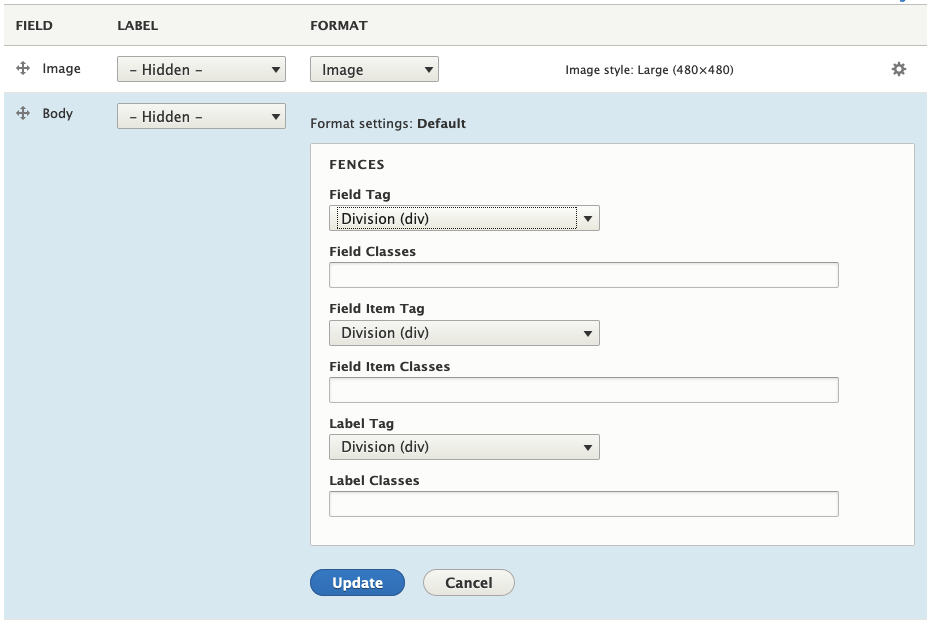 I certainly prefer the D8 Fences over the D7 version. However, it still does not solve the following part of the IS:
- rewriting the output of fields using HTML, tokens and replacement patterns
rewriting the output of fields using HTML, tokens and replacement patterns
I'm not sure this is something we want to support in the Field UI. People can do this in views if they really need it, but I'm worried it'll create more confusion than it's worth on fields.
There's probably a reason it wasn't addressed in Fences, Display Suite, or anything else. Maybe it's unnecessary?
Let's start with the HTML tag control, and see if that solves enough of the problem :)
I'm also skeptical about the request to rewrite fields using replacement patterns and so on. It's interesting (and Display Suite allows to do it using its advanced features), especially when you want to make extensive use of display modes, even in Views - cf. https://github.com/backdrop/backdrop-issues/issues/2994#issuecomment-370684862. But there are more basic requests, and I'd prefer to start with them.
Searching the queue, I found a correspondent META issue including checkboxes: #2084 (I've added a checkbox for HTML control there.)
In my opinion, the following features would meet the basic needs of many site builders:
- Change the HTML elements of field item(s) and wrapper (Fences, or Field Wrappers)
- Add classes to the HTML elements and the label (Fences)
- Change the name of the label.