

 backdrop
[DX] Add contrib and custom directories to the docroot/modules directory.
Add contrib and custom directories to the docroot/modules directory.
How do people feel about this? We added a files directory for easier site installation.
I personally strongly dislike when I inherit a site and the contrib and custom modules are all mixed together.
We could make it easy for the site builders and developers to use best practices by having this structure in place out of the box with README.md files in each explaining what types of modules belong in each.
Are there reasons we should not do this?


Are there reasons we should not do this?
As you've described it yourself, this is a best/recommended practice in order to keep things organized, but if we "enforce" this by default, we are than increasing the complexity for ALL (even people that do not use custom-made modules and just stick with whatever is available contrib). In other words, besides us "nerdy" Backdrop/Drupal freaks, how much (percentage) of sites made with Backdrop will use custom modules?

but if we "enforce" this by default
This does not enforce anything it just puts this structure in place to be used or not. For example, if these (or other directories) are present and a user puts a module (contrib or custom) in docroot/modules/ it will still work just fine.
So, it does not make it any harder for them, but does expose them to what can be done.
Yep, I totally get that. It's just that you'll have two directories there that will be for those of us that like to make the separation of contrib vs custom vs what-have-you modules, but at the same time newbies are used to see in that folder one subfolder for each module. Now they'll have two subfolders in there by default that are not there in order to host a module/project each (what newbies expect), but are instead an exception to the "one folder per module/project" rule. So this rule now becomes "one folder per module/project except for the two default folders that are used to group module/projects". It does complicate things that were simplified for UX reasons. That's what I'm saying.
Other than that, I personally do not oppose the idea at all. This is just the site-builder PMC member in me speaking after considering the change and what it could potentially mean for new, non-coder site builders.
instead an exception to the "one folder per module/project" rule
There is no such rule, that is why the modules work inside or outside of these directories. You may have made up that "rule".
But anyways sounds like you are opposed to it out of the box. What do others think. Looks like so far we have one for and one against (not counting me).
You may have made up that "rule".
True. I might have that rule in my head as a newbie when I think Drupal/Backdrop folder structure. Every tutorial as far back as I can recall explained things this way. Sure, they never said that it was a "rule", but they never went in depth saying that you can have subfolders in there. That is something "advanced" that I learned was totally possible along the way.
...But anyways sounds like you are opposed to it out of the box.
Not opposed at all. I like it! Lets say I'm being skeptical about it. I like everything and anything that has to do with tiding and consistency. That's something I'm known for. It might be a great improvement. All I'm saying is that we need to consider newcomers and the complexity this might add (I'm not saying that it necessarily does so).
We say "lets do things for the majority". So, I'm saying... will the majority of people use custom modules or just stick with whatever is available in contrib? If they don't use custom modules in their simple sites, why have the separation of contrib/custom in the first place? Why add complexity to the learning curve.
Having said all that though, I do often request and insist on features for core that might not be for the majority. Some of these things happen, so there are exceptions to the rule. This could be one.
What do others think.
I think I've made my point. ...shutting up 😉
I think readme.md file with best practice explanation will help newbies to inherit it and Learn right in a moment of curiosity.
I don't see complexity here, but helping to learn good practices in a right moment ( when somebody decide to see what is in modules folder)
This does not enforce anything it just puts this structure in place to be used or not. For example, if these (or other directories) are present and a user puts a module (contrib or custom) in docroot/modules/ it will still work just fine.
Technically, it works fine, but you get a kind of ugly structure if you don't use the contrib and the custom folder, resulting in two empty folders in the middle of the single module folders. Sure, you could delete them, but I would prefer it the other way round: create them, if you need them. (And let's recommend to do it in readme.me for users who use custom modules.)

I don't like contrib/custom separation of modules, probably because I only ever have one custom module that holds all custom code for the site. I see this separation as more of a feature of larger sites that might have lots of custom modules, which makes me think its not for the 80% of Backdrop users.

For years, I had no idea I could place modules inside a sub dir of modules for Drupal. This was never explained. Had I know this was a thing, I would have used it early on when I started having custom modules made for some of my sites.
I think readme.md file with best practice explanation will help newbies to inherit it and Learn right in a moment of curiosity.
I don't see complexity here, but helping to learn good practices in a right moment ( when somebody decide to see what is in modules folder)
I wholeheartedly agree with this.
OOTB, there doesn't need to be extra folders, but the README should clearly explain this is possible and if #3939 gains traction which will allow the deletion of modules from the GUI, a sub-folder for contributed modules downloaded by the project browser makes the most sense.
Point is, making it "so user friendly that anyone can use it", only helps in the very beginning. I agree the folders don't need to be there from the beginning, but it should be explained that modules go in modules and sub dirs are encouraged for anyone who wants to separate contrib from custom.
People shouldn't have to go to some third party website or watch a YouTube video where someone explains this is possible. The project should make it understood from the beginning.

I ran into an issue yesterday that made me realize how much we actually need a separate location for "backdrop" downloaded files vs manual downloaded files for core to better distinguish between a project browser addition vs a "don't touch this" addition.
I ported uc_feeds to use on a project for my own use. @stpaultim ported it and made it an official port, however he did not include several of the patches that I included in my port. When uc_feeds became available through the project browser, it in-turn made it available to the update system. I didn't think anything about it and ran the update on the "newer" version, wiping out the patches I had applied to my own port.
Ideally, if someone has patched a project and doesn't want the module to update through the UI, it would be best if it lived outside of the place where backdrop looks for updating modules. This especially becomes critical for when #414 matures.
I think the updater should still present the fact that an updated version of the "don't touch" module exists, but it should be more selective on allowing the user to make a better informed decision on what to do with the updated module vs their own version. For example, the patches the user added have been applied and the new release incorporates those fixes so the user wants to use the official version instead of their own ported version.
That's a very legit problem @philsward, but not relevant to this issue. Even if your ported module lived under /modules/custom/uc_feeds the installer/updater would still treat the new "official" version as an update to that (so long as they have the same machine name), and updating would still overwrite your custom version.
Can you please create a separate issue for this? We need to add some logic to the updater/installer that would prevent that sort of thing from happening.
In the meantime, you could block updates to your locally-customized and/or half-ported module by adding this bit of code to it:
function uc_feeds_update_projects_alter(&$projects){
  unset($projects['uc_feeds']);
}
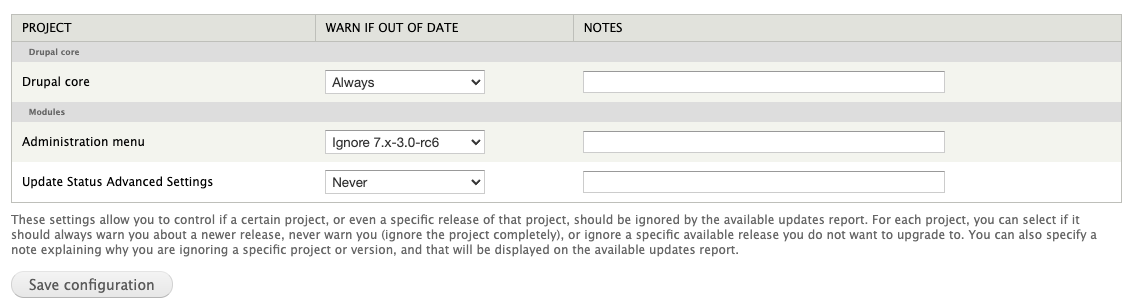
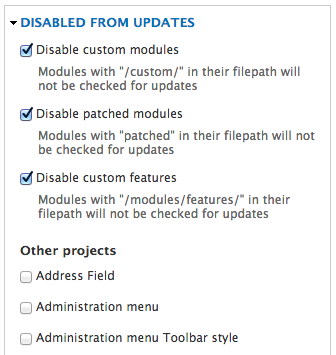
In Drupal, I used to use these two contrib modules to help me with these sorts of things (none of them have been ported over to Backdrop yet though):
- https://www.drupal.org/project/update_advanced
- https://www.drupal.org/project/disable_updates
layouts, themes and profiles need it as well!
I realize that this is an older comment here, however thought I'd add this for posterity: someone asked this at work:
Has anyone ever had a requirement to have a page at
/profileson a Drupal site? If so, how did you get it to work. Currently we’re getting a 403 becausedocroot/profilesis a directory.
The problem seemed to be solvable via a couple of custom .htaccess rewrites, however it still has the potential to be a small headache for less technical people - unless we also provide some documentation and some sample rewrite lines in a README inside that directory.
Sites could theoretically face similar issues if they decided that they need /modules and /themes to be actual pages, however those are pre-existing directories that have been around for long - not something new we'd be introducing.
😄
Interesting problem. Seems any layout path or node alias with same name as a site directory gets a 403. (Create a node with a path alias /core or /themes or a custom layout with a path /files etc). Would be best if Backdrop should scan and see if such a directory path exists and deny creation of that alias.

Seems any layout path or node alias with same name as a site directory gets a 403.
Ditto for Views pages (not unexpectedly).

It happens to every path alias that matches an existing directory or file name.
The directives in the .htaccess file tell the server to check if there is a file or a directory that matches the relative path; if there is one, the server will serve that file/directory. There are also directives that protect some directories/files; that is why a relative path like /core returns a 403 error.

I think that it is better to leave the decision to use a contrib and custom directories to people who are installing Backdrop and not add those directories in the Backdrop repository.
As long as contributed/custom modules are not installed in the directory containing the Backdrop core modules, using a separated directory for those modules is not necessary.
It is true that for Drupal using those directories is the trend, but it is also true that Drupal uses Composer, and its composer.json file can contain the following lines.
"extra": {
    "installer-paths": {
        "core": ["type:drupal-core"],
        "libraries/{$name}": ["type:drupal-library"],
        "modules/contrib/{$name}": ["type:drupal-module"],
        "profiles/contrib/{$name}": ["type:drupal-profile"],
        "themes/contrib/{$name}": ["type:drupal-theme"],
        "drush/{$name}": ["type:drupal-drush"],
        "modules/custom/{$name}": ["type:drupal-custom-module"],
        "themes/custom/{$name}": ["type:drupal-custom-theme"]
    }
}
It is much simpler, as setting the package type automatically install it in the appropriate directory. With Backdrop, if I download a module via the user interface, that module would be installed in a sub-directory of modules, not in a sub-directory of modules/contrib. If I manually copy the module, it would be me to decide in which directory to copy the module: Either I know which modules are custom modules or I have to use a specific prefix for the module machine names (for example custom_), which could alone cause issues.
With Backdrop, if I download a module via the user interface, that module would be installed in a sub-directory of modules, not in a sub-directory of modules/contrib. If I manually copy the module, it would be me to decide in which directory to copy the module: Either I know which modules are custom modules or I have to use a specific prefix for the module machine names (for example custom_), which could alone cause issues.
Would there be some benefit to having the Backdrop UI look specifically for a subfolder named "contrib" and if such exists provide option to install it there? Much less likely that installing custom modules would use the UI.

instead an exception to the "one folder per module/project" rule
There is no such rule, that is why the modules work inside or outside of these directories. You may have made up that "rule".
Thanks for this: I found this thread while looking for any explanation of the current behavior... and I'm happy to find that using /modules/contrib and /modules/custom sub-directories works just fine if you do it manually.
For what it's worth, my reason for wanting this is so that I can have a simple gitignore rule, which doesn't track contrib code but ensures that custom, or modified code is tracked.

Would there be some benefit to having the Backdrop UI look specifically for a subfolder named "contrib" and if such exists provide option to install it there? Much less likely that installing custom modules would use the UI.
Doesn't it do this already if the folder exists? And bee also, if the folder exists, will use it. I would be in favor of adding those folders by default.

I usually don't use "contrib" and have a different name for the "custom" folder. But no strong opinion, as I can rearrange as I like after install. 😉
What I wouldn't want us to do: add those folders to any existing sites. That would cause some mess and confusion.
It has been discussed in yesterday's dev meeting and the most promising solution seemed to be, to create those folders via standard profile. So, only for fresh installs, not via core repo, not for updated or upgraded sites. I like that idea a lot. 👍

I like that implementation too... Increasingly I also expect, over time, that the demographic of people trying Backdrop for the first time will shift from Drupal 7 fans looking for something similar, to Drupal 11+ folks looking for something simpler and this would be a very familiar structure, without any obvious downsides.