
jsbug
 jsbug copied to clipboard
 b44rd
b44rd
Colorful javascript debugging on demand
Simple, colorful javascript debugging on demand
Append ?jsbug=true to url in order to enable logging through jsbug within your browser console. And simply add ?jsbug=false to disable it. Jsbug is enabled/disabled through localstorage and will not perform anything if not enabled. It´s incredibly lightweight and do not require any dependencies.
👉 Try it 👈
Install jsbug
npm install --save jsbug
Make it a part of the project
// Require it
var debug = require("jsbug");

// Or import it
import debug from 'jsbug'
Usage
Basic debugging
// Print "♢ Clicked a button" using blue color
debug("Clicked a button");
Changing the color output
// Print "♢ Clicked another button" using a purple color
debug("Clicked another button", { color: '#6A36CB' });
Indicate ajax calls (start msg with a pipe)
// Print "| Requesting api" using yellow color
debug("| Requesting API");
Indicate success
// Print "* JSON returned" using green color
debug("JSON returned", { success: true });
Indicate failure
// Print "@ Failure! Unexpected result" using red color
debug("Unexpected result", { success: false });
Indicate failure with grouped, inspectable properties
// Print "@ Failure: Unexpected result" using red color and make response object inspectable
debug("Unexpected result", { success: false, group: [response] });
Screenshots
Sample code
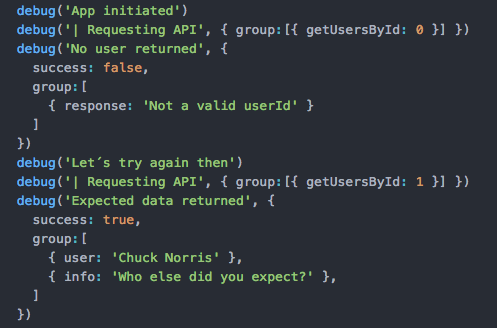
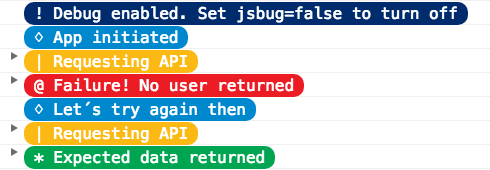
Default result (collapsed)
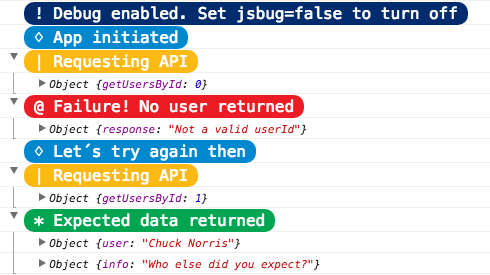
Expanded result
Support
Most modern browsers. Feel free to contribute!
 b44rd
b44rd