

 axyl-os
Can't change cursor shape and behavior
Can't change cursor shape and behavior, any terminal, any WM. I set cursor shape to Block and blinking off in GUI and in config (alacritty.yml) - no results.

I believe phinger-cursors is the new default for axyl. Are you having the same issues with the xfce4-terminal? I belive it is also the default for axyl instead of alacritty.

Sorry, I'm talking about terminal cursor. Terminal doesn't matter, same shape and behavior everywhere.
If you're talking terminal cursor, have you tried tweaking your .Xresources file yet?
Also, are you sure you're editing the correct alacritty config files? The location of each file is window manager specific. For instance, I use i3, so my alacritty.yml isn't stored in my base .config directory. Instead, the full path is ~/.config/i3/alacritty/alacritty.yml
Many users work around this with a symbolic link in ~/.config/ so their terminal looks the same across window managers.
I also use i3 and I edit my ~/.config/i3/alacritty/alacritty.yml. Fonts, colors editing works, but I have cursor config:
cursor: style: shape: Block blinking: Off
And it still I-Beam and blinking.
I have no .Xresources in my home directory, what should I do exactly?
The same behavior over ssh. I assume something rewrite cursor config independent of terminal client.
Set blinking to Never does function as expected for me, but I easily reproduce the shape persistently defaulting to Beam functionality no matter what attribute I enter. I'm looking into it, but don't see any signs of a solution anytime soon from me lool
OK, I installed xterm and set in .Xresources xtermcursorBlink: false nothing happened, cursor still blinks but config fonts, like XTermXftFont: Segoe UI:size=10:antialias=true:style=Regular works
I can successfully set unfocused_hollow to true and I do get a nonblinking block cursor, but when I go back to focusing alacritty the Beam cursor returns. Partial solution almost lol
I completely remove zsh configs and reinstall zsh and now alacritty cursor works as expected. So I think there is some zsh script which overwrite term configs every time.
I completely remove zsh configs and reinstall zsh and now alacritty cursor works as expected. So I think there is some zsh script which overwrite term configs every time.
You might be right. This was found in my ~/.zshrc-personal
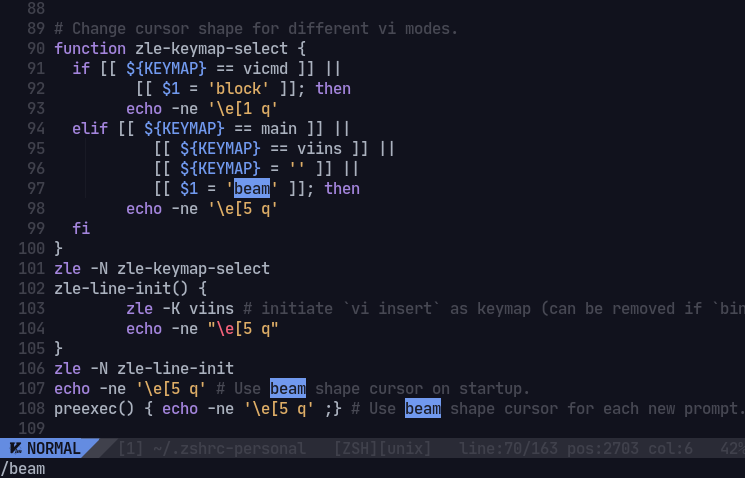
Around line 90:
function zle-keymap-select {
  if [[ ${KEYMAP} == vicmd ]] ||
	 [[ $1 = 'block' ]]; then
	echo -ne '\e[1 q'
  elif [[ ${KEYMAP} == main ]] ||
	   [[ ${KEYMAP} == viins ]] ||
	   [[ ${KEYMAP} = '' ]] ||
	   [[ $1 = 'beam' ]]; then
	echo -ne '\e[5 q'
  fi
}
zle -N zle-keymap-select
zle-line-init() {
	zle -K viins # initiate `vi insert` as keymap (can be removed if `bindkey -V` has been set elsewhere)
	echo -ne "\e[5 q"
}
zle -N zle-line-init
echo -ne '\e[5 q' # Use beam shape cursor on startup.
preexec() { echo -ne '\e[5 q' ;} # Use beam shape cursor for each new prompt.
EDIT: Nvm, changing this block didn't solve anything either. I also tried just removing all of it and still had a beam cursor, so I'm not so sure we can close this issue just yet
EDIT#2: @ajeshp is correct, I proved us both very correct by commenting every line mentioned in this comment and got the desired behavior out of my alacritty cursor.
On Axyl, by default, zsh is using vim mode, which effects the cursor.
You have to comment out a bunch of stuff in ~/.zshrc-personal to disable vim mode.

On Axyl, by default, zsh is using vim mode, which effects the cursor. You have to comment out a bunch of stuff in
~/.zshrc-personalto disable vim mode.
To combine my and @ajeshp's solution, one must comment out lines 90-108 of your base ~/.zshrc-personal file to disable the default vim mode that takes priority in styling the terminal cursor.
I see no other reason to keep this issue thread open.