

 axmolengine
Localization Support
Is your feature request related to a problem? Please describe. Games sometimes require localization support. Currently, UIText and CCLabel do not have any support for this.
Describe the solution you'd like First, cocos-studio already has a localization manager that is unused (No support in cocos studio to enable localization, although it is part of the flatbuffer schema, see options->isLocalized()). I was thinking that maybe we can edit the reader code to localize strings if some global flag is set. Also, localization should be done in such a way that it also enables to set the font on the UIText, because some languages like arabic might require a different font. Maybe something like this:
// TextReader.cpp
ILocalizationManager* lm = LocalizationHelper::getCurrentManager();
if (lm) // or something like if (g_FlagEnableLocalization)
{
    lm->setLocalizedString(label, text);
}
else
{
    label->setString(text);
}

// CustomLocalizationManager.cpp
void CustomLocalizationManager::setLocalizedString(Text* node, std::string_view text)
{
      auto font = this->getFontBasedOnLanguage(_currentLanguage);
      node->setFontName(font);
      node->setString(this->localizeString(text));
}
Describe alternatives you've considered Another alternative is to just mark UIText::setString() and UIText::setFontName() as virtual so users can write their custom UIText nodes inherited from UIText and then they can override setString() and setFontName(). The TextReader in cocos studio can already be overriden by registering the type in ObjectFactory before the app loads, and there instead of doing Text::create() we can create our custom TextCustom::create() node.
And, one more approach could be to just add localization support engine wide, so that setString() function localizes the text before it sets it.
Please suggest a good approach so I can work on it and submit a PR!

Hi @askamn
I've elegantly written my own localization feature and here is how it goes:
the Label or Text is inherited into a custom type called LocalizedLabel or LocalizedText and these classes that inherit the base just add one function, which is setStringLocalized() without passing an object pointer or dealing with a singleton. one note setStringLocalized() can be added to the engine's code directly but I prefer not to modify the engine a lot as my changes could get a conflict. setStringLocalized() would go to a localization manager singleton and check to look for a localized string in the files that have been loaded into that localization singleton, and if nothing is found (i.e file not loaded) then it would set the text to the same text as the localized key as to tell the developer that he/she forgot to load a localization file. also, the localization data could be loaded from JSON, plist, or XML files and for the font names it can be added as a second parameter or something.. that's the design I'd go for to minimize complexity!
as for storing data into files, the engine heavily relies on plist data format which I'm quite unfamiliar with and don't know if a key can hold multiple values. i.e the key needs to hold the string itself and the font name which I think JSON is very good at.
Hope that helps!

That is fine, but the problem is with importing files from an editor, like cocos studio or ax studio. We have to localize the strings while importing.
On Sat, Aug 6, 2022, 12:57 PM Turky Mohammed @.***> wrote:
I've elegantly written my own localization string and here is how it goes:
the Label or Text are inherited into a custom type called LocalizedLabel or LocalizedText and these classes that inherit the base just add one function, which is setStringLocalized() without passing an object reference or dealing with a singleton. one note setStringLocalized() can be added to the engine's code directly but I prefer not to modify the engine a lot as my changes could get a conflict. setStringLocalized() would go a localization manager singleton and check to look for a localized string in the files that have been loaded into that localization singleton, and if nothing is found (i.e file not loaded) then it would set the text to the same text as the localized key as to tell the developer that he/she forgot to load a localization file. also, the localization data could be loaded from JSON, plist, or XML files and for the font names it can be added as a second parameter or something.. that's the design I'd go for to minimize complexity!
— Reply to this email directly, view it on GitHub https://github.com/axis-project/axis/issues/775#issuecomment-1207166538, or unsubscribe https://github.com/notifications/unsubscribe-auth/AAWQGRVES7UCSJAS4UQO4PLVXYHXNANCNFSM55PPRK2A . You are receiving this because you authored the thread.Message ID: @.***>
No... Lets say you create a scene in CocosStudio/X-studio. You add a Text node to it with this string - "EN_SETTING_FPS" which represents a localization key. When loading it in axis with the cocostudio extension there is currently no way to localize this. Ideally, while loading itself, there should be a way to get the localized value for this string ("EN_SETTING_FPS" => "Frames Per Second") and set it on the text node via ->setString(localizedString) You can read the code in TextReader.cpp, you will understand. There is already a localization manager there, but the key isLocalized() is not supported and is always false.
Can you send a code portion of creating and adding text using TextReaders because I didn't find any examples of it
Hi,
You can do this -
Make a copy of TextReader.h and TextReader.cpp in your Classes/ folder somewhere. Rename the class to something else, e.g. CustomTextReader. Manually replace all the macros with their code, e.g. IMPLEMENT_CLASS_NODE_READER_INFO (This one is very important!)
The IMPLEMENT_CLASS_NODE_READER_INFO macros defines the type info TInfo for a type, in our case TextReader. Now we want the type to remain the same, that is "TextReader" but we want it to be parsed by CustomTextReader. When you replace the macro, change the TInfo declaration to this -
axis::ObjectFactory::TInfo CustomTextReader::__Type("TextReader", &CustomTextReader::createInstance);
Notice that in the string argument, I have used "TextReader". This is very important as this is the key of the reader that cocostudio uses to read UIText nodes.
Now the final step is to simply include your customtextreader file before any cocostudio files are included. I included mine in AppDelegate.h. This ensures that your type info will be registered first and when cocostudio textreader tries to register itself, it will fail because the map will already contain a key for "TextReader" (c++ maps do not allow duplicates, if a value exists, insertion is skipped).
If you still face issues, let me know and I will post my files.
Wouldn't it be easier and more convenient if we just stick the localization to the Label class directly? it feels much more organized than this mess
cocostudio actually needs to be deprecated since it doesn't make sense and doesn't have documentation
would this be a viable solution to loading a localization file from json?
of course, you have to organize localization in a way so that you load a file called text_en.json and it retrieves the english keys automatically, and the same goes for other languages but that's just an example.
Let's say we have text_en.json file and this is the content:
{
  "FONT_NAME": "english_font.ttf",
  "FONT_SIZE": "18",

  "KEYS": {
    "ENGLISH_KEY_1": "WOW",
    "ENGLISH_KEY_2": "LOL"
  }
}
and for a text_ar.json file this is the content:
{
  "FONT_NAME": "arabic_font.ttf",
  "FONT_SIZE": "24",

  "KEYS": {
    "ARABIC_KEY_1": "واو",
    "ARABIC_KEY_2": "لول"
  }
}
we could define some more constants like font name and font size that would affect the label too.
also, we could add something like "ENGLISH_KEY_1": "Health: %s" and programmatically replace %s based on a multi parameter function in the label
I think a better solution would be to leave the localization file loading and string replacement to the game itself. The UIText / Label should just call the callbacks of whatever localization solution the game has implemented. For example, the label class could have a callback member variable -
// CCLabel.h
typedef std::string_view (*LocalizerCallback)(cocos2d::Label*, std::string_view);
LocalizerCallback _localizeString;

// CCLabel.cpp
void Label::setString(std::string_view text)
{
    if (_localizeString)
    {
        text = _localizeString(this, text);
    }

    if (text.compare(_utf8Text))
/// ... Other code
The advantage of this approach is that the game can then load its localization files any way it wants! Be it json, binary, xml, etc. And the same goes for replacement, it doesn't have to rely on any pattern imposed by the engine, like you said - "ENGLISH_KEY_1": "Health: %s" ... it can follow any pattern like "ENGLISH_KEY_1": "Health: {1}" or "ENGLISH_KEY_1": "Health: {%HEALTH%}", whatever. The engine doesn't care. All it does, is that is calls the code that handles this replacement.
what about setting the font name and size? LocalizerCallback deals with it right?
I see what you mean by making things controlled by project and not by engine since it's a cpp game engine so you should have the ability to do whatever you want
Actually you can't have a callback as pointer.. it would pollute the class there has to be a function that enables localization
you know what we could make ~Label deal with it
there has to be a class that inherits both function and ref so the function is released when the ref count is 0
There you go
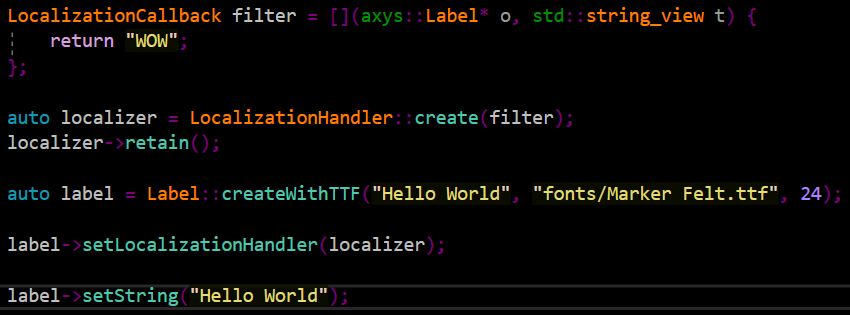
it got overwritten because my function only returns "WOW"

now each time you set a label to that localizer it will hold on to it until it dies then it decreases the ref's count by 1, I called retain to make sure it stays with me even if all labels are destroyed, that's great memory management!
Maybe this is helping too?
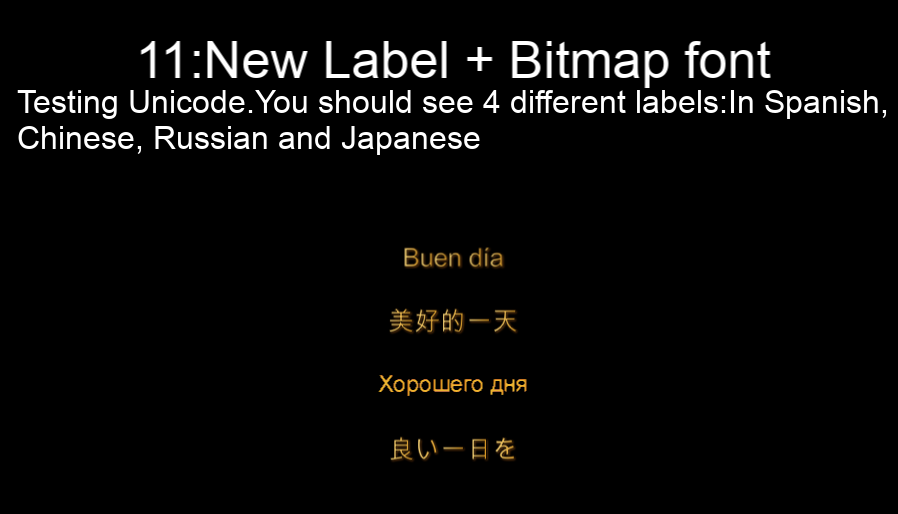
Plz have also a look here: https://github.com/axmolengine/axmol/discussions/598

Can this issue be closed, as there is no problem to be solved in the game engine? The localization solution is not something that should be added to the UI elements (such as Label, UIText or any other text rendering component), as their only responsibility is to display text; those elements should not be converting or translating text.
Conventional implementations have a separate localization layer that does the conversion, then passes the resulting text output to the relevant display code. For example:
string localizedText = Localization::get("TEXT_KEY"); // Gets the text associated with this key for the currently configured language
label->setString(localizedText);
The Localization module handles the key look-ups from whatever localization data is loaded into it, and returns the relevant text. It's a trivial thing to implement.
So, once again, there is nothing to fix in the game engine regarding localization.
