

 axllent
RFE: show Show sender machine in web gui
(Stolen from https://github.com/mailhog/MailHog/issues/207)
Nice to see an active similar project! Can I make a feature request?
It'd be a huge time saver to show which machine the web interface were accepted from. A filter using that would help a lot too. Thanks.

An example of when this feature would be useful: you have lots of servers talking to one MailPit instance, and you want to quickly filter the e-mails to show those from a certain server.
I am considering this, however you want this header to show, another user may want other headers etc. - I can't/won't show them all. I think this could potentially be a runtime flag (to specify which), but I have to give it now thought before I consider implementing this as it also affects the API output.
As for filtering, that is a bit more complicated as the searchable database only indexes certain fields (eg: 95% of the headers are useless and only pollute the search index). Again, I have to give this more thought.

@macau23 I'm still looking into this feature. You said you wanted to see the "sender", however which email header field would provide you with the information you require? The only standard one I can see is the Received header, however there are often (depending how the mail is routed) multiple of these in the headers. This means that displaying them can end up taking up multiple lines in the mail view. In an example I'm viewing I have 16x Received headers in the email:
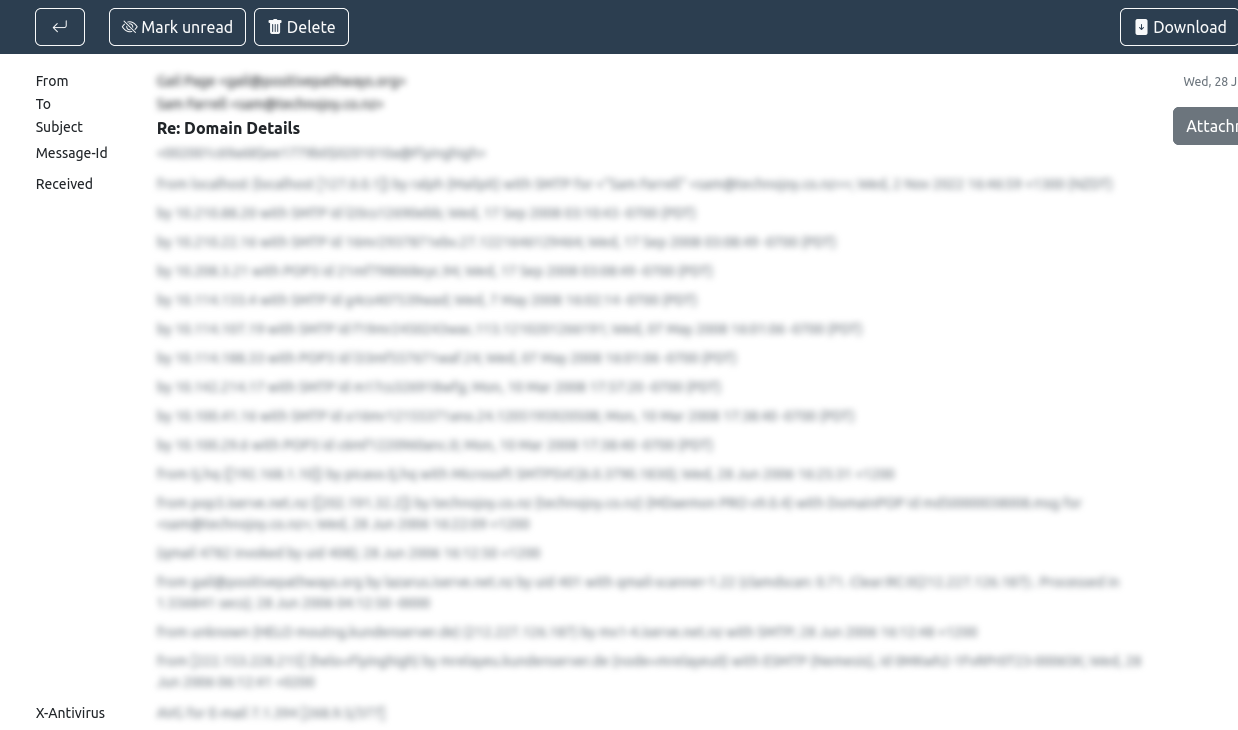
Can you please explain to me how you think this should/would work? I could simply take the very latest of each header (if set) and use that (though that may not suit everyone), or show them all (which also may not suit everyone). I'm interested in your feedback please.
@axllent I have been thinking about this too. I think there are two choices: either show the most recent hop, or provide a way to tag e-mails outside of the gui along with a filter for tags inside the gui. I need to think some more.
Nice, I think tagging is a fantastic idea! I would need to carefully consider the implementation as it would add overhead to the in ingestion process (SMTP), but it would likely solve several things. I'd be interested to hear your thoughts on configuration, as it would probably need to be configured via the cli - or if that becomes too impractical in the UI itself.
None of this is committed yet into code - I am simply playing around to see what can and can't be done at this stage. So far I have come up with a system that:
- Stores individual tags with emails.
- "Filters" can be added on the commandline in the format of
mailpit --tag '<tag1>="<string-to-match>" <tag2>="<string-to-match>"'and are applied when messages are received. These are string matches (not regular expressions) matching any string in the entire email including headers and body, so cannot be limited to particular headers. If you added--tag "[email protected]"every new email containing[email protected]anywhere in the raw message would be tagged with "User". This could of course be a hostname in the headers (eg:host1="from blaa2345.example.com") - Message list displays their tags (similar to Gmail) in the subject line.
- Messages can be manually filtered (searched) by tags using
tag:<tag>in the search (including multiple, or excluding). - All unique tags (in use) are displayed in the side nav for easy filtering.
What can't be done:
- An message/unread count for each tag - this is just too complicated and would require too many heavy database queries.
- Tag filtering is limited to 200 messages (it is just a search filter).
- Live streaming (websocket) is not possible when filtering by a tag (just like a search), so if filtering by a tag, new messages matching that tag don't appear until you return to the inbox view.
Please let me know what you think of this solution and whether that could work for your requirements?
I think this could work! I wonder if it would be safer or less error-prone to split header and body tags though. Normally the end user has a lot of control over the body, and less over the header.
I'm just sharing my thoughts while I work on this... To be honest I can't see a functional and efficient manner in order to achieve this (header/body). Given that all CLI flags also need to be set via an environment variable, the syntax already looks something like:
mailpit -t 'host1=host1.domain.com host2=host2.domain.com "Another tag"="www.example.com"'`
So "<tag name>"="<string to match>" - it's not pretty, but I can't see any other way of doing this without relying on an external configuration file which I prefer not want to do. The matches are currently done by simply matching the string anywhere within the email which does not add much overhead to the parsing speed. If, however, I have to split the email into a header and footer, expand the taging syntax to allow one or the other or both, I believe it will over-complicate things, both the coding as well as the tagging syntax. This will also likely have a very negative performance & memory impact when ingesting new emails.
I have just released the tagging feature in v1.2.8. Assuming each machine (that you are wanting to tag) is identified by a unique name, you should be able to add tag filters using these. I have also documented the tagging syntax in the wiki.
This issue is stale because it has been open for 30 days with no activity.
![github-actions[bot] avatar](https://avatars.githubusercontent.com/in/15368?v=4 "Published by a pub.dev verified publisher")
This issue was closed because it has been inactive for 7 days since being marked as stale.