

 awslabs
No logs are processed
I have the config:
{
  "cloudwatch.emitMetrics": true,
  "kinesis.endpoint": "https://kinesis.us-west-2.amazonaws.com",
  "firehose.endpoint": "https://firehose.us-west-2.amazonaws.com",
  "log.level": "DEBUG",
  "maxBufferAgeMillis": 5000,
  "flows": [
    {
      "filePattern": "/home/ec2-user/logz/*",
      "deliveryStream": "server-logs-deneme"
    }
  ]
}
I create log files to try:
echo "wow plz work" >> /home/ec2-user/logz/myprecious.log
But after a file I always get the following output: It never parses any log:
2018-02-02 13:28:36.622+0000 ip-10-1-1-20 (FileTailer[fh:server-logs-deneme:/home/ec2-user/logz/*].MetricsEmitter RUNNING) com.amazon.kinesis.streaming.agent.tailing.FileTailer [INFO] FileTailer[fh:server-logs-deneme:/home/ec2-user/logz/*]: Tailer Progress: Tailer has parsed 0 records (0 bytes), transformed 0 records, skipped 0 records, and has successfully sent 0 records to destination.
If permissions are not okay, (trying to watch directory /home/ec2-user/, or /var/log/cron) the agent fails at startup. What am I doing wrong so that the agent is not able to watch the directory and log file?

move your logs folder out of ec2-user's home directory.
the kinesis agent runs under aws-kinesis-user-agent and cannot access ec2-user's directory.
I put my kinesis directory in /var/log/kinesis and ran chown -R aws-kinesis-user-agent:aws-kinesis-user-agent

@kevinsalerno agent.json { "cloudwatch.endpoint": "monitoring.us-east-1.amazonaws.com", "cloudwatch.emitMetrics": true, "firehose.endpoint": "firehose.us-east-1.amazonaws.com", "flows": [ { "filePattern": "/var/log/aws-kinesis-agent/access_log_20180309-122504.log", "deliveryStream": "web-log-ingestion-stream", "dataProcessingOptions": [ { "initialPostion": "START_OF_FILE", "maxBufferAgeMillis":"2000", "optionName": "LOGTOJSON", "logFormat": "COMBINEDAPACHELOG" }] } ] }
I moved my log file "access_log_20180309-122504.log" to /var/log/aws-kinesis-agent/ and also changed owner and group of log file as aws-kinesis-agent-user still kinesis agent is parsing zero records. Below is permission for log file I am trying to read : -rwxrwxrwx+ 1 aws-kinesis-agent-user aws-kinesis-agent-user 7737659 Mar 9 12:26 access_log_20180309-122504.log No idea why it is parsing zero records.

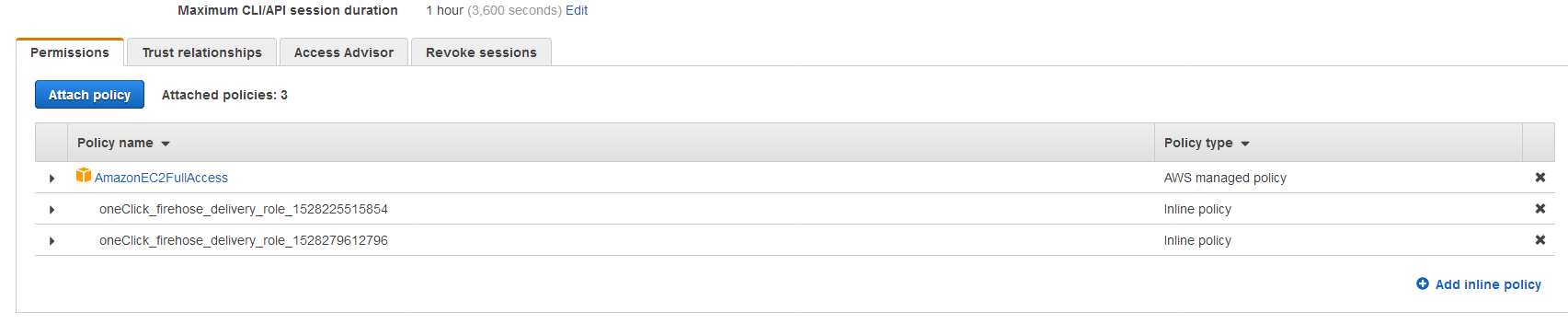
Ensure you have Kinesis Firehose permissions on your EC2 instances IAM user
Hi Team,
I have below configuration and still kinesis agent is not parsing.
-------agent.json--------- [root@ip-172-31-86-34 aws-kinesis]# pwd /etc/aws-kinesis
-- File patten log directory--- [root@ip-172-31-86-34 aws-kinesis-agent]# pwd /var/log/aws-kinesis-agent [root@ip-172-31-86-34 aws-kinesis-agent]# ls -lrt total 1608 -rw-r--r-- 1 aws-kinesis-agent-user aws-kinesis-agent-user 22196 Jun 6 11:11 access_log_20180606-111109.log
--Sample Data in access_log_20180606-111109.log --- [root@ip-172-31-86-34 aws-kinesis-agent]# head -2 access_log_20180606-111109.log 75.152.42.19 - - [06/Jun/2018:11:14:55 +0000] "PUT /apps/cart.jsp?appID=4285 HTTP/1.0" 200 4950 "http://brandt-diaz.com/explore/privacy/" "Mozilla/5.0 (iPod; U; CPU iPhone OS 4_2 like Mac OS X; it-IT) AppleWebKit/531.47.1 (KHTML, like Gecko) Version/3.0.5 Mobile/8B114 Safari/6531.47.1" 49.54.76.77 - - [06/Jun/2018:11:15:52 +0000] "GET /apps/cart.jsp?appID=1984 HTTP/1.0" 200 5057 "http://www.hinton-pena.com/" "Mozilla/5.0 (X11; Linux i686) AppleWebKit/5322 (KHTML, like Gecko) Chrome/15.0.803.0 Safari/5322"
--agent.json details Based on the above details agent.json is configured.---- { "cloudwatch.endpoint": "monitoring.us-east-1.amazonaws.com", "cloudwatch.emitMetrics": true, "firehose.endpoint": "firehose.us-east-1.amazonaws.com", "flows": [ { "filePattern": "/var/log/aws-kinesis-agent/access_log*", "deliveryStream": "arn:aws:firehose:us-east-1:125049575438:deliverystream/web_log_ingestion_stream", "dataProcessingOptions": [ { "initialPostion": "START_OF_FILE", "maxBufferAgeMillis":"2000", "optionName": "LOGTOJSON", "logFormat": "COMBINEDAPACHELOG" }] } ] }
However i am still getting 0 record parsed by the tailer. here is log from /var/log/aws-kinesis
25049575438:deliverystream/web_log_ingestion_stream:/var/log/aws-kinesis-agent/access_log* 2018-06-06 11:25:06.017+0000 ip-172-31-86-34 (FileTailer[fh:arn:aws:firehose:us-east-1:125049575438:deliverystream/web_log_ingestion_stream:/var/log/aws-kinesis-agent/access _log*]) com.amazon.kinesis.streaming.agent.tailing.FirehoseParser [INFO] FirehoseParser[fh:arn:aws:firehose:us-east-1:125049575438:deliverystream/web_log_ingestion_stream:/v ar/log/aws-kinesis-agent/access_log*]: Opening /var/log/aws-kinesis-agent/access_log_20180606-111109.log for parsing. 2018-06-06 11:25:06.031+0000 ip-172-31-86-34 (Agent STARTING) com.amazon.kinesis.streaming.agent.Agent [INFO] Agent: Startup completed in 43 ms. 2018-06-06 11:25:36.047+0000 ip-172-31-86-34 (Agent.MetricsEmitter RUNNING) com.amazon.kinesis.streaming.agent.Agent [INFO] Agent: Progress: 0 records parsed (22196 bytes), and 0 records sent successfully to destinations. Uptime: 30059ms 2018-06-06 11:25:36.051+0000 ip-172-31-86-34 (FileTailer[fh:arn:aws:firehose:us-east-1:125049575438:deliverystream/web_log_ingestion_stream:/var/log/aws-kinesis-agent/access _log*].MetricsEmitter RUNNING) com.amazon.kinesis.streaming.agent.tailing.FileTailer [INFO] FileTailer[fh:arn:aws:firehose:us-east-1:125049575438:deliverystream/web_log_inge stion_stream:/var/log/aws-kinesis-agent/access_log*]: Tailer Progress: Tailer has parsed 0 records (22196 bytes), transformed 0 records, skipped 0 records, and has successfu lly sent 0 records to destination.
Can you please look .. i am kind of stuck not moving forward.
My Role:

move your logs folder out of ec2-user's home directory.
the kinesis agent runs under aws-kinesis-user-agent and cannot access ec2-user's directory.
I put my kinesis directory in /var/log/kinesis and ran chown -R aws-kinesis-user-agent:aws-kinesis-user-agent
This worked for me!

@skatkar can you elaborate more please, I tried Kevin's solution as well but it didn't work for me. By the way, I've been trying to follow this tutorial https://d1.awsstatic.com/Projects/P4113850/aws-projects_build-log-analytics-solution-on-aws.pdf.

@kevinsalerno agent.json { "cloudwatch.endpoint": "monitoring.us-east-1.amazonaws.com", "cloudwatch.emitMetrics": true, "firehose.endpoint": "firehose.us-east-1.amazonaws.com", "flows": [ { "filePattern": "/var/log/aws-kinesis-agent/access_log_20180309-122504.log", "deliveryStream": "web-log-ingestion-stream", "dataProcessingOptions": [ { "initialPostion": "START_OF_FILE", "maxBufferAgeMillis":"2000", "optionName": "LOGTOJSON", "logFormat": "COMBINEDAPACHELOG" }] } ] }
I moved my log file "access_log_20180309-122504.log" to /var/log/aws-kinesis-agent/ and also changed owner and group of log file as aws-kinesis-agent-user still kinesis agent is parsing zero records. Below is permission for log file I am trying to read : -rwxrwxrwx+ 1 aws-kinesis-agent-user aws-kinesis-agent-user 7737659 Mar 9 12:26 access_log_20180309-122504.log No idea why it is parsing zero records.
@SureshDigia Did you find any solution for the problem?

I am running into exactly the same issue as @mustafaakin and @Angarsk8, any news or insights on this one ? Seems is there for a while.

not sure what of the following made the difference for me, but for people bumping into the same errors, here are some things that I did after posting and made the aws kinesis agent to work just fine eventually:
- I've installed the agent from the URL ( instead of installing from the yum repo )
- in the agent configuration I've inserted :
2.1)
initialPosition = START_OF_FILE2.2) 'deliveryStream' = <the name of your kinesis (firehose) stream> make sure you set up all the [Required] configuration params
Watch closely the aws-kinesis-agent log (tail -f <>) for all kinds of notifications.
Myself I had some Role Errors that were clue me in the right direction to fix them.
Hi All,
For all those who stil haven't got it, please follow the steps below which worked for me
- In the agent.json file, add "filePattern": "/tmp/_access_log*.log". Note that the agent will look for files in the /tmp/ library since it can't look for files in the ec2-user folder
- Run the Python Fake log generator file using the command below python apache-fake-log-gen.py -n 0 -o LOG -p /tmp/
Please let me know if this does not work for you.

Followed @vicks316 instructions and still, the logs are not being processed.
2020-03-04 18:05:51.987+0000 (Agent.MetricsEmitter RUNNING) com.amazon.kinesis.streaming.agent.Agent [INFO] Agent: Progress: 0 records parsed (2210186 bytes), and 0 records sent successfully to destinations. Uptime: 90066ms


Ensure you have Kinesis Firehose permissions on your EC2 instances IAM user
how to do that? i m facing same problem

@kevinsalerno Ensure you have Kinesis Firehose permissions on your EC2 instances IAM user
In my case, the fix was just being careful about which user generated the logs data, and the permissions on the logs. If the agent is able to parse 0 records, then the issue is that the agent can't read the file. If it can parse, but it can't deliver, then the issue should be related to IAM permissions on the IAM user provided, or perhaps firehose or file pattern config in agent.json.
It's fine if the logs folder is owned by root, the important thing is that read permissions are provided to the agent, which can be accomplished by chmod on the specific logs folder to 777 to be safe (though 755 should be enough). For the parent folders, just ensure that they have x permission, which for a folder, is permission to traverse it. So, parent folders need permission 755 (system folders like /var have this by default, but it's very easy to mess something up with the -R flag).
