
aws-toolkit-eclipse
 aws-toolkit-eclipse copied to clipboard
 aws
aws
Cannot change AWS SAM local executable location on eclipse
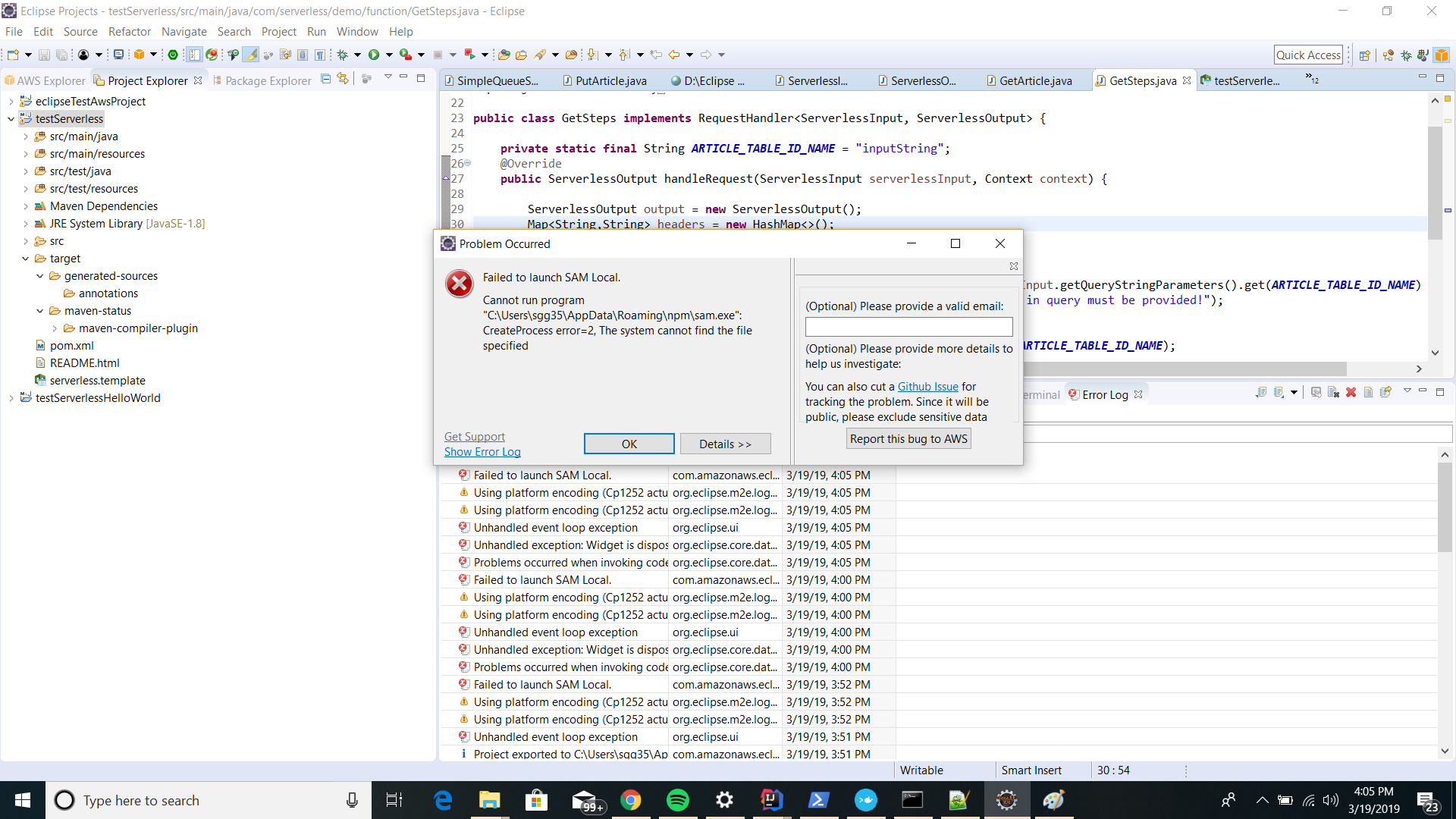
I am trying to Debug my lambda function on AWS tool kit. When I do debug it gives me an error stating:
Failed to launch SAM Local.
Cannot run program "C:\Users\sgg35\AppData\Roaming\npm\sam.exe":
 CreateProcess error=2, The system cannot find the file specified
I go to the location and stated above and there is no such executable. I find the excutable to be in "C:\Program Files\Amazon\AWSSAMCLI\bin\sam.cmd"
So I go to windows->preferences and change the AWS SAM local location appropriately:

But when I try to debug it again, I get the same error i.e.
Cannot run program "C:\Users\sgg35\AppData\Roaming\npm\sam.exe":


เมื่อ ส. 23 มี.ค. 2019 เวลา 09:49 otatop [email protected] เขียนว่า:
I have the same problem
— You are receiving this because you are subscribed to this thread. Reply to this email directly, view it on GitHub https://github.com/aws/aws-toolkit-eclipse/issues/137#issuecomment-475832911, or mute the thread https://github.com/notifications/unsubscribe-auth/Ao3HFzEiJ2hOJClxlIyTxB6R5ktgnifBks5vZZY3gaJpZM4b9Ahl .

Failed to launch SAM Local. Cannot run program "C:\Users\sgg35\AppData\Roaming\npm\sam.exe": CreateProcess error=2, The system cannot find the file specified
Sorry for the inconvenience. We will take a look at this issue and let you know once we get any progress.
Meanwhile, we'd like you to try the AWS Toolkit for JetBrains. It has all the SAM local running/debugging features as the Eclipse toolkit does. Other than Java, it also supports Python in the same user experiences. As we are focusing more on the JetBrains IDEs, you will get support much faster than Eclipse.

@zhangzhx Hey Zhangzhx ,thanks for your reply. Also I would prefer using Intellij over eclipse toolkit but I found that it doesn't yet support deploying Lambda functions in Java (let me know if this is not the case).Also seems like most of the documentation on the AWS docs is for eclipse AWS tool kit .
@Snedden The toolkit is depending on SAM CLI for building the underlying projects in different languages. JetBrains toolkit is waiting for SAM to release the support of Java build. Stay tuned, I will let you know once it is supported.
The Eclipse toolkit is still depending on an older version of SAM CLI and with no proper testing to the newer SAM CLI versions.
@Snedden , we just released the JetBrains toolkit 1.2 that fully supports Java. Please give it a try and let us know if you have any problems.
Hi I am using MyEclipse and others in team using Eclipse and want to use AWS Toolkit without having to switch IDE for Java development of serveless apps. I am experiencing the exact same issue as reported here and I see a few other issues in this project that are related to same problem with SAM local. We would really like to be able to use SAM local to run / test Java code before deploying and running in cloud. Is the AWS toolkit for Eclipse being deprecated? Surely Eclipse is still used widely and other AWS Eclipse toolkit functions seem to work pretty well. Anyway is it best advice now to switch to JetBrains for Java serverless support in AWS?

I had the same problem. When I changed the sam location in Window > Preferences > AWS SAM Local, it continued to used the old location when debugging the lambda. However, I did get it to use the correct sam location by right-clicking the *.java file that contains the lambda, selecting "Debug As" > "Debug Configuration..." and expanding "Advanced Settings". Then select the "Configure AWS SAM Local..." link in the "SAM Local Configuration" section and just press the "Apply and Close" button in the dialog that opens. Then click into the "SAM runtime" input (to the left of the "Configure AWS SAM Local..." link, which is disabled) and the value changed for me.
