
aws-sdk-js
 aws-sdk-js copied to clipboard
 aws
aws
Dyanmodb.update to delete entry from StringSet does not work
Confirm by changing [ ] to [x] below to ensure that it's a bug:
- [x] I've gone though Developer Guide and API reference
- [x] I've checked AWS Forums and StackOverflow for answers
- [x] I've searched for previous similar issues and didn't find any solution
Describe the bug Can not delete a entry from string set using DELETE operation.
Is the issue in the browser/Node.js? Node.js
If on Node.js, are you running this on AWS Lambda?
Details of the browser/Node.js version 10.17.0
SDK version number 2.580.0
To Reproduce (observed behavior) Steps to reproduce the behavior (please share code or minimal repo)
- Create StringSet and put some data in it.
- Delete entry from Set (error)
Invalid UpdateExpression: Incorrect operand type for operator or function; operator: DELETE, operand type: MAP"
problem code.
const dynamoDb = new AWS.DynamoDB.DocumentClient();
  const resp = await dynamoDb.scan({
    TableName: TABLE_NAME,
    FilterExpression: 'attribute_exists(Cids)',
  }).promise();
  console.info(`Update ${resp.Count} users`);

  for (const item of resp.Items || []) {
    console.info(item.Uid);
    await dynamoDb.update({
      TableName: TABLE_NAME,
      Key: {
        Uid: { S: item.Uid },
      },
      UpdateExpression: 'DELETE Cids :cameraId',
      ReturnValues: 'ALL_NEW',
      ExpressionAttributeValues: {
        ':cameraId': { SS: [id] },
      }
    }).promise();
  }
but same operation in python and CLI works.
Expected behavior Delete the entry from string set.

Hey @haandol, thank-you for reach out to us with your issue.
I believe you are not using the correct syntax in your code:
For example:
 ExpressionAttributeValues: {
        ":cameraId": { "SS": [id] },
      }

//similar for the ```key``` as well.
Please reach out if that doesn't solve the problem.

This error has nothing to do with syntax error (and I tried your suggestion too, just in case) because the exact same request payload works in Python
client.update_item(
        TableName=SESSION_TABLE_NAME,
        Key={
          'Uid': { 'S': user_id },
        },
        UpdateExpression='DELETE Cids :cameraId',
        ReturnValues='ALL_NEW',
        ExpressionAttributeValues={
          ':cameraId': { 'SS': [rig_id] },
        }
      )
I have seen similar errors coming because of incorrect syntax.
Trying to reproduce this.
const dynamoDb = new AWS.DynamoDB.DocumentClient({region: 'ap-northeast-2'});
  const resp = await dynamoDb.scan({
    TableName: TABLE_NAME,
    FilterExpression: 'attribute_exists(Cids)',
  }).promise();
  console.info(`Update ${resp.Count} users`);

  for (const item of resp.Items || []) {
    console.info(item.Uid);
    await dynamoDb.update({
      TableName: TABLE_NAME,
      Key: {
        Uid: item.Uid,
      },
      UpdateExpression: 'DELETE Cids :cameraId',
      ReturnValues: 'ALL_NEW',
      ExpressionAttributeValues: {
        ':cameraId': dynamodb.createSet([id]),
      }
    }).promise();
  }
DocumentClient.createSet() works.
or
const AWS = require('aws-sdk');
const dynamoDb = new AWS.DynamoDB({region: 'ap-northeast-2'});
dynamoDb.updateItem({
  TableName: 'test',
  Key: {
    Uid: { S: 'id1'},
  },
  UpdateExpression: 'ADD Cids :cameraId',
  ExpressionAttributeValues: {
    ':cameraId': { SS: ['cid3'] },
  }
}, (err, data) => {
  if (err) console.log(err);
  else console.log(data);
})
no DocumentClient version works too.
DocumentClient generated the body goes like this.
{"TableName":"test","Key":{"Uid":{"M":{"S":{"S":"id1"}}}},"UpdateExpression":"DELETE Cids :cameraId","ExpressionAttributeValues":{":cameraId":{"M":{"SS":{"L":[{"S":"cid1"}]}}}}}
DocumentClient wraps 'SS' with 'M' and it occurs the error, operator: DELETE, operand type: MAP
Hey @haandol, I was able to reproduce this.
Will reach out to the service team for them to fix it.
any updates on this, @ajredniwja ? experiencing the same issue.
npm:
+ [email protected]

 sls --version
Framework Core: 1.74.1 (standalone)
Plugin: 3.6.14
SDK: 2.3.1
Components: 2.31.6
Fri Jul 24 - 00:00:47

const dynamoDb = new AWS.DynamoDB.DocumentClient({region: 'ap-northeast-2'});
  const resp = await dynamoDb.scan({
    TableName: TABLE_NAME,
    FilterExpression: 'attribute_exists(Cids)',
  }).promise();
  console.info(`Update ${resp.Count} users`);

  for (const item of resp.Items || []) {
    console.info(item.Uid);
    await dynamoDb.update({
      TableName: TABLE_NAME,
      Key: {
        Uid: item.Uid,
      },
      UpdateExpression: 'DELETE Cids :cameraId',
      ReturnValues: 'ALL_NEW',
      ExpressionAttributeValues: {
        ':cameraId': dynamodb.createSet([id]),
      }
    }).promise();
  }
DocumentClient.createSet()works.or
const AWS = require('aws-sdk');
const dynamoDb = new AWS.DynamoDB({region: 'ap-northeast-2'});
dynamoDb.updateItem({
  TableName: 'test',
  Key: {
    Uid: { S: 'id1'},
  },
  UpdateExpression: 'ADD Cids :cameraId',
  ExpressionAttributeValues: {
    ':cameraId': { SS: ['cid3'] },
  }
}, (err, data) => {
  if (err) console.log(err);
  else console.log(data);
})
no DocumentClient version works too.
I found the same issue and the first suggestion on the above worked for me (using the dynamodb.createSet function in the ExpressionAttributes).

This does not work for me too.
    params = {
        TableName : accountDataTableName,
        Key: { id: '0' },
        UpdateExpression: "DELETE evidenceBacklog :evidenceID",
        ExpressionAttributeValues: {
            ":evidenceID": ID,
        }
    };

    result = await docClient.update(params).promise();
Data:
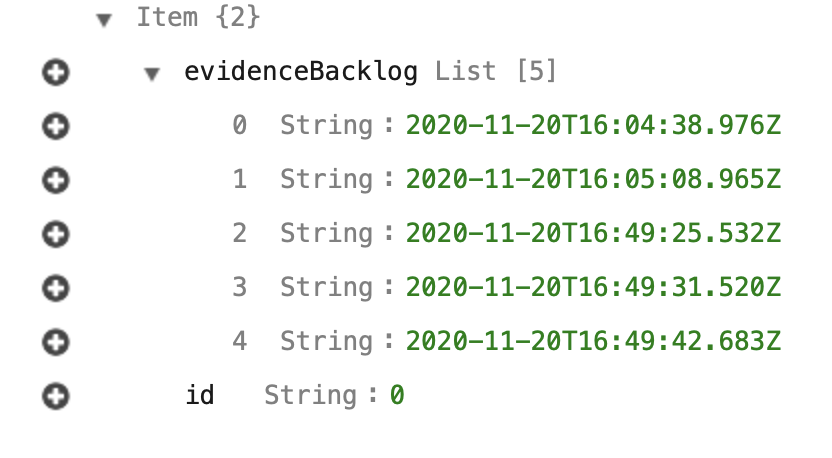
throws:
{"errorType":"ValidationException","errorMessage":"Invalid UpdateExpression: Incorrect operand type for operator or function; operator: DELETE, operand type: STRING, typeSet: ALLOWED_FOR_DELETE_OPERAND","trace":["ValidationException: Invalid UpdateExpression: Incorrect operand type for operator or function; operator: DELETE, operand type: STRING, typeSet: ALLOWED_FOR_DELETE_OPERAND"

I tried DocumentClient.createSet() but received: ValidationException: An operand in the update expression has an incorrect data type
{"TableName":"test.table","Key":{"room_id":"123"},"UpdateExpression":"set #lmd = :lmd DELETE viewer_ids :vid","ExpressionAttributeNames":{"#lmd":"last_activity_time"},"ExpressionAttributeValues":{":lmd":"2021-04-27T18:10:32.849+08:00",":vid":["test_school_id_T_1"]},"ReturnValues":"ALL_NEW"}
anyone can help? thanks.

@haandol @ajredniwja I've been facing a similar issue and I've posted its details in this Stack Overflow.
It is odd because if i use ADD it works but not DELETE...
The error is:
ERROR Invoke Error
{
  "errorType":"Error",
  "errorMessage":"ValidationException: Invalid UpdateExpression: Incorrect operand type for operator or function;
   operator: DELETE, operand type: NUMBER, typeSet: ALLOWED_FOR_DELETE_OPERAND",
  "stack":[...]
}
Would you suggest any workarounds while this gets fixed?
I really appreciate any insights towards this.
Keep Rocking!

The only workaround possible for me here was not to use a DELETE operation, instead, you gotta query the item, find the index in the array you wish to delete, and remove it a REMOVE operation:
like in this case, arrayField contains an array of Users, and I want to delete by user's phoneNumber.
const dataStore = await dynamodb.get(queryParams).promise(); let i=0; //save the index for(i = 0; i < dataStore.Item.myTable.length; i++){ if(dataStore.Item.arrayField[i].phone === phoneNumber) { break; } }
//extracted from for loop for clarity
if(i < dataStore.Item.arrayField.length){
    const updateStoreParams = {
        TableName: tableName,
        Key: storeTableKey,
        UpdateExpression: `REMOVE arrayField[${i}]`,
    }
    await dynamodb.update(updateStoreParams).promise().catch((err) => {
        console.log(err);
        throw err;
        });
}
.net dev celerino herrera g https://chamizo.pro/contact
On Fri, Apr 30, 2021 at 1:06 PM Paulo Fagiani @.***> wrote:
@haandol https://github.com/haandol @ajredniwja https://github.com/ajredniwja I've been facing a similar issue and I've posted its details in this Stack Overflow https://stackoverflow.com/questions/67338331/updating-dynamodb-record-with-delete-set-on-updateexpression-fails-with-node-js .
It is odd because if i use ADD it works but not DELETE...
The error is:
ERROR Invoke Error { "errorType":"Error", "errorMessage":"ValidationException: Invalid UpdateExpression: Incorrect operand type for operator or function; operator: DELETE, operand type: NUMBER, typeSet: ALLOWED_FOR_DELETE_OPERAND", "stack":[...] }
Would you suggest any workarounds while this gets fixed?
I really appreciate any insights towards this.
Keep Rocking!
— You are receiving this because you commented. Reply to this email directly, view it on GitHub https://github.com/aws/aws-sdk-js/issues/3025#issuecomment-830351372, or unsubscribe https://github.com/notifications/unsubscribe-auth/AAWDXZBL4OCPKKKBYJ2NAW3TLMEUTANCNFSM4J65GDGA .
@celerno thanks for taking the time to point that! I actually tried but it became a bit inefficient with big sets and that led me to implement it with another SDK to compare and I ended up with the exactly same error. That's how I notice my mistake.
I explain the details here
but this is the code that worked for me:
// Notice below that I inject ADD if operation is DELETE and a comma otherwise
DynamoDB.update({
      TableName,
      Key,
      UpdateExpression: `
        ${operation} socketIds :valuesToModify
        ${operation == 'DELETE' ? 'ADD' : ','} version :incrementVersionBy
      `,
      ConditionExpression: `version = :version`,
      ExpressionAttributeValues: {
        ':version': channelRecord.version,
        ':incrementVersionBy': 1,
        ':valuesToModify': DynamoDB.createSet([socketId])
     }
})
I hope that to become helpful to others in the future!
Thanks again!!
Thanks for the tip! Very clever. Good luck!
El sáb., 1 de mayo de 2021 12:38 p. m., Paulo Fagiani < @.***> escribió:
@celerno https://github.com/celerno thanks for taking the time to point that! I actually tried but it became a bit inefficient with big sets and that led me to implement it with another SDK to compare and I ended up with the exactly same error. That's how I notice my mistake.
I explain the details here https://stackoverflow.com/a/67350174/1463744
but this is the code that worked for me:
// Notice below that I inject ADD if operation is DELETE and a comma otherwiseDynamoDB.update({ TableName, Key, UpdateExpression:
${operation} socketIds :valuesToModify ${operation == 'DELETE' ? 'ADD' : ','} version :incrementVersionBy, ConditionExpression:version = :version, ExpressionAttributeValues: { ':version': channelRecord.version, ':incrementVersionBy': 1, ':valuesToModify': DynamoDB.createSet([socketId]) }})I hope that to become helpful to others in the future!
Thanks again!!
— You are receiving this because you were mentioned. Reply to this email directly, view it on GitHub https://github.com/aws/aws-sdk-js/issues/3025#issuecomment-830683614, or unsubscribe https://github.com/notifications/unsubscribe-auth/AAWDXZHTKLFJ2MQCPJ3YES3TLRKDDANCNFSM4J65GDGA .

const dynamoDb = new AWS.DynamoDB.DocumentClient({region: 'ap-northeast-2'});
  const resp = await dynamoDb.scan({
    TableName: TABLE_NAME,
    FilterExpression: 'attribute_exists(Cids)',
  }).promise();
  console.info(`Update ${resp.Count} users`);

  for (const item of resp.Items || []) {
    console.info(item.Uid);
    await dynamoDb.update({
      TableName: TABLE_NAME,
      Key: {
        Uid: item.Uid,
      },
      UpdateExpression: 'DELETE Cids :cameraId',
      ReturnValues: 'ALL_NEW',
      ExpressionAttributeValues: {
        ':cameraId': dynamodb.createSet([id]),
      }
    }).promise();
  }
DocumentClient.createSet()works.or
const AWS = require('aws-sdk');
const dynamoDb = new AWS.DynamoDB({region: 'ap-northeast-2'});
dynamoDb.updateItem({
  TableName: 'test',
  Key: {
    Uid: { S: 'id1'},
  },
  UpdateExpression: 'ADD Cids :cameraId',
  ExpressionAttributeValues: {
    ':cameraId': { SS: ['cid3'] },
  }
}, (err, data) => {
  if (err) console.log(err);
  else console.log(data);
})
no DocumentClient version works too.
If the above solution didn't work for you then check the Item in your Table and make sure that the attribute you're trying to delete an element from is of the type StringSet("SS") and not List("L")! Take a look here if you want to learn more about Dynamodb data types.

Greetings! We’re closing this issue because it has been open a long time and hasn’t been updated in a while and may not be getting the attention it deserves. We encourage you to check if this is still an issue in the latest release and if you find that this is still a problem, please feel free to comment or open a new issue.
![github-actions[bot] avatar](https://avatars.githubusercontent.com/in/15368?v=4 "Published by a pub.dev verified publisher")