

 aws
aws
HTTP to HTTPS redirect
Community Note
- Please vote on this issue by adding a 👍 reaction to the original issue to help the community and maintainers prioritize this request
- Please do not leave "+1" or "me too" comments, they generate extra noise for issue followers and do * not help prioritize the request If you are interested in working on this issue or have submitted a pull request, please leave a comment
Tell us about your request What do you want us to build?
A redirect from http to https for app runner apps
Describe alternatives you've considered A clear and concise description of any alternative solutions or features you've considered.
Guess I could set up an API gateway and lambda? or WAF? Seems like overkill though.
Additional context Anything else we should know?
Attachments If you think you might have additional information that you'd like to include via an attachment, please do - we'll take a look. (Remember to remove any personally-identifiable information.)
Trying to connect just hangs on connection failed
❯ curl -v http://xqddwvtx9n.us-west-2.awsapprunner.com/
*   Trying 44.239.28.9...
* TCP_NODELAY set
* Connection failed
* connect to 44.239.28.9 port 80 failed: Operation timed out
*   Trying 35.164.201.193...
* TCP_NODELAY set
* Connection failed
* connect to 35.164.201.193 port 80 failed: Operation timed out
*   Trying 35.80.251.48...
* TCP_NODELAY set
https works though

@matschaffer Thank you for reporting this. Did you ever implement a proper workaround for this? I'm struggling to see how anyone ships web apps without http redirects.

@paynecodes no, I was looking at moving an app currently on aws beanstalk to apprunner, but abandoned the idea after running into this.
If you really really needed to run on apprunner, I could see maybe setting up a cloudfront distro or waf that handles the "front door" and the redirect. But seems like a lot of extra work for minimal benefit when compared to just running on beanstalk.
I'm already using netlify and so switching to cloudflare is extra step just for this use case. I hope they implement this feature fast.

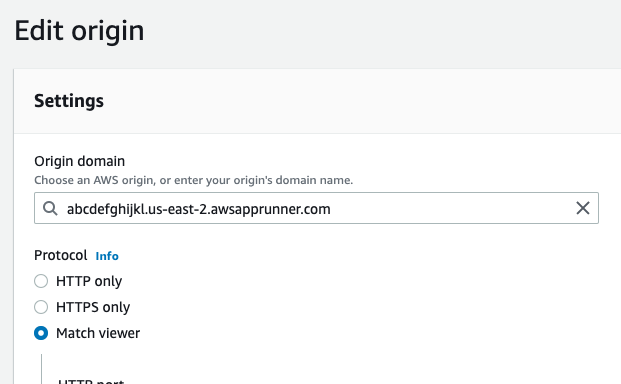
As a workaround, I created an AWS CloudFront distribution that routes traffic to the App Runner instance. I was able to use the App Runner generated URL as the CloudFront distribution Origin Domain (ex https://abcdefghijkl.us-east-2.awsapprunner.com). Within the CloudFront distribution Origin configuration, in the Protocol section, I chose "Match Viewer" to accept both HTTP and HTTPS. I then updated the default Behavior (default *) with "Viewer protocol policy" of redirect HTTP to HTTPS with the Origin being the only Origin I created that points to the App Runner URL
Because I wanted to support the root / apex domain (https://domain.com) and a subdomain (https://www.domain.com) I had to create a multi-domain SSL certificated right from the CloudFront distribution create screen.
That being said, I would have still preferred port 80 being open and redirecting to the HTTPS port 443. I upvoted this feature request.

That's neat!! Thank you @tmichalski.
But for some reason my app runner's instance is not recognised as origin. It just says You have no available origins in Ireland (eu-west-1).
@s-kris The Origin Domain input doesn't list App Runner instances (not sure why). But, underneath the "Origin domain" input field title, there is text that says "Choose an AWS origin, or enter your origin's domain name". I took this to mean that I can either select something from the AWS listing (which nothing was listed for me) or just put in the App Runner URL of my app (which you can find on the App Runner console). I copied the URL into the Origin domain and CloudFront is simply proxying inbound requests through to my App Runner URL.
Disappointed that this isn't implemented yet. Seems like critical tablestakes for a web app service.

Is there any plan to implement http -> https in app runner directly? It would be nice to know if this is even planned.

~~As a workaround, you can perform the redirect within your app. Just add middleware that checks the protocol of the host header, and redirects if it's http.~~
This doesn't work. It seems Cloudfront is required for this issue and #53

I am pleased to see support for route53 aliases, but I would like to see an automatic redirect to https, as accessing from http will cause a timeout. Otherwise, the meaning of supporting aliases will be lost.

The problem can be mitigated to a degree by setting HSTS (Strict-Transport-Security header), ideally with preload. But definitely a surprising and frustrating omission in App Runner.

Thanks for your patience on this issue. We are going to take a look at this.

Another method that we used to resolve this was add in a 301 redirect in our nginx config for our docker container that we use app runner to serve.

If anyone is working with dotnet core on AppRunner bumping into this issue, this workaround worked for me.
https://learn.microsoft.com/en-us/aspnet/core/host-and-deploy/proxy-load-balancer?view=aspnetcore-7.0#when-it-isnt-possible-to-add-forwarded-headers-and-all-requests-are-secure
// Program.cs

app.Use((context, next) =>
{
    context.Request.Scheme = "https";
    return next(context);
});

You can create an AWS CloudFront distribution that routes traffic to the App Runner instance.

Hello everyone, thanks for all the feedback. We will be fixing this in App Runner soon so that you do not have to implement any workarounds for HTTP to HTTPS redirect. Keep it on your watch-list. Coming Soon!

Glad to hear -- just launched our product in private beta on AppRunner and encountered this issue by some users
Appreciate your hard work!


Hello everyone, App Runner now supports HTTP to HTTPS redirect. Thank you all for your feedback.
Launch Announcement: https://aws.amazon.com/about-aws/whats-new/2023/02/aws-app-runner-http-https-redirect/
That's neat!! Thank you @tmichalski.
But for some reason my app runner's instance is not recognised as origin. It just says
You have no available origins in Ireland (eu-west-1).
Pretty sure Cloudfront SSL certs are limited to us-east-1 'N.Virginia' and the origin must be in the same region of the distribution. So basically its currently limited to us-east-1
