

 aws-quickstart
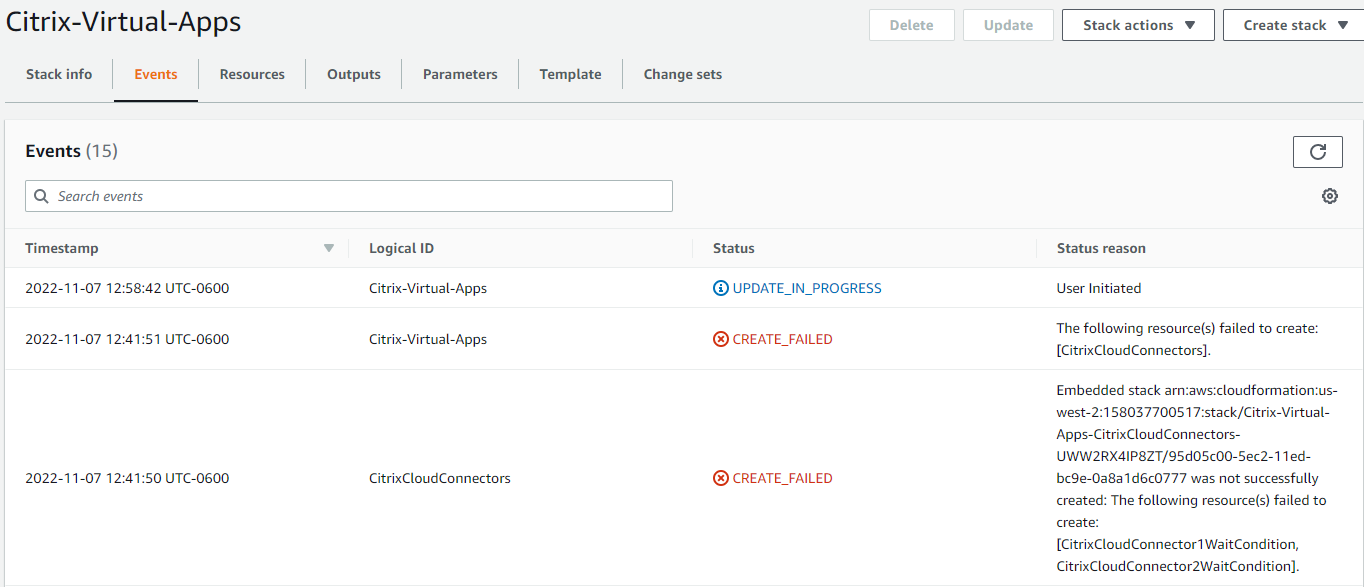
CREATE_FAILED::CloudFormation::Stack Citrix-Virtual-Apps-CitrixCloudConnectors-
Can someone please provide assistance with the CloudFormation error while deploying the Citrix-Virtual-Apps Quickstart t
Citrix-Virtual-Apps CREATE_FAILED 2022-11-07 11:33:44 UTC-0600 This template deploys a Citrix Virtual Apps Service Resource Location. WARNING This template creates Amazon EC2 Windows instance and related resources. You will be billed for the AWS resources used if you create a stack from this template. (qs-1p6u9q6o0)
Citrix-Virtual-Apps-CitrixCloudConnectors-UWW2RX4IP8ZT NESTED CREATE_FAILED 2022-11-07 11:35:35 UTC-0600 This template deploys two Citrix Cloud Connectors. (qs-1t985k9rp)

Embedded stack arn:aws:cloudformation:us-west-2:158037700517:stack/Citrix-Virtual-Apps-CitrixCloudConnectors-UWW2RX4IP8ZT/95d05c00-5ec2-11ed-bc9e-0a8a1d6c0777 was not successfully created: The following resource(s) failed to create: [CitrixCloudConnector1WaitCondition, CitrixCloudConnector2WaitCondition].

@davemuhlbradt - could you share the logs from the Citrix Cloud Connector instances?

@vsnyc If I'm not mistaken it looks like aws documentation recommends against waiting for ec2 instances this way. I'm also experiencing this issue.

@davemuhlbradt - could you share the logs from the Citrix Cloud Connector instances?
@vsnyc Attached logs.zip for same issue occurring in my environment
@skymoore - sorry I was on vacation and picking this up. Looking at the logs, it looks like the b-join-domain command is failing. I'll check if I'm able to reproduce.
2022-11-09 21:50:44,749 P2948 [INFO] Command b-join-domain
2022-11-09 21:50:45,202 P2948 [INFO] -----------------------Command Errors-----------------------
2022-11-09 21:50:45,202 P2948 [ERROR] 	The system cannot find the file specified.
2022-11-09 21:50:45,218 P2948 [INFO] ------------------------------------------------------------
2022-11-09 21:50:45,218 P2948 [ERROR] Exited with error code 1
I tested this, we need to update the submodules. With the updated submodule, I am able to get past this step. I am unable to verify a full successful run at this time due to expired licenses. I have created a PR: https://github.com/aws-quickstart/quickstart-citrix-daas/pull/39 to fix the submodules.
2022-12-07 17:21:48,782 P1336 [INFO] Config rename 2022-12-07 17:21:48,938 P1336 [INFO] ============================================================ 2022-12-07 17:21:48,938 P1336 [INFO] Command a-execute-powershell-script-RenameComputer 2022-12-07 17:21:49,375 P1336 [INFO] Completed successfully. 2022-12-07 17:23:12,237 P2652 [INFO] ++++++++++++++++++++++++++++++++++++++++++++++++++++++++++++ 2022-12-07 17:23:12,268 P2652 [INFO] Config domainjoin 2022-12-07 17:23:13,074 P2652 [INFO] ============================================================ 2022-12-07 17:23:13,074 P2652 [INFO] Command a-set-dns 2022-12-07 17:23:19,830 P2652 [INFO] -----------------------Command Output----------------------- 2022-12-07 17:23:19,830 P2652 [INFO] Transcript started, output file is C:\cfn\log\Set-Dns.ps1.txt 2022-12-07 17:23:19,830 P2652 [INFO] ------------------------------------------------------------ 2022-12-07 17:23:19,830 P2652 [INFO] Completed successfully. 2022-12-07 17:23:49,923 P2652 [INFO] ============================================================ 2022-12-07 17:23:49,923 P2652 [INFO] Command b-join-domain 2022-12-07 17:23:55,517 P2652 [INFO] -----------------------Command Output----------------------- 2022-12-07 17:23:55,517 P2652 [INFO] WARNING: The changes will take effect after you restart the computer 2022-12-07 17:23:55,517 P2652 [INFO] CTX-CC1-ozl0. 2022-12-07 17:23:55,517 P2652 [INFO] ------------------------------------------------------------ 2022-12-07 17:23:55,517 P2652 [INFO] Completed successfully. 2022-12-07 17:25:36,202 P744 [INFO] ++++++++++++++++++++++++++++++++++++++++++++++++++++++++++++ 2022-12-07 17:25:36,234 P744 [INFO] Config installCloudConnector 2022-12-07 17:25:37,489 P744 [INFO] ============================================================ 2022-12-07 17:25:37,489 P744 [INFO] Command a-disableIEESC 2022-12-07 17:25:37,866 P744 [INFO] Completed successfully. 2022-12-07 17:25:38,007 P744 [INFO] ============================================================
Re-opening for validation. @skymoore - I have merged the PR. Please deploy the Quick Start as usual and let me know if you run into any issues. If you get past your originally reported issue, we can close this out and work on any newly identified issues independently.
@vsnyc sounds good. I won't be able to get to it until Monday, but it's on my list.
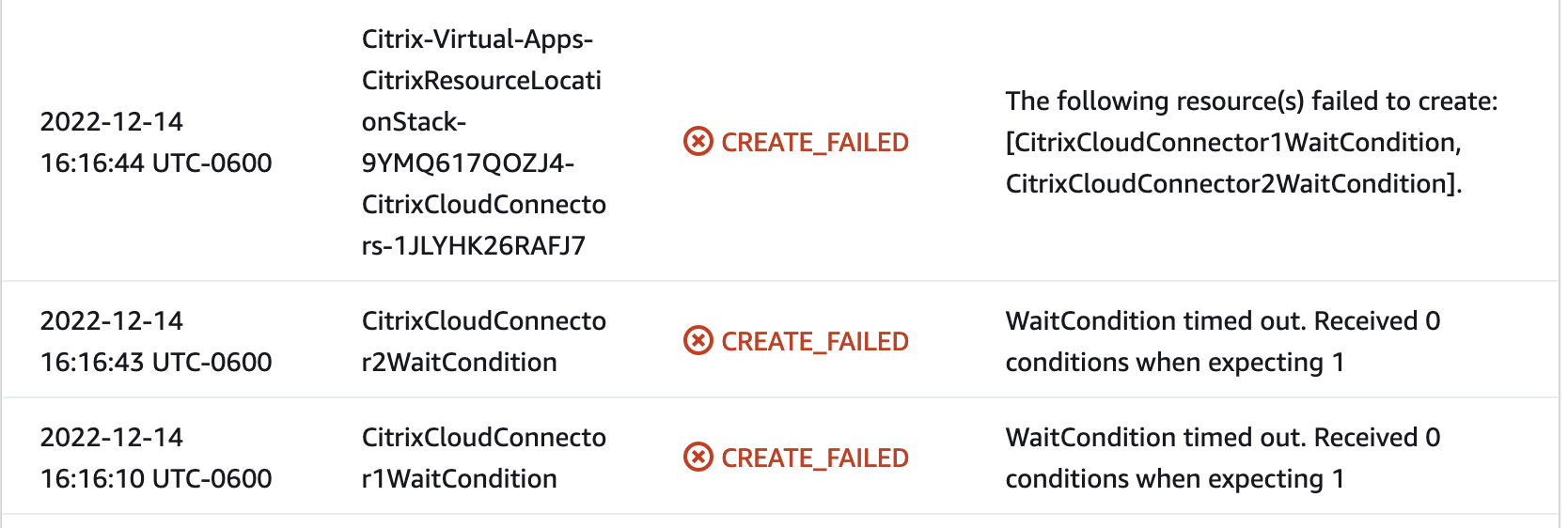
I am also stuck on this error when deploying into an existing VPC, but I'm seeing it take nearly an hour to show the "CREATE_FAILED: Embedded stack... ...following resources failed to create: [CitrixCloudConnector1WaitCondition, CitrixCloudConnector2WaitCondition]" message after the last CREATE_COMPLETE message.
Is the Domain admin password being used for this step of the config? It's not clear if this field is for an existing Domain administrator account or if the template is creating a new user and attempting to use that new account to join an existing domain.
Is there a way to skip domain join and manually join them to the domain after the quickdeploy is complete?

@vsnyc Haven't forgotten about this, just waiting on my counterpart to be ready. Scheduled for tomorrow.
I am also stuck on this error when deploying into an existing VPC, but I'm seeing it take nearly an hour to show the "CREATE_FAILED: Embedded stack... ...following resources failed to create: [CitrixCloudConnector1WaitCondition, CitrixCloudConnector2WaitCondition]" message after the last CREATE_COMPLETE message.
Is the Domain admin password being used for this step of the config? It's not clear if this field is for an existing Domain administrator account or if the template is creating a new user and attempting to use that new account to join an existing domain.
Is there a way to skip domain join and manually join them to the domain after the quickdeploy is complete?
@clw111 - could you post the logs, at what step did it fail? In my testing, the instance is able to join the domain correctly. See the logs I attached on Dec 8.
 ☹️ @vsnyc
@vsnyc I thought perhaps it has something to do with the IAM role we're executing the cloudformation with, but this is the policy on the role:
{
    "Version": "2012-10-17",
    "Statement": [
        {
            "Effect": "Allow",
            "Action": "*",
            "Resource": "*"
        }
    ]
}
@skymoore - could you attach the logs.zip, similar to how you had done on Nov 16? I want to see if the error is at a different step. Also, please reach out to me at [email protected], we can setup a meeting to discuss this. It would help if you have the error environment available for troubleshooting.
@vsnyc I do have the error environment available. I will send an email to [email protected] and extract the logs today.
Verified in a working session with @skymoore that the originally reported issue is now resolved.