

 aws-amplify
Error syncing many-to-many table
Describe the bug
As of today, whenever I amend or create a link between two elements of tables that have a many-to-many relationship through the Studio I get this error:
[IncomingAsyncSubscriptionEventToAnyModelMapper] The operation couldn’t be completed. (Amplify.GraphQLResponseError<AWSPluginsCore.MutationSync<AWSPluginsCore.AnyModel>> error 0.)
Updating the elements without linking works fine, same with one-to-many relationships.
I created a new app with just the two tables and the same issue persisted.
Steps To Reproduce
Steps to reproduce the behavior:

1. Go to 'Amplify studio', create two tables and set a many-to-many relationship between them.

2. Create basic app

3. Pull the changes to the local machine.

3. Include "Amplify.DataStore.start" after "Amplify.configure()"

4. Create 2 elements (No error, and sync is immediate)

5. Add link between them.

4. See error and no sync until I restart the app
Expected behavior
There shouldn't be any error and the sync should be immediate
Amplify Framework Version
1.18.1
Amplify Categories
Analytics, API, Auth, DataStore, Predictions, Storage
Dependency manager
Swift PM
Swift version
5.0
CLI version
7.6.11
Xcode version
13.2.1
Relevant log output
No response
Is this a regression?
No
Regression additional context
No response
Device
iPhone13 - Simulator
iOS Version
iOS 15
Specific to simulators
No response
Additional context
No response

@Nfgyou Thanks for reporting this issue. We have a related issue linked below and will be working on it.
https://github.com/aws-amplify/amplify-ios/issues/1614

Hi @Nfgyou, can you provide us with the schema that you modeled in the Studio UI? the raw graphql file should be viewable in the tab next to deploy.

We're working on reproducing this scenario with what we know so far, ie the many-to-many relationship described in the amplify documentation site: https://docs.amplify.aws/lib/datastore/relational/q/platform/ios/#many-to-many and since @Nfgyou had went through the Studio experience, we'll reproduce it again to visually inspect any schema differences there are. Will provide an update here once we have the results of our investigation
Hello sorry for the late reply,
I don't have access to that schema, but it was simply creating any two tables in Amplify studio and setting a M-2-M relationship between them.
I have since moved to using GraphQL instead of DataStore so I have no idea if this issue is still happening. I can test it again if you cannot reproduce it and see.
Hi @Nfgyou, using this schema:
type Author @model @auth(rules: [{allow: public}]) {
  id: ID!
  firstName: String
  lastName: String
  books: [Book] @manyToMany(relationName: "AuthorBook")
}

type Book @model @auth(rules: [{allow: public}]) {
  id: ID!
  title: String
  publisherID: ID! @index(name: "byPublisher")
  authors: [Author] @manyToMany(relationName: "AuthorBook")
}
We were able to successfully sync the join models when saving them to AppSync. The code basically saved a book and author, then used the two models when constructing the join model. Please let us know if you have any additional context as to the code you used to save the join model as well. We'll continue our investigation from the Studio data modeling experience.
We were able to reproduce this error when saving data directly through Amplify Studio's Content tab. After creating the Book, and Author, then selecting the Author item, and Linking to an existing Book, will save the join model AuthorBook successfully in the Studio UI

With the iOS App running (and DataStore started), the subscription event received for that AuthorBook CreateMutation fails with the following error:
Error logs
(lldb) po graphQLResponse
▿ Result<MutationSync<AnyModel>, GraphQLResponseError<MutationSync<AnyModel>>>
  ▿ failure : GraphQLResponseError<MutationSync<AnyModel>>: GraphQL service returned a successful response containing errors: [Amplify.GraphQLError(message: "Cannot return null for non-nullable type: \'AWSDateTime\' within parent \'Author\' (/onCreateAuthorBook/author/createdAt)", locations: nil, path: Optional([Amplify.JSONValue.string("onCreateAuthorBook"), Amplify.JSONValue.string("author"), Amplify.JSONValue.string("createdAt")]), extensions: nil), Amplify.GraphQLError(message: "Cannot return null for non-nullable type: \'AWSDateTime\' within parent \'Author\' (/onCreateAuthorBook/author/updatedAt)", locations: nil, path: Optional([Amplify.JSONValue.string("onCreateAuthorBook"), Amplify.JSONValue.string("author"), Amplify.JSONValue.string("updatedAt")]), extensions: nil), Amplify.GraphQLError(message: "Cannot return null for non-nullable type: \'Int\' within parent \'Author\' (/onCreateAuthorBook/author/_version)", locations: nil, path: Optional([Amplify.JSONValue.string("onCreateAuthorBook"), Amplify.JSONValue.string("author"), Amplify.JSONValue.string("_version")]), extensions: nil), Amplify.GraphQLError(message: "Cannot return null for non-nullable type: \'AWSTimestamp\' within parent \'Author\' (/onCreateAuthorBook/author/_lastChangedAt)", locations: nil, path: Optional([Amplify.JSONValue.string("onCreateAuthorBook"), Amplify.JSONValue.string("author"), Amplify.JSONValue.string("_lastChangedAt")]), extensions: nil), Amplify.GraphQLError(message: "Cannot return null for non-nullable type: \'AWSDateTime\' within parent \'Book\' (/onCreateAuthorBook/book/createdAt)", locations: nil, path: Optional([Amplify.JSONValue.string("onCreateAuthorBook"), Amplify.JSONValue.string("book"), Amplify.JSONValue.string("createdAt")]), extensions: nil), Amplify.GraphQLError(message: "Cannot return null for non-nullable type: \'AWSDateTime\' within parent \'Book\' (/onCreateAuthorBook/book/updatedAt)", locations: nil, path: Optional([Amplify.JSONValue.string("onCreateAuthorBook"), Amplify.JSONValue.string("book"), Amplify.JSONValue.string("updatedAt")]), extensions: nil), Amplify.GraphQLError(message: "Cannot return null for non-nullable type: \'Int\' within parent \'Book\' (/onCreateAuthorBook/book/_version)", locations: nil, path: Optional([Amplify.JSONValue.string("onCreateAuthorBook"), Amplify.JSONValue.string("book"), Amplify.JSONValue.string("_version")]), extensions: nil), Amplify.GraphQLError(message: "Cannot return null for non-nullable type: \'AWSTimestamp\' within parent \'Book\' (/onCreateAuthorBook/book/_lastChangedAt)", locations: nil, path: Optional([Amplify.JSONValue.string("onCreateAuthorBook"), Amplify.JSONValue.string("book"), Amplify.JSONValue.string("_lastChangedAt")]), extensions: nil)]
Recovery suggestion: The list of `GraphQLError` contains service-specific messages
    ▿ error : 8 elements
      ▿ 0 : GraphQLError
        - message : "Cannot return null for non-nullable type: \'AWSDateTime\' within parent \'Author\' (/onCreateAuthorBook/author/createdAt)"
        - locations : nil
        ▿ path : Optional<Array<JSONValue>>
          ▿ some : 3 elements
            ▿ 0 : JSONValue
              - string : "onCreateAuthorBook"
            ▿ 1 : JSONValue
              - string : "author"
            ▿ 2 : JSONValue
              - string : "createdAt"
        - extensions : nil.
      ▿ 1 : GraphQLError
        - message : "Cannot return null for non-nullable type: \'AWSDateTime\' within parent \'Author\' (/onCreateAuthorBook/author/updatedAt)"
        - locations : nil
        ▿ path : Optional<Array<JSONValue>>
          ▿ some : 3 elements
            ▿ 0 : JSONValue
              - string : "onCreateAuthorBook"
            ▿ 1 : JSONValue
              - string : "author"
            ▿ 2 : JSONValue
              - string : "updatedAt"
        - extensions : nil
      ▿ 2 : GraphQLError
        - message : "Cannot return null for non-nullable type: \'Int\' within parent \'Author\' (/onCreateAuthorBook/author/_version)"
        - locations : nil
        ▿ path : Optional<Array<JSONValue>>
          ▿ some : 3 elements
            ▿ 0 : JSONValue
              - string : "onCreateAuthorBook"
            ▿ 1 : JSONValue
              - string : "author"
            ▿ 2 : JSONValue
              - string : "_version"
        - extensions : nil
      ▿ 3 : GraphQLError
        - message : "Cannot return null for non-nullable type: \'AWSTimestamp\' within parent \'Author\' (/onCreateAuthorBook/author/_lastChangedAt)"
        - locations : nil
        ▿ path : Optional<Array<JSONValue>>
          ▿ some : 3 elements
            ▿ 0 : JSONValue
              - string : "onCreateAuthorBook"
            ▿ 1 : JSONValue
              - string : "author"
            ▿ 2 : JSONValue
              - string : "_lastChangedAt"
        - extensions : nil
      ▿ 4 : GraphQLError
        - message : "Cannot return null for non-nullable type: \'AWSDateTime\' within parent \'Book\' (/onCreateAuthorBook/book/createdAt)"
        - locations : nil
        ▿ path : Optional<Array<JSONValue>>
          ▿ some : 3 elements
            ▿ 0 : JSONValue
              - string : "onCreateAuthorBook"
            ▿ 1 : JSONValue
              - string : "book"
            ▿ 2 : JSONValue
              - string : "createdAt"
        - extensions : nil
      ▿ 5 : GraphQLError
        - message : "Cannot return null for non-nullable type: \'AWSDateTime\' within parent \'Book\' (/onCreateAuthorBook/book/updatedAt)"
        - locations : nil
        ▿ path : Optional<Array<JSONValue>>
          ▿ some : 3 elements
            ▿ 0 : JSONValue
              - string : "onCreateAuthorBook"
            ▿ 1 : JSONValue
              - string : "book"
            ▿ 2 : JSONValue
              - string : "updatedAt"
        - extensions : nil
      ▿ 6 : GraphQLError
        - message : "Cannot return null for non-nullable type: \'Int\' within parent \'Book\' (/onCreateAuthorBook/book/_version)"
        - locations : nil
        ▿ path : Optional<Array<JSONValue>>
          ▿ some : 3 elements
            ▿ 0 : JSONValue
              - string : "onCreateAuthorBook"
            ▿ 1 : JSONValue
              - string : "book"
            ▿ 2 : JSONValue
              - string : "_version"
        - extensions : nil
      ▿ 7 : GraphQLError
        - message : "Cannot return null for non-nullable type: \'AWSTimestamp\' within parent \'Book\' (/onCreateAuthorBook/book/_lastChangedAt)"
        - locations : nil
        ▿ path : Optional<Array<JSONValue>>
          ▿ some : 3 elements
            ▿ 0 : JSONValue
              - string : "onCreateAuthorBook"
            ▿ 1 : JSONValue
              - string : "book"
            ▿ 2 : JSONValue
              - string : "_lastChangedAt"
        - extensions : nil
It appears the create mutation request sent from Studio does not contain all the fields necessary needed by the subscription operation established by the iOS DataStore. This is a selection set mismatch error that we're actively looking into, and we'll verify the linking functionality in Studio once JS DataStore has been updated to the expected selection set
Hi @Nfgyou we are using this issue to track the progress we are making on resolving selection set related issues. Please follow for future updates: https://github.com/aws-amplify/amplify-ios/issues/1753

We currently have the PRs open (https://github.com/aws-amplify/amplify-swift/pull/2583 and more) that will address this problem. Will provide updates once we have tagged releases for the relevant changes (CLI/codegen/library PRs)
Note for the team: The PR https://github.com/aws-amplify/amplify-swift/pull/2583 and related codegen changes are required to verify the fix of this issue. Use the schema from this comment https://github.com/aws-amplify/amplify-swift/issues/1601#issuecomment-1189455907 and the repro steps from https://github.com/aws-amplify/amplify-swift/issues/1601#issuecomment-1191763271
I started testing this out from Studio and things are looking good for Book and Author. When I create data through Studio for Book/Author, the subscription event received on the iOS DataStore client and reconciled successfully into the local database.
What my schema looks like
type Book @model @auth(rules: [{allow: public}]) {
  id: ID!
  title: String
  authors: [Author] @manyToMany(relationName: "BookAuthor")
}

type Author @model @auth(rules: [{allow: public}]) {
  id: ID!
  firstName: String
  lastName: String
  books: [Book] @manyToMany(relationName: "BookAuthor")
}

Creating data through the Content tab

Recieving the subscription events on the iOS App, logs
resolve(reconciling([AWSPluginsCore.MutationSync<AWSPluginsCore.AnyModel>(model: AWSPluginsCore.AnyModel(id: "afa0d504-917f-4837-8a18-6dda6d4d311a", instance: amplify1601.Book(id: "afa0d504-917f-4837-8a18-6dda6d4d311a", title: Optional("test"), authors: Optional(Amplify.List<amplify1601.BookAuthor>), createdAt: Optional(Amplify.Temporal.DateTime(foundationDate: 2022-12-28 17:37:25 +0000)), updatedAt: Optional(Amplify.Temporal.DateTime(foundationDate: 2022-12-28 17:37:25 +0000))), modelName: "Book"), syncMetadata: AWSPluginsCore.MutationSyncMetadata(id: "Book|afa0d504-917f-4837-8a18-6dda6d4d311a", deleted: false, lastChangedAt: 1672249045865, version: 1))]), reconciled) -> finished
I can't however verify that join model is reconciled successfully because I'm seeing this issue when trying to save a join model through Studio:
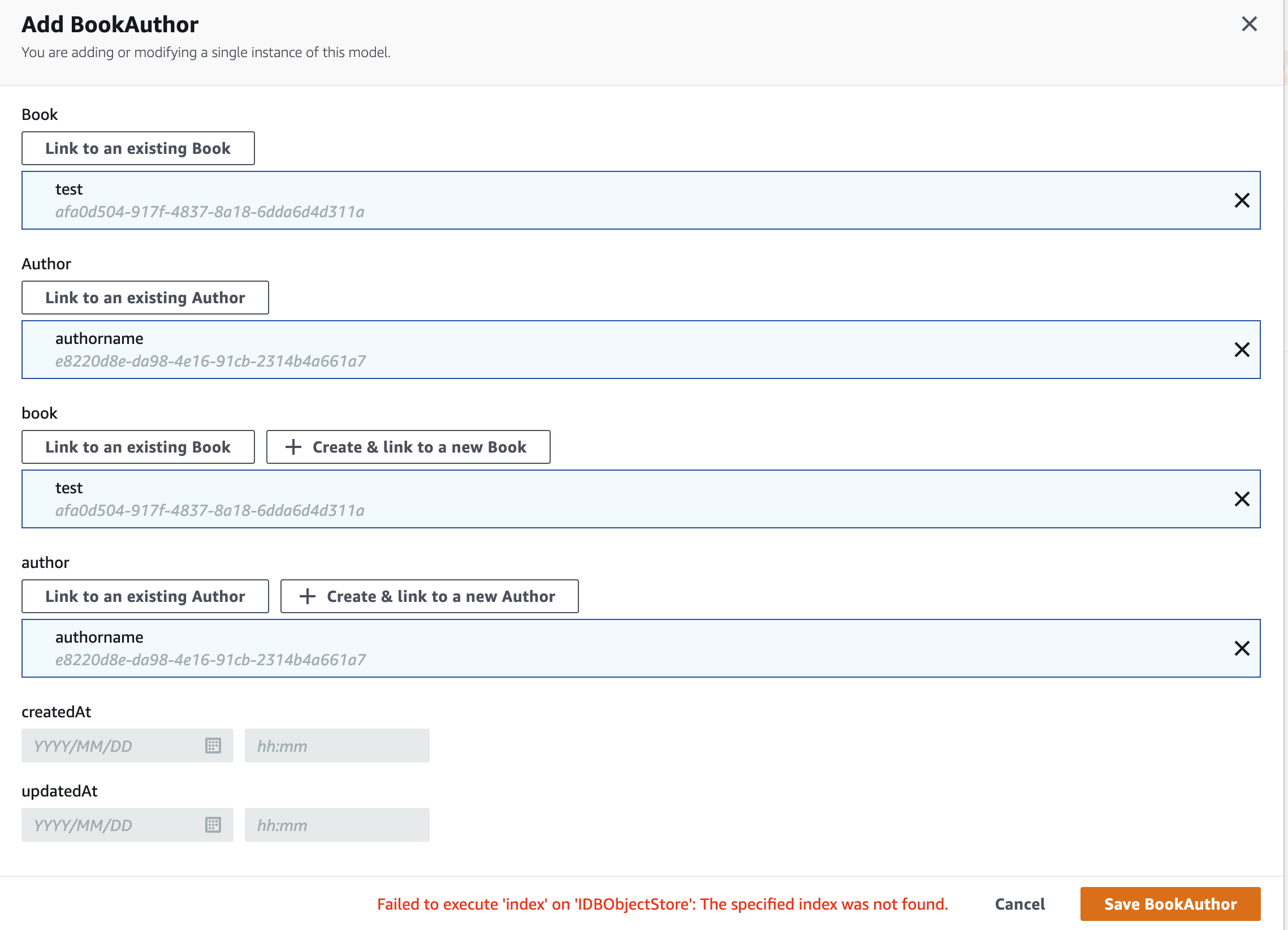
The error "Failed to execute 'index' on 'IDBObjectStore': The specified index was not found." appears to be the same error others are seeing over in https://github.com/aws-amplify/amplify-studio/issues/752
Once the Studio issue is resolved, we can retest the following scenario with Studio instead of using AppSync console:
To test this roughly, navigate over to the AppSync console (Studio -> GraphQL API -> Deployed graphql resources), -> Queries -> Mutation
write the selection set to what Studio/JS is sending:
mutation MyMutation2 {
  createBookAuthor(input: {authorId: "b87ebfd4-04e7-45aa-b54a-6916928bb5c8", bookId: "532078b3-376a-451d-a470-608cc7e462a5"}) {
    _deleted
    _lastChangedAt
    _version
    authorId
    bookId
    createdAt
    id
    updatedAt
    author {
      id
      _deleted
    }
    book {
      id
      _deleted
    }
  }
}
AppSync response
{
  "data": {
    "createBookAuthor": {
      "_deleted": null,
      "_lastChangedAt": 1672249755333,
      "_version": 1,
      "authorId": "b87ebfd4-04e7-45aa-b54a-6916928bb5c8",
      "bookId": "532078b3-376a-451d-a470-608cc7e462a5",
      "createdAt": "2022-12-28T17:49:15.300Z",
      "id": "f2c727db-7fa0-4e4c-8679-65e6da9ebc7c",
      "updatedAt": "2022-12-28T17:49:15.300Z",
      "author": {
        "id": "b87ebfd4-04e7-45aa-b54a-6916928bb5c8",
        "_deleted": null
      },
      "book": {
        "id": "532078b3-376a-451d-a470-608cc7e462a5",
        "_deleted": null
      }
    }
  }
}
iOS App logs
[StateMachine<State, Action>] resolve(reconciling([AWSPluginsCore.MutationSync<AWSPluginsCore.AnyModel>(model: AWSPluginsCore.AnyModel(id: "f2c727db-7fa0-4e4c-8679-65e6da9ebc7c", instance: amplify1601.BookAuthor(id: "f2c727db-7fa0-4e4c-8679-65e6da9ebc7c", _book: Amplify.LazyReference<amplify1601.Book>, _author: Amplify.LazyReference<amplify1601.Author>, createdAt: Optional(Amplify.Temporal.DateTime(foundationDate: 2022-12-28 17:49:15 +0000)), updatedAt: Optional(Amplify.Temporal.DateTime(foundationDate: 2022-12-28 17:49:15 +0000))), modelName: "BookAuthor"), syncMetadata: AWSPluginsCore.MutationSyncMetadata(id: "BookAuthor|f2c727db-7fa0-4e4c-8679-65e6da9ebc7c", deleted: false, lastChangedAt: 1672249755333, version: 1))]), reconciled) -> finished
Note: what do we expect Studio/JS's selection set to be?
- no
__typename - version metadata fields at the top level,
_deleted, _lastChangedAt, _version - nested
authorandbookonly containing its primary keys, in this case justid _deleted
Tested and verified in the new amplify-swift version 2.6.1 and models generated by amplify-cli version 11.0.3. Before generating models make sure to enable generatemodelsforlazyloadandcustomselectionset to true inside cli.json file.
Here is how my cli.json looks like:
{
  "features": {
    "graphqltransformer": {
      "addmissingownerfields": true,
      "improvepluralization": false,
      "validatetypenamereservedwords": true,
      "useexperimentalpipelinedtransformer": true,
      "enableiterativegsiupdates": true,
      "secondarykeyasgsi": true,
      "skipoverridemutationinputtypes": true,
      "transformerversion": 2,
      "suppressschemamigrationprompt": true,
      "securityenhancementnotification": false,
      "showfieldauthnotification": false,
      "usesubusernamefordefaultidentityclaim": true,
      "usefieldnameforprimarykeyconnectionfield": false,
      "enableautoindexquerynames": true,
      "respectprimarykeyattributesonconnectionfield": true,
      "shoulddeepmergedirectiveconfigdefaults": false,
      "populateownerfieldforstaticgroupauth": true
    },
    "frontend-ios": {
      "enablexcodeintegration": true
    },
    "auth": {
      "enablecaseinsensitivity": true,
      "useinclusiveterminology": true,
      "breakcirculardependency": true,
      "forcealiasattributes": false,
      "useenabledmfas": true
    },
    "codegen": {
      "useappsyncmodelgenplugin": true,
      "usedocsgeneratorplugin": true,
      "usetypesgeneratorplugin": true,
      "cleangeneratedmodelsdirectory": true,
      "retaincasestyle": true,
      "addtimestampfields": true,
      "handlelistnullabilitytransparently": true,
      "emitauthprovider": true,
      "generateindexrules": true,
      "enabledartnullsafety": true,
      "generatemodelsforlazyloadandcustomselectionset": true
    },
    "appsync": {
      "generategraphqlpermissions": true
    },
    "latestregionsupport": {
      "pinpoint": 1,
      "translate": 1,
      "transcribe": 1,
      "rekognition": 1,
      "textract": 1,
      "comprehend": 1
    },
    "project": {
      "overrides": true
    }
  },
  "debug": {
    "shareProjectConfig": false
  }
}
