

 aws-amplify
"Amplify.Auth.signIn(username, nil)" triggers "SRP_A" challenge
Describe the bug
When attempting to trigger the custom auth challenge by using Amplify.auth.signin(username, nil) we receive a session containing SRP_A in the define auth challenge trigger, when instead we are expecting CUSTOM_CHALLENGE
Following Amplify documentation here : > https://docs.amplify.aws/sdk/auth/custom-auth-flow/q/platform/ios
Response:
{
    "version": "1",
    "region": "xxxxxxx",
    "userPoolId": "xxxxxxxx",
    "userName": "xxxxxxxxx",
    "callerContext": {
        ...
    },
    "triggerSource": "DefineAuthChallenge_Authentication",
    "request": {
        "userAttributes": {
           ...
        },
        "session": [
            {
                "challengeName": "SRP_A",
                "challengeResult": true,
                "challengeMetadata": null
            }
        ]
    },
    "response": {
        "challengeName": null,
        "issueTokens": null,
        "failAuthentication": null
    }
}
Expected:
{
    "version": "1",
    "region": "xxxxxx",
    "userPoolId": "xxxxxxx",
    "userName": "xxxxxxx,
    "callerContext": {
        ...
    },
    "triggerSource": "DefineAuthChallenge_Authentication",
    "request": {
        "userAttributes": {
     ...
        },
        "session": []
    },
    "response": {
        "challengeName": "CUSTOM_CHALLENGE",
        "issueTokens": false,
        "failAuthentication": false
    }
}
We are using 2 methods of sign-in in our mobile application utilising Amplify Authentication with Cognito, which are:
emailandpasswordlogin with the following method:
self.signInOperation = Amplify.Auth.signIn(username: email, password: "Tester321&")
                        .resultPublisher
                        .sink {
                            if case let .failure(authError) = $0 {
                                print(authError)
                            }
                        }
                        receiveValue: { pUser in
                            switch pUser.nextStep {
                            case .confirmSignInWithCustomChallenge(_):
                                print(pUser)

                            case .done:
                                print(pUser)
                            default:
                                print(pUser)
                            }
                        }
phone_numberwith passwordless login using the following method:
self.signInOperation = Amplify.Auth.signIn(username: phone, password: nil)
                        .resultPublisher
                        .sink {
                            if case let .failure(authError) = $0 {
                                print(authError)
                            }
                        }
                        receiveValue: { pUser in
                            switch pUser.nextStep {
                            case .confirmSignInWithCustomChallenge(_):
                                print(pUser)

                            case .done:
                                print(pUser)
                            default:
                                print(pUser)
                            }
                        }
Method of initialisation:
     do {
                try Amplify.add(plugin: AWSCognitoAuthPlugin())
                try Amplify.configure()
                AWSDDLog.sharedInstance.logLevel = .debug
              print("Amplify configured with auth plugin")

        } catch {
            print("Failed to initialize Amplify with \(error)")
        }
To Reproduce Steps to reproduce the behavior:
- Attempt to call
Amplify.auth.signin(..)with parameters:
username: phone_number
password: nil
Observed Behavior
When attempting a passwordless login triggering custom auth challenge the SDK returns SRP_A as challenge type when instead it should return CUSTOM_AUTH as the challenge type for the login to succeed
Expected Behavior
By calling Amplify.Auth.signIn(username, nil) we are looking to receive CUSTOM_AUTH as the challenge type
Stack Trace
SDK response
AuthError: Incorrect username or password.
Recovery suggestion: Check whether the given values are correct and the user is authorised to perform the operation.
Cloudwatch Logs
Received
{
    "version": "1",
    "region": "ap-southeast-1",
    "userPoolId": "xxxxxxxxxxxxxxxx",
    "userName": "tester001",
    "callerContext": {
        "awsSdkVersion": "aws-sdk-unknown-unknown",
        "clientId": "xxxxxxxxxxxx"
    },
    "triggerSource": "DefineAuthChallenge_Authentication",
    "request": {
        "userAttributes": {
            "sub": "xxxxxxxxxxx",
            "email_verified": "true",
            "cognito:user_status": "CONFIRMED",
            "cognito:email_alias": "[email protected]",
            "cognito:phone_number_alias": "+6600000000",
            "phone_number_verified": "true",
            "phone_number": "+6600000000",
            "given_name": "test",
            "family_name": "test",
            "email": "[email protected]"
        },
        "session": [
            {
                "challengeName": "SRP_A",
                "challengeResult": true,
                "challengeMetadata": null
            }
        ]
    },
    "response": {
        "challengeName": null,
        "issueTokens": null,
        "failAuthentication": null
    }
}
Expected
{
    "version": "1",
    "region": "ap-southeast-1",
    "userPoolId": "xxxxxxxxxxx",
    "userName": "xxxxxxxxxxx",
    "callerContext": {
        "awsSdkVersion": "aws-sdk-unknown-unknown",
        "clientId": "xxxxxxxxxxxxx"
    },
    "triggerSource": "DefineAuthChallenge_Authentication",
    "request": {
        "userAttributes": {
            "sub": "xxxxxxxxxxx",
            "email_verified": "true",
            "cognito:user_status": "CONFIRMED",
            "cognito:email_alias": "[email protected]",
            "cognito:phone_number_alias": "+6600000000",
            "phone_number_verified": "true",
            "phone_number": "+6600000000",
            "given_name": "test",
            "family_name": "test",
            "email": "[email protected]"
        },
        "session": []
    },
    "response": {
        "challengeName": "CUSTOM_CHALLENGE",
        "issueTokens": false,
        "failAuthentication": false
    }
}
Unique Configuration Custom Authentication using the following triggers:
- Define Auth
- Create Auth Challenge
- Verify Auth Challenge
Areas of the SDK you are using (AWSMobileClient, Cognito, Pinpoint, IoT, etc)? Cognito User Pools
Environment(please complete the following information):
- SDK Version: 2.23.2
- Dependency Manager: Cocoapods
- Swift Version : Swift 5.0 (Swift UI)
- Xcode Version: 12.3
Device Information (please complete the following information):
- Device: iPhone 11 and Simulators
- iOS Version: 14.3
Additional context Add any other context about the problem here like your specific use case.
Relevant Console Output In some cases, it might be helpful to add any logs from your console that better help you tell the story of this issue. You can easily enable logging in your app by putting the following code in your app delegate.
AWSDDLog.sharedInstance.logLevel = .debug
AWSDDLog.add(AWSDDTTYLogger.sharedInstance)

Hi, @Ramesh707 Thanks for reaching out
The link your provided is for aws-sdk, but based on your description, you are using Amplify library. This is the link for Amplify Auth Custom Flow.
And since you are using custom flow. We need detailed steps that we can follow to reproduce the issue. How does your user do sign up? And did you do some changes to your AWS Cognito Console?

Hey there @ruiguoamz ,
Thank you for the swift reply, ok so in regards to your questions. Indeed we are using Amplify SDK, the following is how we make signup calls:
func signUp() {
     let phone = "+66XXXXXXXX"

     var aUserAttributeArray = [
         AuthUserAttribute(.email, value: "[email protected]")
     ]
         aUserAttributeArray.append(AuthUserAttribute(.givenName, value: "dssssd"))

         aUserAttributeArray.append(AuthUserAttribute(.familyName, value: "scssdcds"))

         aUserAttributeArray.append(AuthUserAttribute(.phoneNumber, value: phone))

     let options = AuthSignUpRequest.Options(userAttributes: aUserAttributeArray)
     Amplify.Auth.signUp(username: randomAlphaNumericString(length: 7), password: "Test123*", options: options) { result in
         switch result {
         case .success(let signUpResult):
             self.signIn(username: phone)
         case .failure(let error):
             print("An error occurred while registering a user \(error)")
         }
     }
 }
And this is the function we use for sign-in:
func signIn(username: String) {
      Amplify.Auth.signIn(username: username, password: nil) { result in
          switch result {
          case .success:
              print("Sign in succeeded")
          case .failure(let error):
              print("Sign in failed \(error)")
          }
      }
  }
In regards to special configuration in AWS Cognito:
- We have set ability for users to sign-in with email or phone number
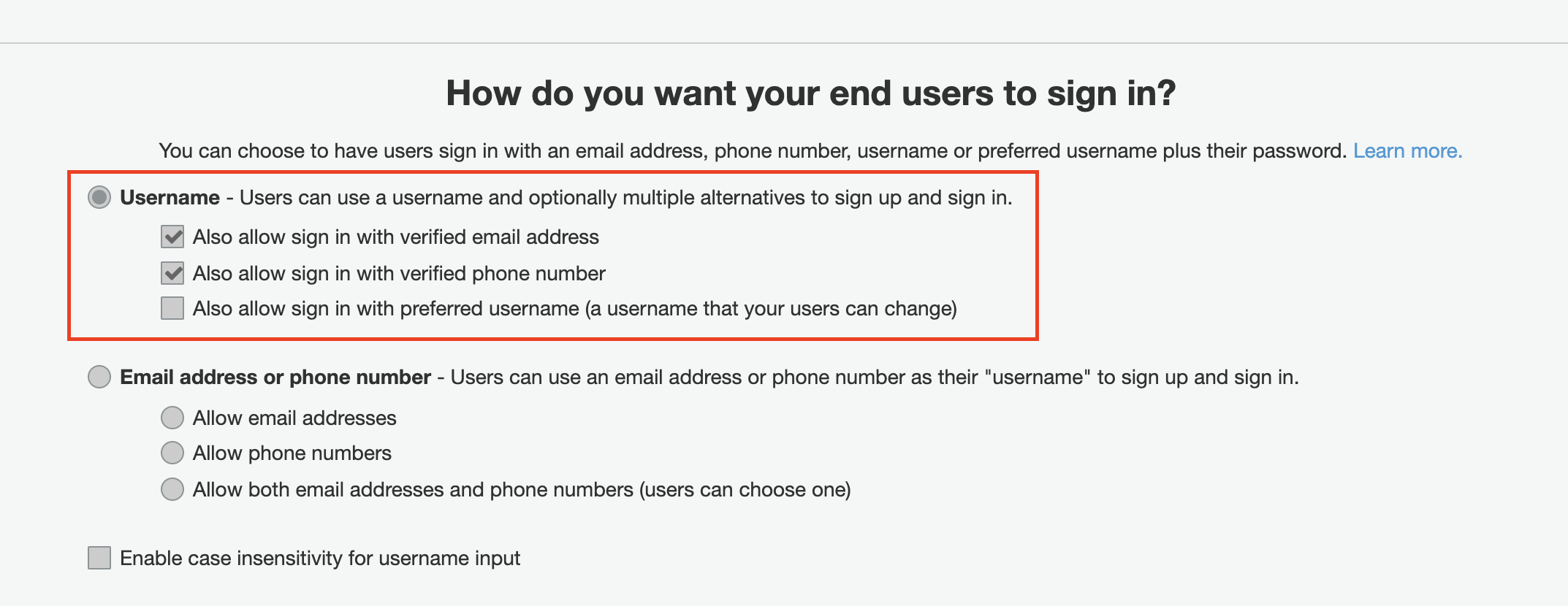
- We have a Define Auth challenge, Create Auth Challenge, Verify Auth Challenge Triggers
Reproducing error:
- Use the functions above to make a signup
- Use function above to make a login without password as to initiate the
CUSTOM AUTH - Console log the event being received in Define Auth Challenge
Expected:
{
    "version": "1",
    "region": "ap-southeast-1",
    "userPoolId": "xxxxxxxxxxx",
    "userName": "xxxxxxxxxxx",
    "callerContext": {
        "awsSdkVersion": "aws-sdk-unknown-unknown",
        "clientId": "xxxxxxxxxxxxx"
    },
    "triggerSource": "DefineAuthChallenge_Authentication",
    "request": {
        "userAttributes": {
            "sub": "xxxxxxxxxxx",
            "email_verified": "true",
            "cognito:user_status": "CONFIRMED",
            "cognito:email_alias": "[email protected]",
            "cognito:phone_number_alias": "+6600000000",
            "phone_number_verified": "true",
            "phone_number": "+6600000000",
            "given_name": "test",
            "family_name": "test",
            "email": "[email protected]"
        },
        "session": []
    },
    "response": {
        "challengeName": "CUSTOM_CHALLENGE",
        "issueTokens": false,
        "failAuthentication": false
    }
}
Actual:
{
    "version": "1",
    "region": "ap-southeast-1",
    "userPoolId": "xxxxxxxxxxxxxxxx",
    "userName": "tester001",
    "callerContext": {
        "awsSdkVersion": "aws-sdk-unknown-unknown",
        "clientId": "xxxxxxxxxxxx"
    },
    "triggerSource": "DefineAuthChallenge_Authentication",
    "request": {
        "userAttributes": {
            "sub": "xxxxxxxxxxx",
            "email_verified": "true",
            "cognito:user_status": "CONFIRMED",
            "cognito:email_alias": "[email protected]",
            "cognito:phone_number_alias": "+6600000000",
            "phone_number_verified": "true",
            "phone_number": "+6600000000",
            "given_name": "test",
            "family_name": "test",
            "email": "[email protected]"
        },
        "session": [
            {
                "challengeName": "SRP_A",
                "challengeResult": true,
                "challengeMetadata": null
            }
        ]
    },
    "response": {
        "challengeName": null,
        "issueTokens": null,
        "failAuthentication": null
    }
}
Please let us know if theres anything else you require will be happy to provide.
While @ruiguoamz investigates, can you also confirm that you configured your Amplify library for custom authentication (e.g., via the amplifyconfiguration.json file) with a value of CUSTOM_AUTH for the authenticationFlowType key?

Hi,
@ruiguoamz Thank you for the reply. Please find below the amplifyconfiguration.json file attached (The attachment is in .txt file since .json file is not supported to attach here)
Pasting config inline for easier evaluation:
{
    "UserAgent": "aws-amplify-cli/2.0",
    "Version": "1.0",
    "auth": {
        "plugins": {
            "awsCognitoAuthPlugin": {
                "UserAgent": "aws-amplify/cli",
                "Version": "0.1.0",
                "IdentityManager": {
                    "Default": {}
                },
                "CognitoUserPool": {
                    "Default": {
                        "PoolId": "ap-southeast-XXXXXXX",
                        "AppClientId": "XXXXXXXXX",
                        "Region": "ap-southeast-1"
                    }
                },
                "Auth": {
                    "Default": {
                        "OAuth": {
                            "WebDomain": "XXXXX.XXXXX",
                            "AppClientId": "XXXXXXXXX",
                            "SignInRedirectURI": "xxxxxxx",
                            "SignOutRedirectURI": "xxxxxxxxxx",
                            "Scopes": [
                                "phone",
                                "email",
                                "openid",
                                "profile",
                                "aws.cognito.signin.user.admin"
                            ]
                        },
                        "authenticationFlowType": "CUSTOM_AUTH"
                    }
                }
            }
        }
    }
}
Please refer this note here - https://docs.amplify.aws/lib/auth/signin_with_custom_flow/q/platform/ios#lambda-trigger-setup. AWSCognitoAuthPlugin assumes that the initial step is a SRP_A flow, this is a current limitation because of the underlying AWSMobileClient SDK that we use. You can override this behavior by making the Define Auth Challenge Lambda trigger to bypass the initial username/password verification and proceed to the custom challenge.
exports.handler = (event, context) => {
  if (event.request.session.length === 1 &&
    event.request.session[0].challengeName === 'SRP_A') {
    event.response.issueTokens = false;
    event.response.failAuthentication = false;
    event.response.challengeName = 'CUSTOM_CHALLENGE';
  } else if (
    event.request.session.length === 2 &&
    event.request.session[1].challengeName === 'CUSTOM_CHALLENGE' &&
    event.request.session[1].challengeResult === true
  ) {
    event.response.issueTokens = true;
    event.response.failAuthentication = false;
  } else {
    event.response.issueTokens = false;
    event.response.failAuthentication = true;
  }
  context.done(null, event);
};
Does this fix works for your use case?

@royjit In our case we are using 2 forms of login method in a single application which are:
- Email and Password
- Phone Number and Passwordless
Therefore the above method wouldn't work in our case, this seems to only be the case with IOS SDK however, the Android SDK seems to satisfy our requirements for both login methods, is there any chance that Amplify team/ our team could propose a fix for standardising the session responses to match Android hence fixing our issue we are facing ?

This is what we are expecting for the first session from IOS SDK:
- Note: Android SDK already gives us this response
{
    "version": "1",
    "region": "xxxxxx",
    "userPoolId": "xxxxxxx",
    "userName": "xxxxxxx,
    "callerContext": {
        ...
    },
    "triggerSource": "DefineAuthChallenge_Authentication",
    "request": {
        "userAttributes": {
     ...
        },
        "session": []
    },
    "response": {
        "challengeName": "CUSTOM_CHALLENGE",
        "issueTokens": false,
        "failAuthentication": false
    }
}
Amplify iOS does not currently support the ability to change auth methods at runtime. We'll take this as a feature request and update this issue when we have more info.
@palpatim Please let us know if you need any additional information from us, currently we have a work around to ensure we can use both login methods at runtime, however would be great if we could have that in the SDK thanks.

@daniel-g-pomelo would you mind sharing your workaround for supporting both login methods? Facing the same issue. Thanks!

Hey there @corleymj , sure !
So the way we do it is by setting the amplify apps to CUSTOM_CHALLENGE in the config and then adding an additional attribute in Cognito itself (eg) loginMethod which would contain either SRP_A or CUSTOM_CHALLENGE for every user. Then in the define auth challenge we detect if its a first session login and we read this attribute from Cognito to make the decision on how to respond to client apps.
*Keep in mid you will need an endpoint of sorts to perform the updating of the attribute depending on what user decides to login with prior to callingt he auth.signin(..) SRP_A been a username and password login and CUSTOM_CHALLENGE been a phone number login.
I hope this helps !