

 aws-amplify
Visual Data editor loses unsaved work when creating new model with similar name as existing model
Before opening, please confirm:
- [X] I have searched for duplicate or closed issues.
- [X] I have read the guide for submitting bug reports.
- [X] I have done my best to include a minimal, self-contained set of instructions for consistently reproducing the issue.
- [X] I have removed any sensitive information from my code snippets and submission.
App Id
dntco4q28bj1y
Region
ap-southeast-2
Environment name
dev
Figma File Version (if applicable)
No response
Amplify CLI Version
No response
If applicable, what version of Node.js are you using?
No response
What operating system are you using?
Windows 10
Browser type?
Google Chrome
Describe the bug
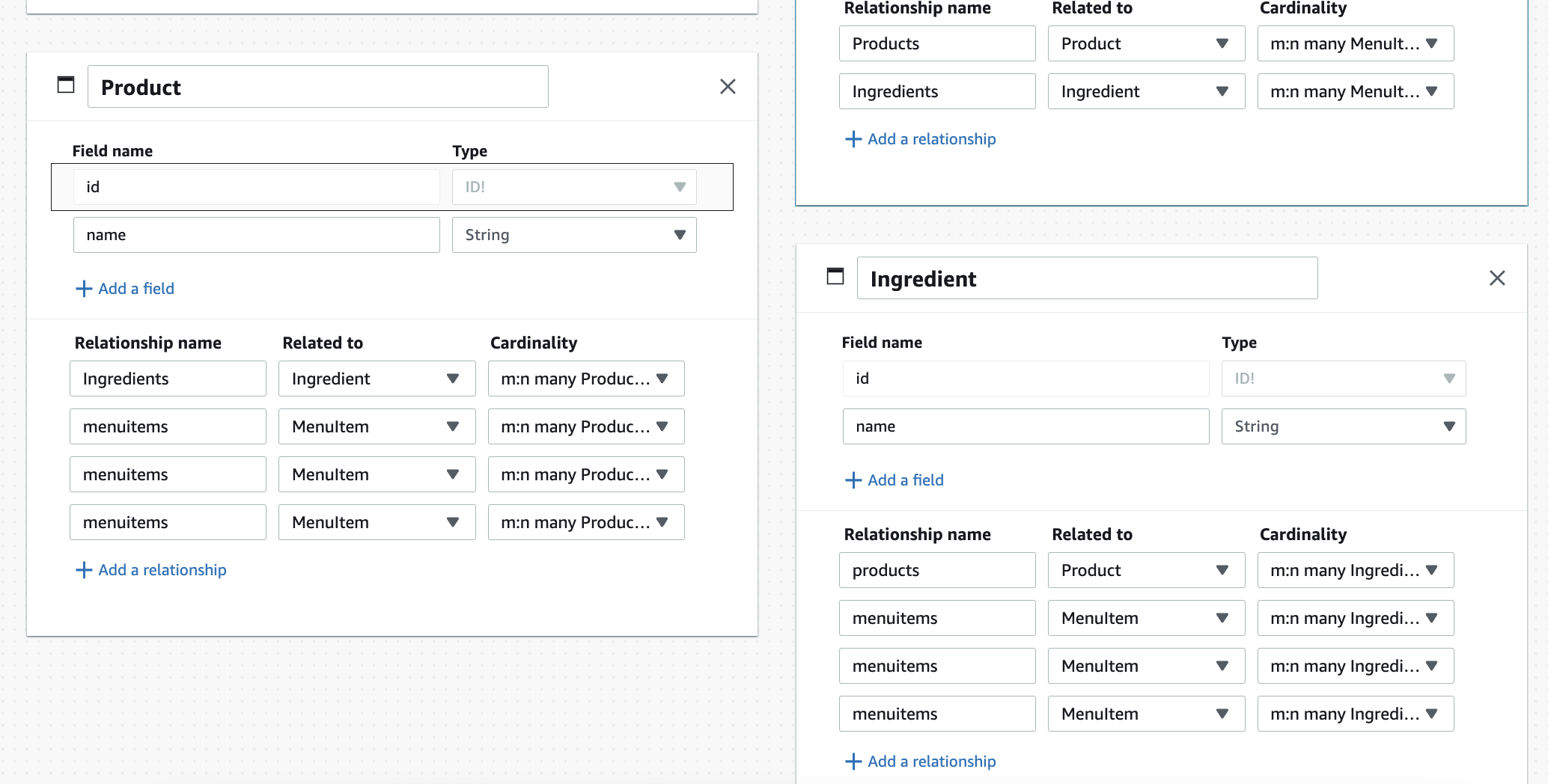
When creating a group of related models in the visual data editor a bug occurs when starting to name a new model with the same beginning word as an existing model, the editor corrupts the models and unsaved work is lost. When starting to name the new model it somehow picks a data relationship from the existing model with the similar name and applies it. The existing model relationships now point to the new model. The delete button on the relationships is then unresponsive and the screen refreshes and loses all unsaved work.
Expected behavior
When creating a new model it does not automatically pick up data or relationships from existing models.
Reproduction steps
- Create a new model named Ingredient and give it a name string field.
- Create a new model named Product and give it a name string field.
- Add a many-to-many relationship on Product to Ingredient
- Create a new model named MenuItem and give it a name string field.
- Create a many-to-many relationship on MenuItem to Product.
- Create a many-to-many relationship on MenuItem to Ingredient.
- Create a new model and start to name it Menu - notice that at "Men" it automatically adds two many-to-many relationships to the new model pointing to MenuItem, and the two relationships on MenuItem start to point to this new "Men" model.
- Try deleting the relationships on MenuItem and re-adding them - note that Product now has two MenuItem relationships, one of which can't be deleted
- The first time I tried this and was trying to correct the problems the screen refreshed and I lost all unsaved work
Project Identifier
No response
Additional information
No response

Hey @KingsleyStephens, thank you for reaching out and providing us the reproduction steps. I was able to reproduce the behaviour. Marking this as bug for further investigation.

Think this is probably the bug that just cost me a couple of hours of work. Ended up with mismatched relationships during save and publish. During correction half my models and enums just disappeared. First time trying out Amplify. May never come back - very disappointed to see that a bug that loses people's work hasn't been addressed in months. Is this even a production ready service?
