

 aws-amplify
DataStore fails to update new records when using auth rules
Before opening, please confirm:
- [X] I have searched for duplicate or closed issues and discussions.
- [X] I have read the guide for submitting bug reports.
- [X] I have done my best to include a minimal, self-contained set of instructions for consistently reproducing the issue.
JavaScript Framework
React
Amplify APIs
Authentication, DataStore
Amplify Categories
auth, storage, api
Environment information
  System:
    OS: macOS 11.6.1
    CPU: (12) x64 Intel(R) Core(TM) i7-9750H CPU @ 2.60GHz
    Memory: 350.59 MB / 16.00 GB
    Shell: 5.8 - /bin/zsh
  Binaries:
    Node: 16.13.0 - ~/.nvm/versions/node/v16.13.0/bin/node
    npm: 8.1.0 - ~/.nvm/versions/node/v16.13.0/bin/npm
  Browsers:
    Chrome: 96.0.4664.93
    Safari: 15.1
  npmPackages:
    @aws-amplify/datastore: ^3.7.2 => 3.7.2
    @aws-amplify/ui-react: ^2.1.4 => 2.1.4
    @aws-amplify/ui-react-internal:  undefined ()
    @aws-amplify/ui-react-legacy:  undefined ()
    @testing-library/jest-dom: ^5.16.1 => 5.16.1
    @testing-library/react: ^11.2.7 => 11.2.7
    @testing-library/user-event: ^12.8.3 => 12.8.3
    aws-amplify: ^4.3.10 => 4.3.10
    react: ^17.0.2 => 17.0.2
    react-dom: ^17.0.2 => 17.0.2
    react-scripts: 4.0.3 => 4.0.3
    web-vitals: ^1.1.2 => 1.1.2
  npmGlobalPackages:
    @aws-amplify/cli: 7.6.3
    corepack: 0.10.0
    npm: 8.1.0
Describe the bug
Trying to update a newly created record using DataStore fails when using a @model that has an @auth rule on it.
The _version and _lastChangedAt fields are undefined when an update is invoked immediately after creating a record (See Reproduction steps for an example.) As a result, DataStore emits the following warning when trying to update the Todo record and change it's name to test:
...
errorType: "MappingTemplate"
localModel: Model {id: '42e47af8-54fc-4e78-9801-61c8bcbc2b0b', name: 'Test', _version: undefined, _lastChangedAt: undefined, _deleted: undefined}
message: "Value for field '$[_version]' must be a number."
operation: "Update"
remoteModel: null
...
Upon refreshing the page, it becomes clear that the update was unsuccessful.
This error does not occur when I am NOT using the @auth rule and Amazon Cognito User Pool with the Todo model.
Expected behavior
Update a record using DataStore.save on a newly created record should work when using @auth rules just like it works when not using @auth rules.
Reproduction steps
- Create new react application using
npx create-react-app datastore-example. - Setup local development environment by running
amplify initand use the defaults. - Add authentication with
Default configurationand configure it to use aUsernameby runningamplify add auth - Add the DataStore
- Run
amplify add api - Select
GraphQL - Change the
Authorization modetoAmazon Cognito User Pool - Change
Conflict detectiontoOptimistic Concurrency - Choose
Single object with fields (e.g., “Todo” with ID, name, description)template. - Update the
schema.graphqlfile as follows:type Todo @model @auth(rules: [{allow: owner }]) { id: ID! name: String! description: String }
- Run
- Generate models by running
amplify codegen models - Push the changes by running
amplify push- When asked
Do you want to generate code for your newly created GraphQL APIselectNsince we already generated models in the previous step.
- When asked
- Next install Amplify libraries by running
npm i aws-amplify @aws-amplify/ui-react @aws-amplify/datastore - Set up frontend by replacing the contents of src/index.js with:
import React from 'react'; import ReactDOM from 'react-dom'; import App from './App'; import Amplify from "aws-amplify"; import awsExports from "./aws-exports"; import '@aws-amplify/ui-react/styles.css'; Amplify.configure(awsExports); ReactDOM.render( <App/>, document.getElementById('root') ); - Also, replace the contents of src/App.js with:
import React, {useEffect, useState} from 'react'; import {Todo} from "./models"; import {DataStore} from "@aws-amplify/datastore"; import {withAuthenticator} from '@aws-amplify/ui-react' function App() { const [name, setName] = useState(''); const [todos, setTodos] = useState([]); useEffect(() => { function fetchData() { DataStore.query(Todo).then((persistedTodos) => { setTodos(persistedTodos); }) } fetchData(); const subscription = DataStore.observe(Todo).subscribe((value) => { fetchData(); }) return () => subscription.unsubscribe(); }, []); async function addTodo() { const initialTodo = await DataStore.save(new Todo({name: ''})); console.log("initialTodo", initialTodo); let savedTodo = await DataStore.query(Todo, initialTodo.id); console.log("savedTodo", savedTodo); if (savedTodo != null) { let todoWithChanges = Todo.copyOf(savedTodo, draft => { draft.name = name }); const updatedTodo = await DataStore.save(todoWithChanges); console.log("updatedTodo", updatedTodo); } } return ( <> <ul> {todos.map(todo => (<li key={todo.id}>{todo.name} (id: {todo.id})</li>))} </ul> <input onChange={(e) => setName(e.target.value)} value={name}/> <button onClick={addTodo}>Add</button> </> ); } export default withAuthenticator(App); - Use
npm run startto run the application. - Create an account and complete the signin process.
- Open the browser development tools and view the console output
- Attempt to create a new todo
- Notice the warning message in the console stating that
"Value for field '$[_version]' must be a number.". If you refresh the page, you'll notice that the update to the name of the todo was not saved.
Code Snippet
See Reproduction steps for a complete sample.
The following should work when using an @auth rule but it doesn't. If an @auth rule is not used, it works fine.
const name = 'Test';
const initialTodo = await DataStore.save(new Todo({name: ''}));
let savedTodo = await DataStore.query(Todo, initialTodo.id);
if (savedTodo != null) {
    let todoWithChanges = Todo.copyOf(savedTodo, draft => {
        draft.name = name
    });
    const updatedTodo = await DataStore.save(todoWithChanges);
}

Hi @josephskeller 👋 Thanks for raising this issue and providing great steps to reproduce. I was able to reproduce this issue and will label it as a bug for the team to investigate further.

UPDATE: I'm not totally sure if this is a bug now, because I noticed that editing/updating a record separately doesn't seem to cause this behavior.
Is there a reason you're trying to update a record in the same function you're creating it?
@chrisbonifacio, thank you for looking into this issue. To answer your question, part of the reason for updating the record in the same function that created it was to illustrate the same type of issue I'm having in a larger application. The issue also occurs when updating a record before refreshing the browser window.
For example, here is an update to the existing code that allows users to edit a todo. Simply replace the App.js with the following:
import React, { useEffect, useState } from 'react';
import { Todo } from './models';
import { DataStore } from '@aws-amplify/datastore';
import { withAuthenticator } from '@aws-amplify/ui-react';

function App() {
  const [newName, setNewName] = useState('');
  const [name, setName] = useState('');
  const [todos, setTodos] = useState([]);

  useEffect(() => {
    function fetchData() {
      DataStore.query(Todo).then((persistedTodos) => {
        setTodos(persistedTodos);
      });
    }

    fetchData();

    const subscription = DataStore.observe(Todo).subscribe((value) => {
      fetchData();
    });
    return () => subscription.unsubscribe();
  }, []);

  async function addTodo() {
    const initialTodo = await DataStore.save(new Todo({ name: '' }));
    let savedTodo = await DataStore.query(Todo, initialTodo.id);
    if (savedTodo != null) {
      let todoWithChanges = Todo.copyOf(savedTodo, draft => {
        draft.name = name;
      });
      const updatedTodo = await DataStore.save(todoWithChanges);
    }
    setName("");
  }

  async function updateTodo(id, name) {
    let savedTodo = await DataStore.query(Todo, id);
    if (savedTodo != null) {
      let todoWithChanges = Todo.copyOf(savedTodo, draft => {
        draft.name = name;
      });
      const updatedTodo = await DataStore.save(todoWithChanges);
    }
  }

  return (
    <>
      <ul>
        {todos.map(todo => (<li key={todo.id}>
          <input type='text' value={todo.name}
                 onInput={(e) => updateTodo(todo.id, e.target.value)} /> (id: {todo.id})
        </li>))}
      </ul>
      <input onChange={(e) => setName(e.target.value)} value={name} />
      <button onClick={addTodo}>Add</button>
    </>
  );
}

export default withAuthenticator(App);
You'll notice that when the user tries to type in a new name, the update fails because the _version is still undefined, even a few seconds after from the time the record was created. So, as far as I can tell, editing/updating a record separately does indeed result in the record failing to update.
The issue seems to be intermittent for me. At first I get the error but the records do seem to update and even persist to DynamoDB as I am able to retrieve them with the updated values in the console. Doesn't seem that DataStore fails to update the record, but there does seem to be an issue with the subscription when performing consecutive saves.
Did you refresh the page between the time the record was created and updated? If so, yes, it will work. But, from as far as I can tell, if you don't refresh the browser, it won't work. Refreshing the browser causes the _version and related fields to be populated which allows updates to work.
I have the same issue, but it seems to only happen if I create and delete/update before DataStore syncs. If I create something and quickly delete (before it syncs to cloud), I get this error. If I wait 1-2secs after creating, I do not have this error when deleting/updating.

I have the same issue with updating records after first creation, but it also seems to extend to updating any existing record more than once after querying it too. If i query a record and the _version is 1 for example, i can do a Datastore.save() and the changes are properly synced to the cloud, but when i look at the object the _version is still 1 (even if i try to re-query the record again), and any further updates don't sync, though they are stored locally. Once i refresh the page, i get _version = 2 and i can make one update before it fails again.

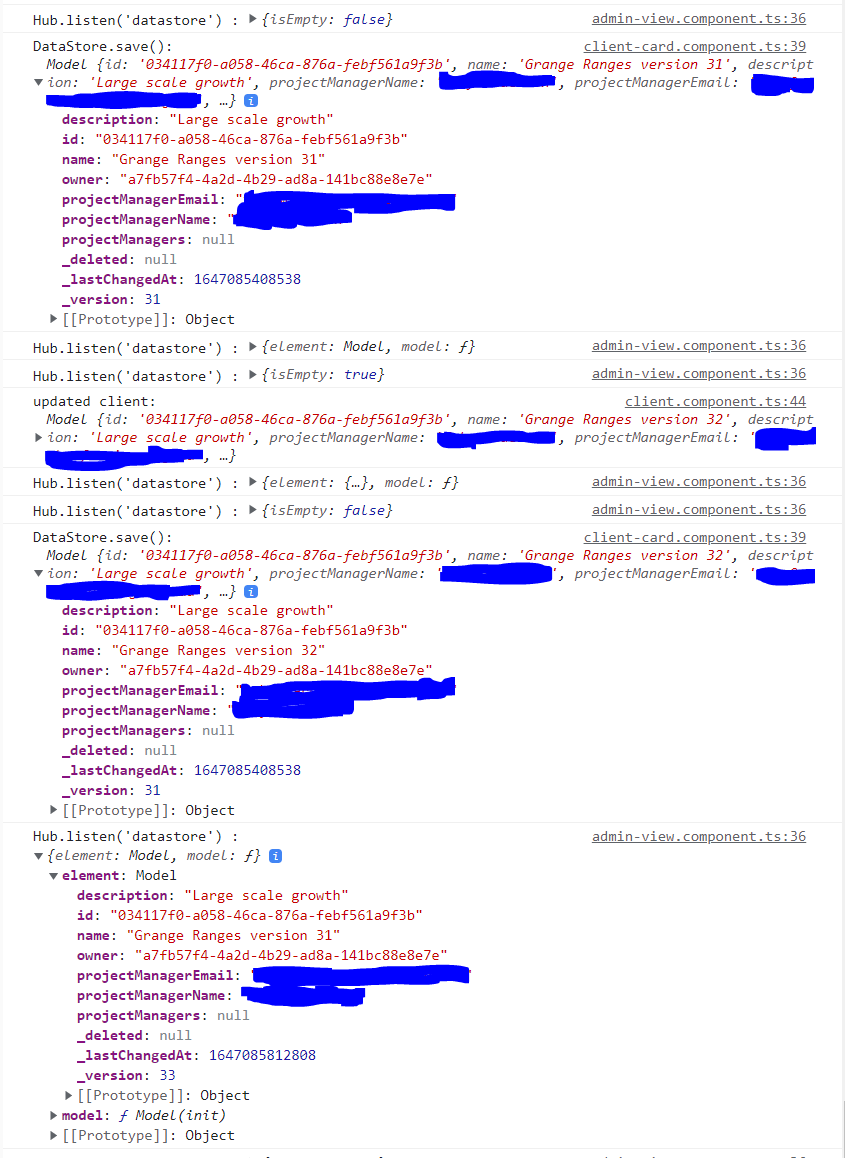
@chrisbonifacio Any updates on this? I am have the exact same issue as described by @socialsuiteDan . I can save a Model multiple times to DataStore locally but the objects version locally never changes until I refresh the browser where the remote versions number has increased by the number of times it has been saved. If I subscribe to Hub I can see the model is syncing in there and returning the new version number but the object returned from DataStore.save() or DataStore.query() is the same until the browser has been refreshed.
I am using aws-amplify version 4.3.16. Below is image of the Chrome console showing return data from the DataStore and the Hub after doing a save:


Does anyone have a simple workaround for this? I am running into the same issue where DataStore Create returns the object with undefined values for createdAt, updatedAt, and _version. If I fetch it from Datastore before refresh those values are undefined, however if I use a subscription from observeQuery of Datastore, those values are populated. Same with using the GraphQL client api.

I'm not able to reproduce this on the latest version. This bug must have been inadvertently fixed with some other change. Please comment if you are still experiencing the issue.

