

 aws-amplify
Ability to customize pop ups when calling signInWithRedirect on iOS
Describe the bug
-
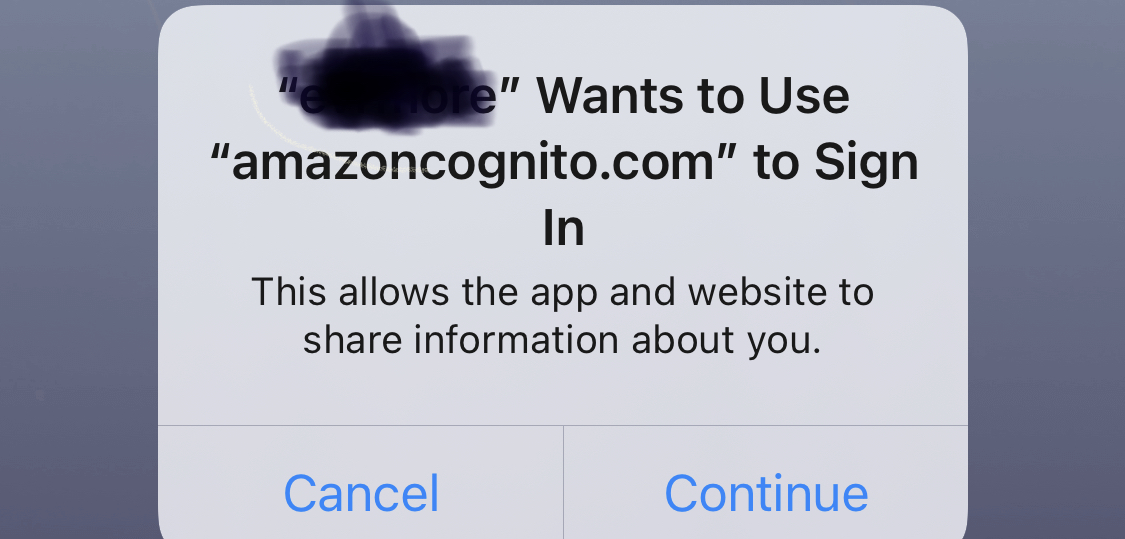
Using withOAuth HOC and facebookSignIn flow in expo bare / react native shows alert that says "AppName Wants to Use "amazoncognito.com" to Sign In" The users may not be familiar with amazoncognito.com and may be confused since they chose to sign in with Facebook, not Amazon.
-
New users need to sign in to facebook even if they're signed in to Facebook App on their iPhone. This lowers conversions since users have to enter email/password that they may not remember.
Is there any way to have permission say "use 'facebook.com'" to sign in? Is there any way to have new users signed in if they've signed in to the Facebook app on their phone?
I'm using expo bare and already have Facebook SDK Pod, so if there's a native way to achieve Cognito+Facebook sign in please share.
To Reproduce Steps to reproduce the behavior:
- Click a button with onPress action this.props.facebookSignIn
Expected behavior
- Alert asking if user would like to sign in with "facebook.com"
- Following screen have user signed in to facebook.
Screenshots If applicable, add screenshots to help explain your problem.
Smartphone (please complete the following information):
- iPhone 8 plus
- iOS 12.2
- react-native 0.59.5
- aws-amplify 1.1.26
- "aws-amplify-react-native": "2.1.10",
Additional context Add any other context about the problem here.
Sample code
const urlOpener = async (url, redirectUrl) => {
  const { type, url: newUrl } = await WebBrowser.openAuthSessionAsync(url, redirectUrl);

  if (type === 'success') {
    await WebBrowser.dismissBrowser();

    if (Platform.OS === 'ios') {
      return Linking.openURL(newUrl);
    }
  }
};

Amplify.configure({
Auth: {
...
oauth: {
      domain: Config.REACT_APP_COGNITO_DOMAIN,
      scope: ['public_profile', 'email'],
      redirectSignIn: `app://signIn`,
      redirectSignOut: `app://signOut`,
      responseType: 'code',
      urlOpener,
    }
You can turn on the debug mode to provide more info for us by setting window.LOG_LEVEL = 'DEBUG'; in your app.

@mkrn do you get the same alert when you logout/signout of your app? I get the same alert “... wants to use Amazoncognito to signin...” both when the user signs in and when the user signs out.
Different problem, but just in case you have not tested the signout flow.

@bonillam Yes, get the same alert on sign out: "appName" Wants to Use "amazoncognito.com" to Sign In
@mkrn I do not think the flow you are describing is possible. There's a statement buried in the docs indicating that RN apps must use the hosted Cognito UI (which you can hide), but the initial web browser redirect does go there before Facebook. The popup is an Expo thing indicating an oauth flow via a web redirect is about to happen. https://docs.expo.io/versions/v30.0.0/sdk/auth-session/
One small idea for an improvement would be to associate a custom domain with Cognito in the AWS Console, so at least the user associates the auth flow with an existing app experience.

Thanks, @loganwedwards
As for custom domain that's a great suggestion!
As for the second part of my issue, I think that even though Expo web browser shares cookies with system browser, not all users are logged in to Facebook in the browser, but most are in the Facebook app.
I will explore integrating Amplify iOS SDK with FB SDK since I already have swift parts as well in the app.
+1 , is there another url opener we can provide to the was config so we can customize the " "appName" Wants to Use "amazoncognito.com" to Sign In " message, which is shown for both sign in and sign out ?
instead of using the default Expo Link opener provided here : https://aws-amplify.github.io/docs/js/authentication#a-note-for-expo-users

Closing this issue as it seems it was solved. Please feel free to reopen in need be.

The last comment is an open, unanswered question, and the issue is not in any way fixed, and no workaround or solution was offered, so why on earth would you say it is solved?
I'm facing the same problem. When a user tries to sign out on iOS, they get a pop up saying my app wants to use my domain to sign in. A user should never have to give permission just to sign out. How to I circumvent this?

Apologizes, I read it as the workaround was able to resolve this. Reopening issue
https://docs.expo.io/versions/latest/sdk/auth-session/?redirected Additionally, AuthSession simplifies setting up authorized redirect URLs by using an Expo service that sits between you and your authentication provider (read Security considerations for caveats). This is particularly valuable with Expo because your app can live at various URLs. In development, you can have a tunnel URL, a lan URL, and a localhost URL. The tunnel URL on your machine for the same app will be different from a co-worker's machine. When you publish your app, that will be another URL that you need to whitelist. If you have multiple environments that you publish to, each of those will also need to be whitelisted. AuthSession gets around this by only having you whitelist one URL with your authentication provider: https://auth.expo.io/@your-username/your-app-slug. When authentication is successful, your authentication provider will redirect to that Expo Auth URL, and then the Expo Auth service will redirect back to your appplication. If the URL that the auth service is redirecting back to does not match the published URL for the app or the standalone app scheme (eg: exp://expo.io/@your-username/your-app-slug, or yourscheme://), then it will show a warning page before asking the user to sign in. This means that in development you will see this warning page when you sign in, a small price to pay for the convenience.
@mkrn Does it happen if we config app scheme in production?

I am currently seeing the same issue with logout displaying the "sign-in" system alert. Can we either cache that a user has already provided permission to visit this URL on sign-in (thus making the second alert on sign-out obsolete), change the contents of the message so it does not indicate sign-in, or remove the need for it altogether?

Is there any update/workaround regarding this issue? I'm having the same problem - showing a system alert on login and on logout (" AppName Wants to Use "amazoncognito.com" to Sign In"). This UX is unacceptable and misleading.

Having the same problem even with a custom scheme. Compared with some existing user experiences of other apps using federated sign in (Quora for example) and none of them have this experience especially a text describing "'XYZ' wants to use 'ABC' to sign in" on logout. This is so confusing and misleading. Can we please have a workaround at least?

Hello!! Has there been any progress here? Again, I would love for amplify to to say "sign out" in the alert when I call the sign out function.

Just chiming in as well. Our app is also affected by this UX issue. Thanks!

We are using hosted UI and native swift and this is a super annoying and confusing user experience. Is there a workaround to solve this issue?

@ahmadfs We are investigating a custom react ui that acts as a login proxy. Instead of calling amplify from our mobile app, we will open our custom react hosted ui in an inapp browser and call the amplify login function from there and pass the jwt token back to the mobile app via deep linking. Then when we sign out we will delete the jwt from the application.
We just got flagged by the App Store, asking what this message is. Very annoying.
Has anyone found a fix or workaround?

Yes i have found the solution.
swift api -opens-> an inapp browser.
browser navigates to a custom login web page you create and host yourself. then call the amplify js library login function from the web page.
Now you will need to handle storing of the jwt token yourself. but when a user logs out now you can delete the jwt token from the ios device manually.
Hope that helps b/c the solution works for me. it just takes a little web development.
@niclego That's awesome. If you have a tutorial or followed guidance from anywhere else I'd love the link. Nice workaround solution!
I'll have to backlog your solution for a future release of my project though. It's a little further than I'm willing to go at this point.

Marking this as a feature request, as the desired functionality regarding customizing the permission message and not requiring Facebook users to sign in doesn't currently exist. However, we are looking to improve this experience in the future!
With that said, If you would like to change the url that the permission request shows, you can do that via the Cognito console by adding a custom domain.


We moved to Auth0 and they support emphemural login on iOS devices which hides the iOS popup. This was the functionality we were looking for.
I am also hoping for this to be resolved soon. In the mean time I will look at Auth0 as an alternative.

Is this issue resolved? I am facing the same issue while signing in as well as signing out. Please advise. Thanks

I used https://www.npmjs.com/package/react-native-inappbrowser-reborn with "ephemeralWebSession" set to on and alert was not shown

+1 on what bitcot's comment. From reading through the chat here, it seems that it's possible to customize both the app name and url in the pop-up message, but the fact the message reads "...to Sign In" when calling signOut is extremely confusing for users.
Note that I'm using the Swift library.
Any help on this would be greatly appreciated :)

For iOS you can use Prefer private session during signIn it will not show any alert on signing and signout
Amplify.Auth.signInWithWebUI(presentationAnchor: self.view.window!, options: .preferPrivateSession()) { ... }

Hey, i have got everything setup and working, Just need little help on how to redirect to a particular screen when configuring the redirecturls for my react native app with RN CLI.
Currently:
"redirectSignIn":"myapp://", // my:app// ??? (screen name)
"redirectSignOut": "myapp://",
Any help on this would be greatly appreciated, thank you :)
