

 aws-amplify
Rewrites and redirect does not work in manual static deployments
Before opening, please confirm:
- [X] I have checked to see if my question is addressed in the FAQ.
- [X] I have searched for duplicate or closed issues.
- [X] I have read the guide for submitting bug reports.
- [X] I have done my best to include a minimal, self-contained set of instructions for consistently reproducing the issue.
App Id
https://ap-southeast-2.console.aws.amazon.com/amplify/home?region=ap-southeast-2#/d2f0p04mnv8zp2
Region
ap-southeast-2
Amplify Hosting feature
Manual deploys, Redirects
Describe the bug
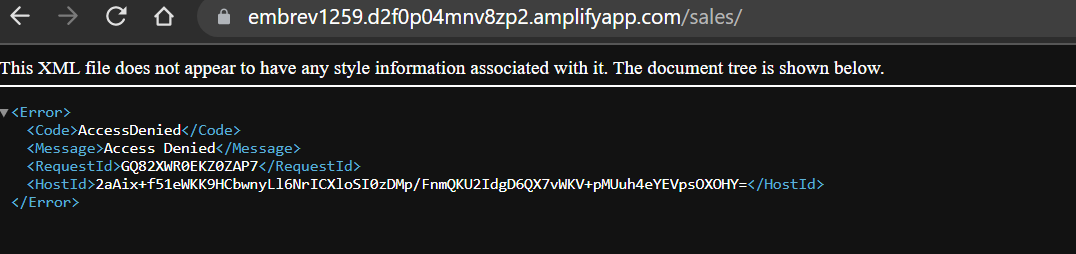
We are currently doing static SPA hosting via Amplify Console. Accessing the root path seems to be working. However refreshing the containing routes will show the following error:
Files are getting deployed using NodeJS script:
await amplify
  .startDeployment({
    appId,
    branchName,
    sourceUrl: `s3://${data.Bucket}/${data.Key}`,
  })
  .promise();
I already added the configuration in Rewrites and redirects settings but it does not seem to change anything

Expected behavior
Rewrite and redirects should work with manual deploy
Reproduction steps
- Setup rewrites and redirect
- Add new environment
- Select Amazon S3 as method
- Wait for build to be completed
- Access hosting url with adding route/path (e.g.
https://testdeploy.d2f0p04mnv8zp2.amplifyapp.com/anything/
Build Settings
No response
Additional information
No response

Hi @incr3m apologies for the delay. I'm not able to reproduce this access denied behavior. When you create your zip file, are you navigating inside the build directory and zipping the contents? If you just zip the folder itself, then you can run into this access denied error.

@hloriana I tried using a different zip library and append file per file and still getting the same issue. Here's the full deploy script i'm using for this. Let me know if you need the actual APP IDs:
import AWS from "aws-sdk";
import fs from "fs";
// import * as url from 'url';
import { zip } from "zip-a-folder";

// const __dirname = url.fileURLToPath(new URL('.', import.meta.url));

const [branchName, directory] = process.argv.slice(2);

const zipPath = `${directory}.zip`;

await zip(directory, zipPath);

const PRJ = "emb-hosting";
const STATIC_HOSTING_APP_ID = "d2f0pxxxxxxxxx";
const S3_BUCKET_NAME = "mbdevops-xxxxx-dev";

const amplify = new AWS.Amplify({
  region: "ap-southeast-2",
});

const s3 = new AWS.S3({
  region: "ap-southeast-2",
});

const appId = STATIC_HOSTING_APP_ID;

try {
  await amplify
    .createBranch({
      appId,
      branchName,
    })
    .promise();
} catch (err) {
  console.log(">>deploy-zip/index::", "branch exists: ", branchName); //TRACE
}

const { jobSummaries } = await amplify
  .listJobs({
    appId,
    branchName,
    maxResults: 1,
  })
  .promise();

console.log(">>deploy-zip/index::", "jobSummaries", jobSummaries); //TRACE

const lastJob = jobSummaries[0];
if (lastJob && lastJob.status === "PENDING") {
  console.log(">>deploy-zip/index::", "job is ongoing"); //TRACE
  await amplify.stopJob({ appId, branchName, jobId: lastJob.jobId }).promise();
}

function uploadToS3(fileName, s3Key) {
  const readStream = fs.createReadStream(fileName);

  const params = {
    Bucket: S3_BUCKET_NAME,
    Key: `${PRJ}/${branchName}/${s3Key}`,
    Body: readStream,
    // ACL: 'public-read',
  };

  return new Promise((resolve, reject) => {
    s3.upload(params, function (err, data) {
      readStream.destroy();

      if (err) return reject(err);

      return resolve(data);
    });
  });
}

const data = await uploadToS3(zipPath, `${branchName}/${branchName}.zip`);

if (!data.Location) throw new Error("Can't get data location");

await amplify
  .startDeployment({
    appId,
    branchName,
    sourceUrl: `s3://${data.Bucket}/${data.Key}`,
  })
  .promise();

const reviewUrl = `https://${branchName}.${appId}.amplifyapp.com`;
/**
 * Expose deploy URL
 */
console.log(">>deploy-zip/index::", "url", reviewUrl); //TRACE
There may be an incompatibility with how zip-a-folder package creates the file and what is needed to host a manual deploy app on Amplify.
According to our documentation, this error occurs when:
When you create the zip folder, make sure you zip the contents of your build output and not the top level folder. For example, if your build output generates a folder named “build” or “public”, first navigate into that folder, select all of the contents, and zip it from there. If you do not do this, you will see an “Access Denied” error because the site's root directory will not be initialized properly.
That being said, I'm unfamiliar with how zip-a-folder creates the zip file but it could be causing the error. I recommend manually zipping the contents and deploying that to see if the issue persists.
It also appears that your app seems to be working at this time. We do apologize for the oversight of this issue. If you continue to experience unexpected behaviors, please open a new issue and we will be happy to help.
⚠️COMMENT VISIBILITY WARNING⚠️
Comments on closed issues are hard for our team to see. If you need more assistance, please either tag a team member or open a new issue that references this one. If you wish to keep having a conversation with other community members under this issue feel free to do so.
![github-actions[bot] avatar](https://avatars.githubusercontent.com/in/15368?v=4 "Published by a pub.dev verified publisher")
This issue has been automatically locked since there has not been any recent activity after it was closed. Please open a new issue for related bugs.