
amplify-hosting
 amplify-hosting copied to clipboard
 aws-amplify
Pages not loading: RequestHeaderSectionTooLarge
Before opening, please confirm:
- [X] I have checked to see if my question is addressed in the FAQ.
- [X] I have searched for duplicate or closed issues.
- [X] I have read the guide for submitting bug reports.
- [X] I have done my best to include a minimal, self-contained set of instructions for consistently reproducing the issue.
App Id
d1t8f7v7uqkz9e
Region
us-east-1
Amplify Console feature
Monorepo
Describe the bug
Pages are not loading properly.
Instead, showing: RequestHeaderSectionTooLarge error:

Expected behavior
Pages should load normally.
Reproduction steps
- Access old feature branches. or
- Deploy a new feature branch and browser thru pages.
- It will throw this error on second-page load or on page reload.
Build Settings
No response
Additional information
No response


We're also having this issue, not found any way around this yet but any work arounds would be appreciated! @carlosbvz did you find any solution?

Hi @georgeperry1 ,
The problem here seems to be a massive and duplicated amount (and size) of the Cognito cookies. (I have not found a nice-n-clean solution for this one yet...)
The workaround here is to "some how manage those cookies"...
I my particular case, the webbApp was leaving duplicated cognito related cookies (from a previous session) and sending them back to the server along with the new creds. I needed to delete those cookies to keep the headers at an acceptable size.
It also seems we cannot increase the size of the max allowed header's size in AWS, so 8192 it is...
More Related info: https://github.com/aws-amplify/amplify-js/issues/1545
Thanks @carlosbvz, thats pretty much exactly the same as our experience. Specifically the hosting of separate environments that were being tested in the same browser.
I'll try the same workaround and hope AWS figure it out!
Same issue. Amplify has been shit to us so far because of that error. May need to go through the effort of dismissing it.


the same issue https://stackoverflow.com/questions/72099368/requestheadersectiontoolarge-your-request-header-section-exceeds-the-maximum-al/73554409#73554409

Any update on this? The problem I am seeing is that Cognito refresh, access and id tokens' size is huge. In one example all three tokens were 7002 bytes plus other header stuff it will be more than 8192. Any idea what can be done?


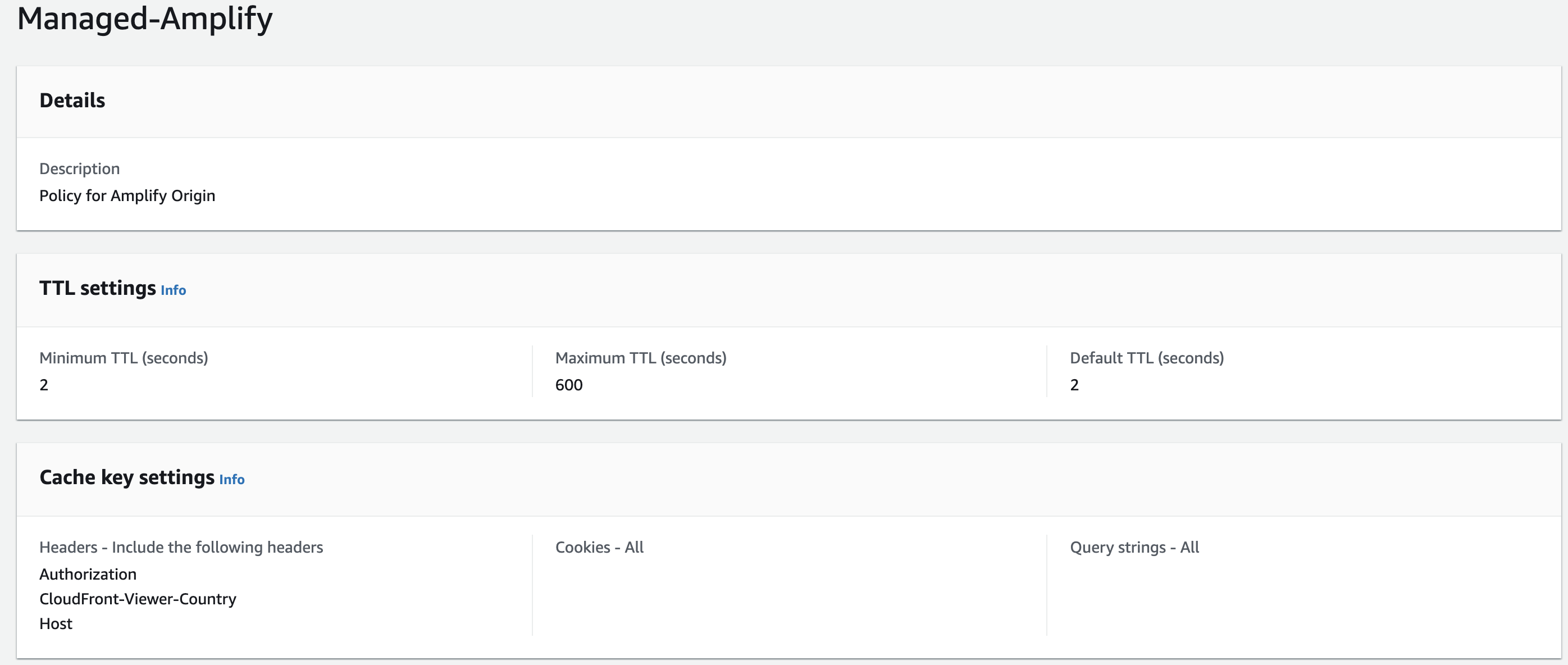
I feel like I'm missing something here. Why are we sending cookies to S3 which is causing the RequestHeaderSectionTooLarge error? Why is the AWS managed Amplify cache policy for cookies set to "All" when S3 has no use for cookies?
"Amazon S3 doesn't process cookies. If you configure a cache behavior to forward cookies to an Amazon S3 origin, CloudFront forwards the cookies, but Amazon S3 ignores them." - https://docs.aws.amazon.com/AmazonCloudFront/latest/DeveloperGuide/RequestAndResponseBehaviorS3Origin.html
Wouldn't the simplest solution be to set cookies = none in the Amplify cache policy?

@raffclar what do you mean?
I think we are speaking about this configuration: (Amplify - Auth)
 That could be used, for example, when you don't want to use the LocalStorage, that keeps your auth credentials only in the current domain or subdomain.
Using a cookie allow you to move under different subdomains sharing the same session. ( app1.domain.com - app_part2.domain.com).
That could be used, for example, when you don't want to use the LocalStorage, that keeps your auth credentials only in the current domain or subdomain.
Using a cookie allow you to move under different subdomains sharing the same session. ( app1.domain.com - app_part2.domain.com).

@raffclar what do you mean? I think we are speaking about this configuration: (Amplify - Auth) That could be used, for example, when you don't want to use the LocalStorage, that keeps your auth credentials only in the current domain or subdomain. Using a cookie allow you to move under different subdomains sharing the same session. ( app1.domain.com - app_part2.domain.com).
I'm also using the cookieStorage config and storing my cognito sessions as cookies. My comment is about the CloudFront cache policy (labelled Amplify) which is managed by AWS and is read-only.
My question is to the Amplify devs; why is Amplify sending the cookies to S3? S3 doesn't use cookies. The cloudfront policy does not need to forward the cookies and this issue could be solved with a simple config change to the CloudFront managed cache policy
Literally changing cookies: all to cookies: none would see this issue resolved.
Amplify serves the web app's static assets from an S3 bucket behind CloudFront. The docs here explain why sending cookies to static assets is bad. https://docs.aws.amazon.com/AmazonCloudFront/latest/DeveloperGuide/Cookies.html "Amazon S3 and some HTTP servers don’t process cookies. Don’t configure CloudFront to forward cookies to an origin that doesn’t process cookies or doesn’t vary its response based on cookies. That can cause CloudFront to forward more requests to the origin for the same object, which slows performance and increases the load on the origin. If, considering the previous example, your origin doesn’t process the country cookie or always returns the same version of locations.html to CloudFront regardless of the value of the country cookie, don’t configure CloudFront to forward that cookie."
CloudFront cache misses are more frequent when cookies are being forwarded like this.
Can an Amplify dev please explain this? Maybe I'm missing something. I'm going to move away from Amplify's managed hosting to self-managed CloudFront because I need to manage the cookies being sent to S3.
also facing this same issue and considering a fairly significant move from amplify hosting to cloudfront hosting, please give us a way to control the cookies being sent to s3 in amplify hosting

We're running into the same issue - strangely it's not reproduceable on one of our Amplify apps but occurs on another. If we have the ability to turn off cookie forwarding to S3 on Amplify's cloudfront distribution, it seems like it would solve the problem.

We're running into the same issue - strangely it's not reproduceable on one of our Amplify apps but occurs on another.
We're in the process of rolling out a fix for this. If you create a new app today, you won't bump into this anymore. The change will take a while to be available for all customers, but if you're bumping into it, feel free to reach out to AWS support with your account id and app id, and we can fast forward the fix for your app.

We're in the process of rolling out a fix for this. If you create a new app today, you won't bump into this anymore. The change will take a while to be available for all customers, but if you're bumping into it, feel free to reach out to AWS support with your account id and app id, and we can fast forward the fix for your app.
Thank you! I've been in touch with AWS support about this, but they seem unaware of this potential fix. They pointed me to this github issue as something the team is aware of. I'll share your response with them and if we can fast forward the fix for one of our apps where we're facing this issue, it would be super helpful!

Is this ever going to be resolved? We can't even add tracking because all the headers keep getting redirect to S3.

I was able to get two of our amplify apps hotfixed via an AWS Support ticket. It took about 4 days for them to fix our apps. Obviously not ideal for those who don't pay for AWS Support but the comment from @calavera is correct on contacting support.
I was able to get two of our amplify apps hotfixed via an AWS Support ticket. It took about 4 days for them to fix our apps. Obviously not ideal for those who don't pay for AWS Support but the comment from @calavera is correct on contacting support.
How did AWS Support solve your problem?

I was able to get two of our amplify apps hotfixed via an AWS Support ticket. It took about 4 days for them to fix our apps. Obviously not ideal for those who don't pay for AWS Support but the comment from @calavera is correct on contacting support.
How did AWS Support solve your problem?
I was curious too and I asked them what the fix was but they declined to explain. I also couldn't find any config change in our cloud resources.
On re-contacting AWS support and quoting @calavera's response here, they filed a request with the eng team to roll out the fix for our prod app that users were encountering this issue with. Another option is to just recreate the amplify app if that's possible for you. Newly created amplify apps don't seem to have this issue.
is it possible that AWS has fixed this issue for all apps? even for old ones? I've been testing it and now I don't face this problem but few months ago yes. In our case what we did was to add a cloudfront distribution in front of tha Amplify to strip unnecessary headers. But if someone can confirm that this issue is fixed maybe we can remove that cloudfront.

This issue can only occur for old applications that use Next.js 10 or 11. Every other app does not present this problem. If you're still using Next.js 10 or 11, our recommendation is to upgrade the app to Next.js 12 or above, and move to our Hosting Compute offering. That will eliminate the problem. We don't have plans to fix this problem for apps that remain using Next.js 10 or 11.
This issue is now closed. Comments on closed issues are hard for our team to see. If you need more assistance, please open a new issue that references this one.
![github-actions[bot] avatar](https://avatars.githubusercontent.com/in/15368?v=4 "Published by a pub.dev verified publisher")