

 autokey
Abrev not working correctly in Libre Writer MX-21
Has this issue already been reported?
- [X] I have searched through the existing issues.
Is this a question rather than an issue?
- [X] This is not a question.
What type of issue is this?
Bug
Which Linux distribution did you use?
Distro: MX-21_x64 Wildflower October 20 2021 base: Debian GNU/Linux 11 (bullseye)
Which AutoKey GUI did you use?
GTK
Which AutoKey version did you use?
0.95.10
How did you install AutoKey?
distribution's repository
Can you briefly describe the issue?
I just installed autokey and started creating some phrases. I paste using kbd and have a mix of abbreviations and hotkey triggers. Hotkey works on everything I've tried. Abbreviations work ok on gmail or browser, let's say, but not on Libre Office Writer. In that app only the last letter of the abbreviation is removed, the rest appears before my phrase. e.g. if the abbrev is abcd for bonjonno it'll come out as abcbonjonno. only in Libre Writer.
Can the issue be reproduced?
Always
What are the steps to reproduce the issue?
type any abbreviation in Libre Writer and see for yourself. using Office 7.0.4.2
What should have happened?
just the phrase
What actually happened?
most of abbreviation and phrase
Do you have screenshots?
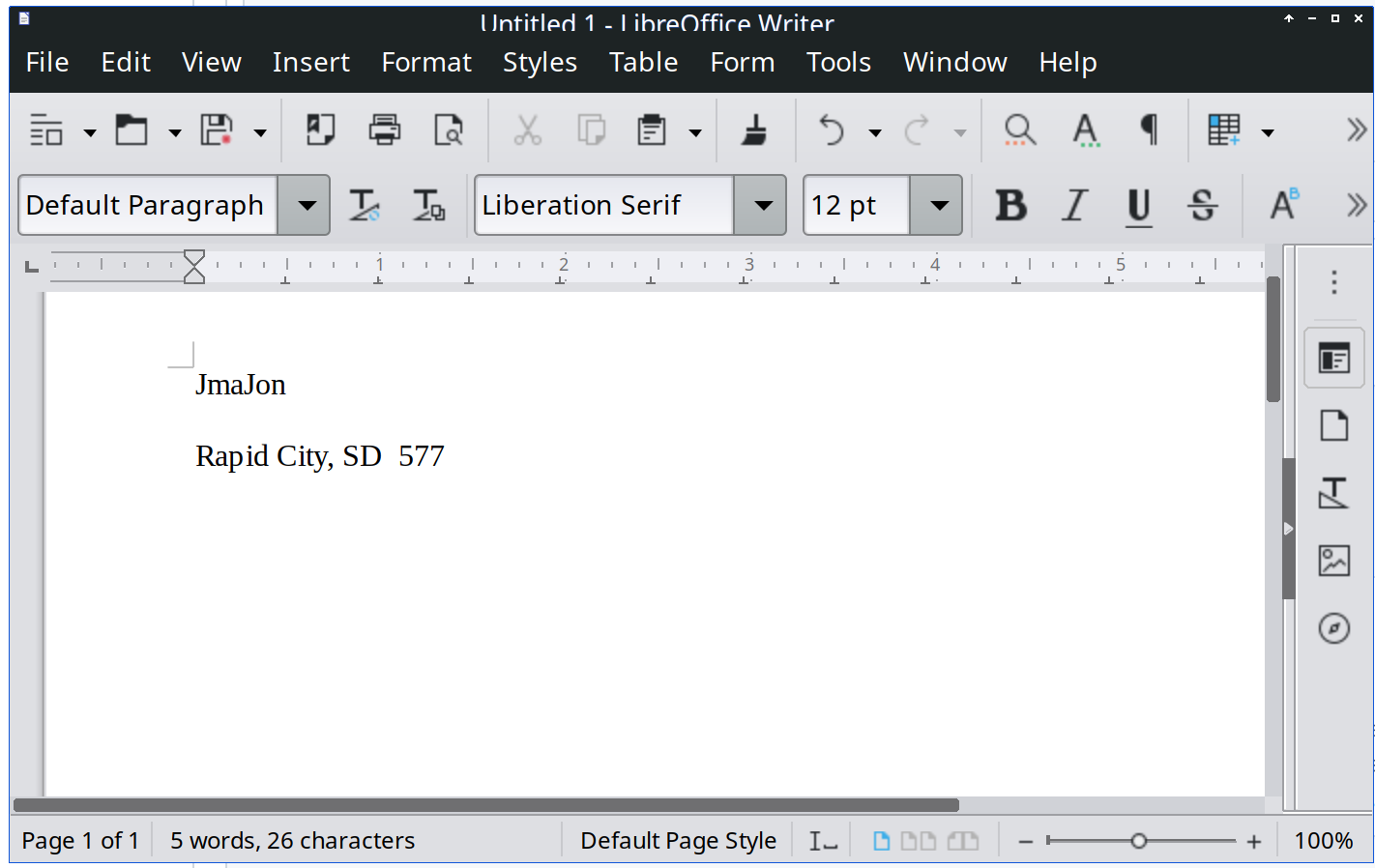
Can you provide the output of the AutoKey command?
No response
Anything else?
No response

The two apps that have the most issues like this are LibreOffice and the Firefox address bar.
The first thing to try is to change the settings on a phrase from Paste using keyboard to Paste using Ctrl+V (the new default setting in 0.96 which is currently in beta testing). If that works, change it in the rest of your phrases.
If you are still experiencing issues, then update us here. There are a a few more extreme things to try if necessary.

This is a known timing issue with LibreOffice Writer, so we've added information about it to the Why is the text messed up when I use a phrase with LibreOffice Writer? section in the AutoKey FAQ. Hopefully one of its suggestions will work for you.

hello. I posted this a year and a half ago and you solved it the same day as I reported above. Am I supposed to close it somehow? If you can, by all means go ahead.
@bonjonno I'll do it. Generally, we prefer if a user closes their own issue. That way there's no possibility of someone feeling that they were slighted in any way. There's a button below this box that says "Close with comment". You should see it on any issue you have opened. Issues can be reopened or new ones filed if you change your mind later or a bug reappears, so closing one is no big deal.