

 autokey
Script for selecting and paste a date
Has this issue already been reported?
- [X] I have searched through the existing issues.
Is this a question rather than an issue?
- [X] This is not a question.
What type of issue is this?
Crash/Hang/Data loss
Which Linux distribution did you use?
Linux Mint 20.3
Which AutoKey GUI did you use?
GTK
Which AutoKey version did you use?
0.95.10 gtk
How did you install AutoKey?
From application management
Can you briefly describe the issue?
I'm not able to get a script, which let me choose a date and past after that in my text document https://github.com/autokey/autokey/discussions/662#discussioncomment-2160950
Can the issue be reproduced?
Always
What are the steps to reproduce the issue?
I tried out this script - but it doesn't work.
# Create a variable for the return code and the date and put the chosen date's value into the date variable:
retCode, date = dialog.calendar(title="Choose a date")
# Use the following line instead if you'd like to control the format of the date:
# retCode, date = dialog.calendar(title="Choose a date", format="%d-%m-%y")

# If no date is chosen and the Cancel button is clicked, the Esc key is pressed, or the dialog window is closed:
if retCode:
    # Create a message and display it in a dialog:
    myMessage = "No date was chosen."
    dialog.info_dialog(title="Cancelled", message=myMessage, width="200")
else:
    # Display the value of the date variable in a dialog:
    dialog.info_dialog(title="The date you chose is:", message=date, width="200")
What should have happened?
...that the date is pasted in the text editor
What actually happened?
I can select the date - but it is not pasted in the document
Do you have screenshots?
Yes here i got help - and i tried some hints. https://github.com/autokey/autokey/discussions/662#discussioncomment-2160950
Can you provide the output of the AutoKey command?
No response
Anything else?
No response

The last line of that script causes it to display a dialog rather than pasting it into the currently-active window. Try this script, with a different last line, instead:
# Create a variable for the return code and the date and put the chosen date's value into the date variable:
retCode, date = dialog.calendar(title="Choose a date")

# If no date is chosen and the Cancel button is clicked, the Esc key is pressed, or the dialog window is closed:
if retCode:
    # Create a message and display it in a dialog:
    myMessage = "No date was chosen."
    dialog.info_dialog(title="Cancelled", message=myMessage, width="200")
else:
    # Display the value of the date variable in a dialog:
    keyboard.send_keys(date)

If that one works for you, I realize that the date format isn't what you'd like it to be since it defaults to YYYY-MM-DD and you'd like it to be DD-MM-YYYY, so you might want to try this script instead, which offers formatting of the date:
# Create a variable for the return code and the date and put the chosen date's value into the date variable:
retCode, date = dialog.calendar(title="Choose a date", format="%d-%m-%Y")

# If no date is chosen and the Cancel button is clicked, the Esc key is pressed, or the dialog window is closed:
if retCode:
    # Create a message and display it in a dialog:
    myMessage = "No date was chosen."
    dialog.info_dialog(title="Cancelled", message=myMessage, width="200")
else:
    # Display the value of the date variable in a dialog:
    keyboard.send_keys(date)
# Create a variable for the return code and the date and put the chosen date's value into the date variable:
retCode, date = dialog.calendar(title="Choose a date")

# If no date is chosen and the Cancel button is clicked, the Esc key is pressed, or the dialog window is closed:
if retCode:
    # Create a message and display it in a dialog:
    myMessage = "No date was chosen."
    dialog.info_dialog(title="Cancelled", message=myMessage, width="200")
else:
    # Display the value of the date variable in a dialog:
    keyboard.send_keys(date)
Date select window appears, but it is not pasted in the text.
A couple of questions:
Do you have a document open and do you then trigger the script while that document has the focus?
How are you triggering the script?
You might also want to take a screenshot of the script inside of AutoKey and paste it into here so we can see if there are any indent problems or extra characters that accidentally got into it or something else that may be causing the issue.
Thanks for help. I open the standard text editor in Linux Mint 20.3 Cinnamon and i want to start the date selection dialogue with: dataus# The dialoguej appears, i can select. And after klicking ok the date is not transferred to the text window.
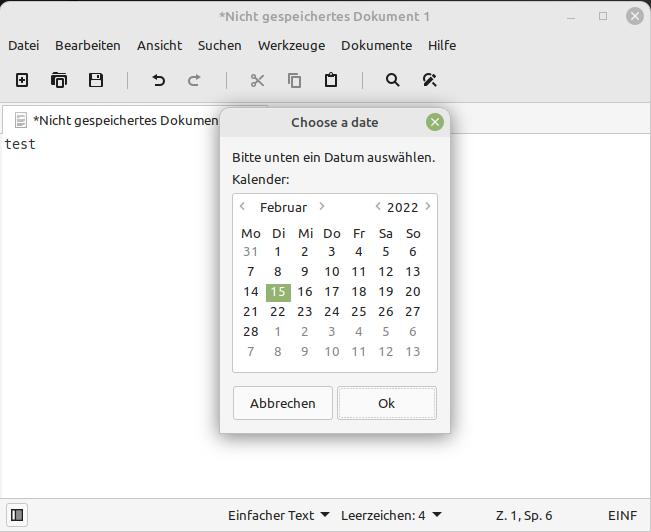
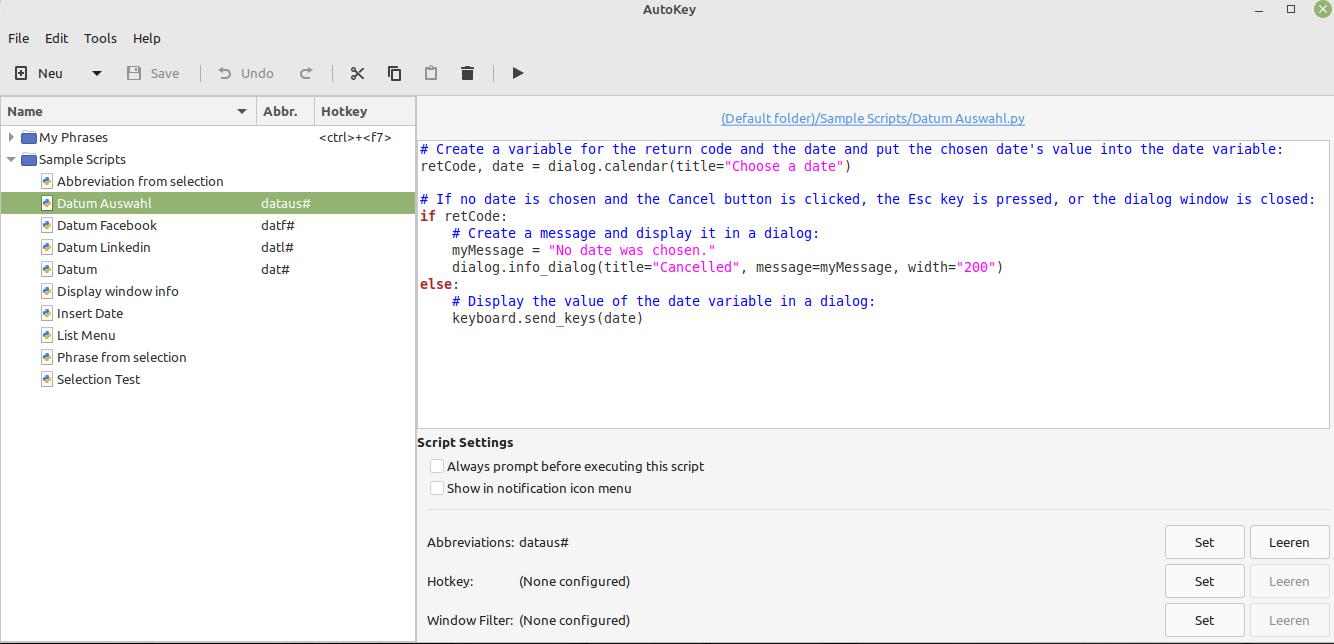
This is getting weird. There is something we're missing. Here are some things I would try:
First, if you press ESC or close the dialog, does your error message display as expected?
Maybe try to see if date has anything in it at all. Replace
keyboard.send_keys(date)
with
keyboard.send_keys(len(date))
If it prints a 0, then date is an empty string for some reason. Otherwise, it should display a reasonable number of characters for a date string to contain.
You could also try
keyboard.send_keys(len(date.strip()))
If that displays a 0 , and the above did not, then date contained white space that was printed, but you just can't see that it did that.
Or, you could try this for the same information
keyboard.send_keys("[" + date + "]")
I'm just paranoid, and it's probably not an issue, but I always try to avoid naming variables anything that even looks like a keyword. Try renaming "date" to "mydate" and see if that does anything.

Some tested.....the "only" issue is: the selected Date is not copied in the text. i can choose the date, but if i close the window, the cursor goes only with one space character right. The other suggestions brings errors or nothing. mydate makes only an script error.
Those screenshots all look perfect. Not a thing looks to be out of place or out of the ordinary. It should work. I downloaded a copy of Linux Mint 20.03 Cinnamon and will install it in a virtual machine to see if I can recreate the issue.
Meanwhile, if you replace that script with this one, does it print Hello World to your text editor when you trigger the script in the same way?
keyboard.send_keys("Hello World")
Yes, that script works. And i have some scripts that past the actual date in it - they worked all. But selection the date don't work.
Okay, I've installed Linux Mint 20.03 Cinnamon in VirtualBox and then installed the GTK and Qt front ends of AutoKey 0.95.10 into it from the default repositories (I believe Linux Mint uses the Ubuntu repositories) and I'm seeing some issues:
AutoKey 0.95.10 in Linux Mint 20.03 Cinnamon:
GTK:
- The date-picker dialog is displayed and the date is printed into the text editor when I trigger the date script without first selecting some text.
- The date-picker dialog is displayed, but the date is not printed when I select some text in the text editor before triggering the date script.
- The cancel dialog is shown when I click the Cancel button after triggering the date script.
- The cancel dialog is shown when I close the window after triggering the date script.
- The cancel dialog is shown when I press the Esc key after triggering the date script.
- The Hello World message is printed into the text editor when I trigger the Hello World script without first selecting some text.
- The Hello World message is printed into the text editor when I select some text in the text editor before triggering the Hello World script.
Qt:
- The date-picker dialog is displayed, but the date is not printed into the text editor when I trigger the date script without first selecting some text.
- The date-picker dialog is displayed, but the date is not printed when I select some text in the text editor before triggering the date script.
- The cancel dialog is not shown when I click the Cancel button after triggering the date script.
- The cancel dialog is not shown when I close the window after triggering the date script.
- The cancel dialog is not shown when I press the Esc key after triggering the date script. In fact, nothing happens.
- The Hello World message is not printed into the text editor when I trigger the Hello World script without first selecting some text.
- The Hello World message is not printed into the text editor when I select some text in the text editor before triggering the Hello World script.
AutoKey 0.95.10 in Kubuntu 20.04 LTS:
GTK:
- The date-picker dialog is displayed and the date is printed into the text editor when I trigger the date script without first selecting some text.
- The date-picker dialog is displayed and the date is printed when I select some text in the text editor before triggering the date script.
- The cancel dialog is shown when I click the Cancel button after triggering the date script.
- The cancel dialog is shown when I close the window after triggering the date script.
- The cancel dialog is shown when I press the Esc key after triggering the date script.
- The Hello World message is printed into the text editor when I trigger the Hello World script without first selecting some text.
- The Hello World message is printed into the text editor when I select some text in the text editor before triggering the Hello World script.
Qt:
- The date-picker dialog is displayed, but the date is not printed into the text editor when I trigger the date script without first selecting some text.
- The date-picker dialog is displayed, but the date is not printed into the text editor when I select some text in the text editor before triggering the date script.
- The cancel dialog is not shown when I click the Cancel button after triggering the date script.
- The cancel dialog is not shown when I close the window after triggering the date script.
- The cancel dialog is not shown when I press the Esc key after triggering the date script. In fact, nothing happens.
- The Hello World message is printed into the text editor when I trigger the Hello World script without first selecting some text.
- The Hello World message is printed into the text editor when I select some text in the text editor before triggering the Hello World script.
AutoKey 0.96.0-beta.10 in Kubuntu 20.04 LTS:
GTK:
- The date-picker dialog is displayed and the date is printed into the text editor when I trigger the date script without first selecting some text.
- The date-picker dialog is displayed and the date is printed when I select some text in the text editor before triggering the date script.
- The cancel dialog is shown when I click the Cancel button after triggering the date script.
- The cancel dialog is shown when I close the window after triggering the date script.
- The cancel dialog is shown when I press the Esc key after triggering the date script.
- The Hello World message is printed into the text editor when I trigger the Hello World script without first selecting some text.
- The Hello World message is printed into the text editor when I select some text in the text editor before triggering the Hello World script.
Qt:
- The date-picker dialog is displayed, but the date is not printed into the text editor when I trigger the date script without first selecting some text.
- The date-picker dialog is displayed, but the date is not printed when I select some text in the text editor before triggering the date script.
- The cancel dialog is not shown when I click the Cancel button after triggering the date script.
- The cancel dialog is not shown when I close the window after triggering the date script.
- The cancel dialog is not shown when I press the Esc key after triggering the date script. In fact, nothing happens.
- The Hello World message is printed into the text editor when I trigger the Hello World script without first selecting some text.
- The Hello World message is printed into the text editor when I select some text in the text editor before triggering the Hello World script.
That was a lot of information. In case you'd like to just see the cases when the script falls over:
AutoKey 0.95.10 in Linux Mint 20.03 Cinnamon:
GTK:
- The date-picker dialog is displayed, but the date is not printed when I select some text in the text editor before triggering the date script.
Qt:
- The date-picker dialog is displayed, but the date is not printed into the text editor when I trigger the date script without first selecting some text.
- The date-picker dialog is displayed, but the date is not printed when I select some text in the text editor before triggering the date script.
- The cancel dialog is not shown when I click the Cancel button after triggering the date script.
- The cancel dialog is not shown when I close the window after triggering the date script.
- The cancel dialog is not shown when I press the Esc key after triggering the date script. In fact, nothing happens.
- The Hello World message is not printed into the text editor when I trigger the Hello World script without first selecting some text.
- The Hello World message is not printed into the text editor when I select some text in the text editor before triggering the Hello World script.
AutoKey 0.95.10 in Kubuntu 20.04 LTS:
Qt:
- The date-picker dialog is displayed, but the date is not printed into the text editor when I trigger the date script without first selecting some text.
- The date-picker dialog is displayed, but the date is not printed into the text editor when I select some text in the text editor before triggering the date script.
- The cancel dialog is not shown when I click the Cancel button after triggering the date script.
- The cancel dialog is not shown when I close the window after triggering the date script.
- The cancel dialog is not shown when I press the Esc key after triggering the date script. In fact, nothing happens.
AutoKey 0.96.0-beta.10 in Kubuntu 20.04 LTS:
Qt:
- The date-picker dialog is displayed, but the date is not printed into the text editor when I trigger the date script without first selecting some text.
- The date-picker dialog is displayed, but the date is not printed when I select some text in the text editor before triggering the date script.
- The cancel dialog is not shown when I click the Cancel button after triggering the date script.
- The cancel dialog is not shown when I close the window after triggering the date script.
- The cancel dialog is not shown when I press the Esc key after triggering the date script. In fact, nothing happens.
Note that although this seems to be mainly a Qt issue, GTK is affected in Linux Mint. Also, the failures are more pronounced in the Linux Mint environment than they are in Kubuntu. I'm not sure if that will provide a clue as to what's causing it or not, but there you have it.
Given that this seems way more involved than it originally appeared to be and given that our developers seem occupied with other things in life at the moment, it might be better to try to workaround this issue for now.
The way I would approach this would be to write your date selection as a standalone bash or zsh script using a dialog manager such as Zenity (which is what autokey-gtk uses under the hood), yad, or kdialog (which is what autokey-qt uses under the hood). The script should write the result to stdout (the terminal). Hopefully, that will work by itself. If it doesn't, then any of those problems will have to be addressed by those who use and support your distro.
Once it works standalone, you can, call it from within your AutoKey script using subprocess(). Running it in a separate process like this may avoid whatever is causing it to fail within the AutoKey environment.
import subprocess
output = subprocess.check_output(["FullPathToMyDialogScript"])
if len(output) > 0:
    keyboard.send_keys(output)
That was a great idea, Joe, and I've filed it away as a future work-around for other things, but this Linux Mint AutoKey + Zenity thing must run pretty deep.
I created this Bash script, saved it as calendar.bash and put it on the Desktop with the permissions set so that it's executable:
#!/bin/bash
pickdate=$(zenity --calendar --date-format="%d-%m-%Y" --title="Date Chooser" --text="Double-click a date to choose it:");

if [ $? = 0 ];
then echo "$pickdate";
else echo "No date was chosen.";
fi
I then created this AutoKey script:
import subprocess

output = subprocess.check_output(["/home/elliria/Desktop/calendar.bash"])

if len(output) > 0:
    keyboard.send_keys(str(output))
AutoKey 0.90.4:
In Ubuntu MATE, it works as expected. If I run the Bash script from the Desktop by clicking on it, it pops up the date-chooser and prints the date into the terminal window after I choose one or it prints a cancellation message into the terminal window if I press the Cancel button or press the Esc key or close the window. If I then open a text editor and run the AutoKey script that calls that Bash script, the date-chooser opens up and the date I chose is printed to the text editor or a cancellation message is printed to the text editor if I press the Cancel button or press the Esc key or close the window. I only tested the GTK front-end there.
AutoKey 0.95.10 in Kubuntu 20.04 LTS:
In Kubuntu 20.04 LTS,if I run the Bash script from the Desktop by clicking on it, it pops up the date-chooser and prints the date into the terminal window after I choose one or it prints a cancellation message into the terminal window if I press the Cancel button or press the Esc key or close the window. If I then open a text editor and run the AutoKey script that calls that Bash script, the date-chooser opens up and the date I chose is printed to the text editor as a byte rather than a string or a cancellation message is printed to the text editor if I press the Cancel button or press the Esc key or close the window. In order to get it to print the date as a string, I had to replace keyboard.send_keys(str(output)) with keyboard.send_keys(str(output.decode("UTF-8"))) in the AutoKey script. It works the same way in both the AutoKey 0.95.10 GTK and Qt front ends.
AutoKey 0.95.10 in Linux Mint 20.03 Cinnamon:
In Linux Mint, however, if I run the Bash script from the Desktop by clicking on it, it pops up the date-chooser and it spits out the date into the terminal window after I choose one or it prints a cancellation message into the terminal window if I press the Cancel button or press the Esc key or close the window. If, however, I then open a text editor and run the AutoKey script that calls that Bash script, the date-chooser opens up, but nothing is printed to the text editor, whether I choose a date or press the Cancel button or press the Esc key or close the window. This happens in both the AutoKey 0.95.10 GTK and Qt front-ends. Something extra odd is going on in Linux Mint.
Thanks for the extensive testing and detailed write-ups.
Solution: Don't use Linux Mint! LOL JK
Does your version of Mint use KDE? If so, I wonder if it does the same weirdness if you replace Zenity with Kdialog.
This part of it really isn't an AutoKey problem, but you can try it if you want to. Same with yad - although that's a Zenity fork, so it will probably do what Zenity does.
If you start AutoKey from a terminal before testing the failure cases, I wonder if any of the bash dialog manager scripts will complain about anything on stdout with messages that show up on the terminal window.
One nit: I try to keep all clutter off my desktop. I would put scripts like this in $HOME/bin. That has the added benefit of putting them in your default PATH if you want to run them in a terminal or call them from another script without specifying the full path. To invoke them from within AutoKey, you'll still need to use the full path because $HOME/bin isn't in the PATH in AutoKey's environment.
I assume Wayland isn't getting in the way because a lot more would be broken if X11 wasn't being used. Thought I'd mention it just in case.
This particular version of Linux Mint uses Cinnamon rather than KDE. I believe you can use KDE with Linux Mint.
I'd try yad, but it's not default software. AutoKey uses Zenity and KDialog, both of which are installed by default in the respective desktops. Also, I want to keep the Linux Mint testing to a minimum. It's not providing me with a driver for my virtual machine's graphics card, so it's giving me a warning that I have high CPU use as a result. Going to its driver manager results in it searching for drivers and telling me I don't need one. I don't like torturing my CPU, so I want to be out of here as soon as possible.
Starting AutoKey from a terminal was a great idea. I've done that and have a log that I'll be attaching here. Oddly, the log seems to show that it's doing what it's supposed to, although nothing is pasted into the text editor. This log was created with these steps:
- Type
autokey-gtk -clinto a terminal window. - Open the text editor.
- Right-click the AutoKey icon in the tray.
- Left-click the test script's entry in the context menu.
- Left-click the OK button to accept today's date.
- When that fails to paste anything into the text editor, return to the terminal window.
- Select all the text in the terminal window.
- Paste it into the empty text editor window.
- Save and share here.
AutoKeyGTKLogFromRunningTestScript.txt
I agree on the desktop clutter, but this is a test environment, so I kept everything right here where I can see it. An actual user can put things elsewhere.
I'm pretty certain that Linux Mint doesn't yet use Wayland, at least not with Cinnamon, but I could be wrong. In fact, it looks like I am. I just did the locate wayland command in a terminal window and turned up all of this:
Testing yad would most likely be a waste of time. I'm just a yad fan boy. :) I haven't read your logs yet, but I was looking for messages from Zenity or Kdialog, not from an AutoKey trace - although it's good to see that AutoKey is working. I am pretty sure these utilities work as desired, so if they are not complaining, they are writing to stdout, but stdout isn't configured properly. Whatever that's about, you have proven that it is definitely not an AutoKey problem.
I believe most distros have been shipping with Wayland support for quite some time. It's just not enabled by default. So, finding files there doesn't mean much. See comments under #600 for how to test for it being active.
What would be nice at this point is some way to replicate the problem when AutoKey isn't running at all, but I don't immediately see how to do that. If that could be done, a bug could be filed with Mint and they wouldn't be able to point back to us. It could probably be done by using bash and xdotool before calling Zenity, but that might take a substantial amount of tinkering to get it to work.
Well, somewhat. I'd say my tests have proven that the GTK problem in Linux Mint isn't caused by AutoKey. The Qt issue still remains in all three environments.
Thanks for the tip on finding out if Wayland is active. I chose to use the loginctl show-session $(loginctl | grep $(whoami) | awk '{print $1}') -p Type command in Linux Mint and it said: Type=X11
There's surely a way to test it without AutoKey running in Linux Mint, but at this point, I'd like it to be somebody else doing it so my CPU can find friendlier environments to be in.
Maybe making a request on our Google Groups list (and maybe on Gitter) would help. We definitely have Mint users.
I've put a request into Gitter and will see about adding one to the Google Groups list as well. Thanks for the suggestion.
Thanks to some help from @ineuw, there's now a functioning script that produces different output depending on which AutoKey front-end you use. When using this script, the GTK front-end uses the 2022-03-01 format and the Qt front-end uses the Tue Mar 1 2022 format.
I realize that @stefan-franz would like the DD-MM-YYYY format, but haven't figured out how to get AutoKey to allow format customization in this version of the script. Hopefully someone else will jump in and help with that. Meanwhile, here's the current script:
# Create a variable for the return code and the date and put the chosen date's value into the date_ variable:
retCode, date_ = dialog.calendar(title="Choose a date")

# If no date is chosen and the Cancel button is clicked, the Esc key is pressed, or the dialog window is closed:
if retCode:
    # Create a message and display it in a dialog:
    myMessage = "No date was chosen."
    dialog.info_dialog(title="Cancelled", message=myMessage, width="200")
else:
    # Put the date onto the clipboard:
    clipboard.fill_clipboard(date_)
    # Pause:
    time.sleep(0.1)
    # Create a variable to hold the Ctrl+v key-combination:
    paste_ = "<ctrl>+v"
    # Send the value of the variable to the currently-active window:
    keyboard.send_keys(paste_)
The script is using the default format for a date. However, AutoKey is configured to use Zenity for the GTK front end and Kdialog for the Qt front end. Maybe the two packages just differ on what they think the default format for a date should be.
Adding code (borrowed from @ineuw) (with whatever format specifier string is desired) should fix this:
ts_ = time.time()
date_ = datetime.datetime.fromtimestamp(ts_).strftime('%Y-%m-%d %H:%M')
If this doesn't fix this inside of AutoKey, then it is likely to also be broken outside of AutoKey and can be used to submit bug reports upstream.
That one didn't end up working for me since it uses the current time and doesn't change the format, but it headed me down some more rabbit holes that resulted in this fully-working GTK-only version of the script that prints the date in DD-MM-YYYY format, the way @stefan-franz wanted it to be:
# Import the datetime module:
import datetime

# Create a variable for the return code and the date and put the chosen date's value into the date variable:
retCode, date_ = dialog.calendar(title="Choose a date")

# If no date is chosen and the Cancel button is clicked, the Esc key is pressed, or the dialog window is closed:
if retCode:
    # Create a message:
    myMessage = "No date was chosen."
    # Display the message in a dialog:
    dialog.info_dialog(title="Cancelled", message=myMessage, width="200")
else:
    # Convert the date to DD-MM-YYYY format:
    date_ = datetime.datetime.strptime(date_, "%Y-%m-%d").strftime("%d-%m-%Y")
    # Put the date onto the clipboard:
    clipboard.fill_clipboard(date_)
    # Pause:
    time.sleep(0.1)
    # Create a paste variable to hold the Ctrl+v key-combination:
    paste_ = "<ctrl>+v"
    # Send the value of the paste variable to the currently-active window:
    keyboard.send_keys(paste_)
A conditional statement can be used to detect which format the date is in and then do the proper conversion from there, but I haven't gotten that far yet. Once that's done, this will work in both front ends.
I'm not sure how to do this in Python, but in bash, date -d "date-string" "date-format" will convert any legal date string into the format specified by date format - so as long as you are starting with a legal date string, you don't have to know what format it is in.
I think this shows how to do that in Python.
Thanks. There are several ways one can do it and they work well outside of the Qt front end of AutoKey. That front end simply won't display a result period, so there's nothing to modify yet.
I got the format of the Qt front end's date string from the related script that @ineuw had provided in Gitter that doesn't offer a date-picking dialog. It did show how the Qt front end "thinks" when it comes to dates since the two front ends spit out different formats in that test. It means we'll need to mess around with the result a bit to suit the OP's format if this gets sorted out and we manage to get the Qt front end to print something.
@Elliria Are you saying that you can get a valid date in some format, convert it to the desired string - as a pure string of characters and AutoKey's API - e.g. keyboard.send_keys() still won't print it? If so, then massive things are broken upstream or the libraries that you think you are using are being overshadowed by other ones that don't work.
You could prove - for instance, that a date is valid without seeing it by comparing it to a known constant date for equality ...
if fn(my_derived_date) == fn("valid-constant date"):
    ## my_derived_date is valid internally
    ...
else
    ## my_derived_date is wrong before I try to convert it to the desired string
    ...
Where fn() is something like strftime().
Alternatively you could get into the advanced weeds with something like this that would throw you into the Python debugger in the middle of things if you can figure out how to get it to talk to a terminal so you can see it. This might be over both of our pay grades.
@BlueDrink9 or @sebastiansam55 , I think we need more advanced Python foo here to figure out what's going on.
No. In the case of the conversion, the failure is mine and not AutoKey's. I'm saying that the Qt front end won't spit out a string at all when I've attempted to get it to use a custom date format when using the AutoKey API's calendar date-picker and its suggested code for formatting the date. Without a string, there's nothing to format.
That said, I was messing around to see if there was a difference between the data spit out by the GTK and Qt front ends, so I used this little code snippet as a test:
# Import the datetime module:
import datetime

# Create a variable for the return code and the date and put the chosen date's value into the date variable:
retCode, date_ = dialog.calendar(title="Choose a date")

# Print the result into the active window:
keyboard.send_keys(date_)
This is my GTK result:
2022-03-09
This is my Qt result:
Wed Mar 9 2022
Since there's a difference, it occurred to me that we might have to wrangle with Qt to get it to display the result in the custom DD-MM-YYYY format requested by the OP once we get it to output anything at all. I've so far been unable to do that conversion, but will mess with it some more.
Meanwhile, I redid all the tests and wrote them up again all in one round-up message that I'll put here to make it easier for anyone who'd like to join in to follow along with the tests.
Before you begin:
- The tests were done in two different environments, both of which are up-to-date on all their updates.
- The tests were done with two different versions of AutoKey.
- The tests were done on both of the AutoKey front ends.
- The tests were done without and with date format customization.
- The line of code that creates the date-picker was taken from the calendar example in the AutoKey API.
- All the failed results are in bold font to make them easier to spot.
- The ValueErrors in test 3 below are my fault rather than AutoKey's fault and can be dealt with by writing a better work-around script.
TEST 1 (DEFAULT DATE FORMAT):
# Create a variable for the return code and the date and put the chosen date's value into the date variable:
retCode, date = dialog.calendar(title="Choose a date")

# If no date is chosen and the Cancel button is clicked, the Esc key is pressed, or the dialog window is closed:
if retCode:
    # Create a message and display it in a dialog:
    myMessage = "No date was chosen."
    dialog.info_dialog(title="Cancelled", message=myMessage, width="200")
else:
    # Display the value of the date variable in a dialog:
    keyboard.send_keys(date)
Test 1 result in AutoKey 0.95.10 in Linux Mint 20.03 Cinnamon:
GTK (failure):
- The date-picker dialog is displayed and the date is only sometimes printed into the text editor when I trigger the date script without selecting some text.
- The date-picker dialog is displayed, but the date is only sometimes printed into the text editor when I trigger the date script after selecting some text.
- The cancel dialog is displayed when I click the Cancel button after triggering the date script.
- The cancel dialog is displayed when I close the window after triggering the date script.
- The cancel dialog is displayed when I press the Esc key after triggering the date script.
Qt (failure):
- The date-picker dialog is displayed, but the date is not printed into the text editor when I trigger the date script without selecting some text.
- The date-picker dialog is displayed, but the date is not printed into the text editor when I trigger the date script after selecting some text.
- The cancel dialog is not displayed when I click the Cancel button after triggering the date script.
- The cancel dialog is not displayed when I close the window after triggering the date script.
- The cancel dialog is not displayed when I press the Esc key after triggering the date script. In fact, nothing happens.
Test 1 result in AutoKey 0.95.10 in Kubuntu 20.04 LTS:
GTK (success):
- The date-picker dialog is displayed and the date is printed into the text editor when I trigger the date script without selecting some text.
- The date-picker dialog is displayed and the date is printed into the text editor when I trigger the date script after selecting some text.
- The cancel dialog is displayed when I click the Cancel button after triggering the date script.
- The cancel dialog is displayed when I close the window after triggering the date script.
- The cancel dialog is displayed when I press the Esc key after triggering the date script.
Qt (failure):
- The date-picker dialog is displayed, but the date is not printed into the text editor when I trigger the date script without selecting some text.
- The date-picker dialog is displayed, but the date is not printed into the text editor when I trigger the date script after selecting some text.
- The cancel dialog is not displayed when I click the Cancel button after triggering the date script.
- The cancel dialog is not displayed when I close the window after triggering the date script.
- The cancel dialog is not displayed when I press the Esc key after triggering the date script. In fact, nothing happens.
Test 1 result in AutoKey 0.96.0-beta.10 in Kubuntu 20.04 LTS:
GTK (success):
- The date-picker dialog is displayed and the date is printed into the text editor when I trigger the date script without selecting some text.
- The date-picker dialog is displayed and the date is printed into the text editor when I trigger the date script after selecting some text.
- The cancel dialog is displayed when I click the Cancel button after triggering the date script.
- The cancel dialog is displayed when I close the window after triggering the date script.
- The cancel dialog is displayed when I press the Esc key after triggering the date script.
Qt (failure):
- The date-picker dialog is displayed, but the date is not printed into the text editor when I trigger the date script without selecting some text.
- The date-picker dialog is displayed, but the date is not printed into the text editor when I trigger the date script after selecting some text.
- The cancel dialog is not displayed when I click the Cancel button after triggering the date script.
- The cancel dialog is not displayed when I close the window after triggering the date script.
- The cancel dialog is not displayed when I press the Esc key after triggering the date script. In fact, nothing happens.
TEST 2 (CUSTOM DATE FORMAT):
# Create a variable for the return code and the date and put the chosen date's value into the date variable:
retCode, date = dialog.calendar(title="Choose a date", format="%d-%m-%Y")

# If no date is chosen and the Cancel button is clicked, the Esc key is pressed, or the dialog window is closed:
if retCode:
    # Create a message and display it in a dialog:
    myMessage = "No date was chosen."
    dialog.info_dialog(title="Cancelled", message=myMessage, width="200")
else:
    # Display the value of the date variable in a dialog:
    keyboard.send_keys(date)
Test 2 result in AutoKey 0.95.10 in Linux Mint 20.03 Cinnamon:
GTK (failure):
- The date-picker dialog is not displayed and the date is not printed into the text editor when I trigger the date script without selecting some text.
- The date-picker dialog is not displayed and the date is not printed into the text editor when I trigger the date script after selecting some text.
- The cancel dialog is displayed.
Qt (failure):
- The date-picker dialog is displayed, but the date is not printed into the text editor when I trigger the date script without selecting some text.
- The date-picker dialog is displayed, but the date is not printed into the text editor when I trigger the date script after selecting some text.
- The cancel dialog is not displayed when I click the Cancel button after triggering the date script.
- The cancel dialog is not displayed when I close the window after triggering the date script.
- The cancel dialog is not displayed when I press the Esc key after triggering the date script. In fact, nothing happens.
Test 2 result in AutoKey 0.95.10 in Kubuntu 20.04 LTS:
GTK (failure):
- The date-picker dialog is not displayed and the date is not printed into the text editor when I trigger the date script without selecting some text.
- The date-picker dialog is not displayed and the date is not printed into the text editor when I trigger the date script after selecting some text.
- The cancel dialog is displayed.
Qt (failure):
- The date-picker dialog is displayed, but the date is not printed into the text editor when I trigger the date script without selecting some text.
- The date-picker dialog is displayed, but the date is not printed into the text editor when I trigger the date script after selecting some text.
- The cancel dialog is not displayed when I click the Cancel button after triggering the date script.
- The cancel dialog is not displayed when I close the window after triggering the date script.
- The cancel dialog is not displayed when I press the Esc key after triggering the date script. In fact, nothing happens.
Test 2 result in AutoKey 0.96.0-beta.10 in Kubuntu 20.04 LTS:
GTK (failure):
- The date-picker dialog is not displayed and the date is not printed into the text editor when I trigger the date script without selecting some text.
- The date-picker dialog is not displayed and the date is not printed into the text editor when I trigger the date script after selecting some text.
- The cancel dialog is displayed.
Qt (failure):
- The date-picker dialog is displayed, but the date is not printed into the text editor when I trigger the date script without selecting some text.
- The date-picker dialog is displayed, but the date is not printed into the text editor when I trigger the date script after selecting some text.
- The cancel dialog is not displayed when I click the Cancel button after triggering the date script.
- The cancel dialog is not displayed when I close the window after triggering the date script.
- The cancel dialog is not displayed when I press the Esc key after triggering the date script. In fact, nothing happens.
TEST 3 (WORK-AROUND - CUSTOM DATE FORMAT):
# Import the datetime module:
import datetime

# Create a variable for the return code and the date and put the chosen date's value into the date variable:
retCode, date_ = dialog.calendar(title="Choose a date")

# If no date is chosen and the Cancel button is clicked, the Esc key is pressed, or the dialog window is closed:
if retCode:
    # Create a message:
    myMessage = "No date was chosen."
    # Display the message in a dialog:
    dialog.info_dialog(title="Cancelled", message=myMessage, width="200")
else:
    # Convert the date to DD-MM-YYYY format:
    date_ = datetime.datetime.strptime(date_, "%Y-%m-%d").strftime("%d-%m-%Y")
    # Put the date onto the clipboard:
    clipboard.fill_clipboard(date_)
    # Pause:
    time.sleep(0.1)
    # Create a paste variable to hold the Ctrl+v key-combination:
    paste_ = "<ctrl>+v"
    # Send the value of the paste variable to the currently-active window:
    keyboard.send_keys(paste_)
Test 3 result in AutoKey 0.95.10 in Linux Mint 20.03 Cinnamon:
GTK (success):
- The date-picker dialog is displayed and the date is printed into the text editor when I trigger the date script without selecting some text.
- The date-picker dialog is displayed and the date is printed into the text editor when I trigger the date script after selecting some text.
- The cancel dialog is displayed when I click the Cancel button after triggering the date script.
- The cancel dialog is displayed when I close the window after triggering the date script.
- The cancel dialog is displayed when I press the Esc key after triggering the date script.
Qt (failure):
- The date-picker dialog is displayed, but the date is not printed into the text editor when I trigger the date script without selecting some text.
- The date-picker dialog is displayed, but the date is not printed into the text editor when I trigger the date script after selecting some text.
- The cancel dialog is not displayed and the
ValueError: time data '' does not match format '%Y-%m-%d'script error occurs when I click the Cancel button after triggering the date script. - The cancel dialog is not displayed and the
ValueError: time data '' does not match format '%Y-%m-%d'script error occurs when I close the window after triggering the date script. - The cancel dialog is not displayed when I press the Esc key after triggering the date script. In fact, nothing happens.
Test 3 result in AutoKey 0.95.10 in Kubuntu 20.04 LTS:
GTK (success):
- The date-picker dialog is displayed and the date is printed into the text editor when I trigger the date script without selecting some text.
- The date-picker dialog is displayed and the date is printed into the text editor when I trigger the date script after selecting some text.
- The cancel dialog is displayed when I click the Cancel button after triggering the date script.
- The cancel dialog is displayed when I close the window after triggering the date script.
- The cancel dialog is displayed when I press the Esc key after triggering the date script.
Qt (failure):
- The date-picker dialog is displayed, but the date is not printed into the text editor when I trigger the date script without selecting some text.
- The date-picker dialog is displayed, but the date is not printed into the text editor when I trigger the date script after selecting some text.
- The cancel dialog is not displayed and the
ValueError: time data '' does not match format '%Y-%m-%d'script error occurs when I click the Cancel button after triggering the date script. - The cancel dialog is not displayed and the
ValueError: time data '' does not match format '%Y-%m-%d'script error occurs when I close the window after triggering the date script. - The cancel dialog is not displayed when I press the Esc key after triggering the date script. In fact, nothing happens.
Test 3 result in AutoKey 0.96.0-beta.10 in Kubuntu 20.04 LTS:
GTK (success):
- The date-picker dialog is displayed and the date is printed into the text editor when I trigger the date script without selecting some text.
- The date-picker dialog is displayed and the date is printed into the text editor when I trigger the date script after selecting some text.
- The cancel dialog is displayed when I click the Cancel button after triggering the date script.
- The cancel dialog is displayed when I close the window after triggering the date script.
- The cancel dialog is displayed when I press the Esc key after triggering the date script.
Qt (failure):
- The date-picker dialog is displayed, but the date is not printed into the text editor when I trigger the date script without selecting some text.
- The date-picker dialog is displayed, but the date is not printed into the text editor when I trigger the date script after selecting some text.
- The cancel dialog is not displayed and the
ValueError: time data '' does not match format '%Y-%m-%d'script error occurs when I click the Cancel button after triggering the date script. - The cancel dialog is not displayed and the
ValueError: time data '' does not match format '%Y-%m-%d'script error occurs when I close the window after triggering the date script. - The cancel dialog is not displayed when I press the Esc key after triggering the date script. In fact, nothing happens.
Since we seem to be stuck on a moderately complex problem, I would suggest:
- Figuring out how to run this in a debugger like pdb so we can examine the exact values returned in the return code and the date string ... I don't know how to do this in a GUI environment.
- Perhaps asking the support communities around Zenity and Kdialog if anyone would be interested in taking a look at this or in suggesting how to approach debugging it.
- This is sufficiently weird that it might need to go to the level of an strace, but that requires significant expertise to use fruitfully
Thanks for the pdb reference. That sent me down quite a rabbit hole and I learned a lot. Its output goes to its own IDE, though. What I didn't figure out was how to get it to spit out some automated output that's readable from within AutoKey. Someone further along in their Python journey than I am can maybe make that happen.
I also messed around very briefly with strace and ltrace, but got tons of output that's way beyond me. Using either of those would also require someone further along in their Python journey than I am.
Asking the KDialog and Zenity communities for help could be exactly what we need if any of them are willing to come try out AutoKey and figure out how it may or may not be hooking into their programs or vice versa and where the point of unhappiness is that's preventing it from working smoothly.
By the way, one test I did was to print the date right after the user has chosen it and before the rest of the script intercepts it and tries to use it. Nothing printed, which fits the result that's being seen in the failures above. Interestingly, though, there's no script error like there would be if you called a variable that doesn't exist. Therefore, AutoKey doesn't dispute the existence of the variable, but it has no value. I'm not sure how useful that is for the next person to come along and look into this, but figured I'd mention it.