

 autokey
Extra key sent when in hotkey mode
Classification:
Bug
Reproducibility:
Sometimes (but pretty frequently)
Version
AutoKey version: 0.95.10
Used GUI: gtk
If the problem is known to be present in more than one version, please list all of those.
Installed via: PPA
Linux Distribution: Ubuntu 20.04
Summary
I mapped Super+u to Ctrl+l for chrome. So every time I press Super+u in chrome, I would expect to see the web address in address bar being selected and ready to be replaced by new addresses I am about to type in (note at this point the original url should still be displayed in the address bar, but just being highlighted). Here is a screenshot of my setup.
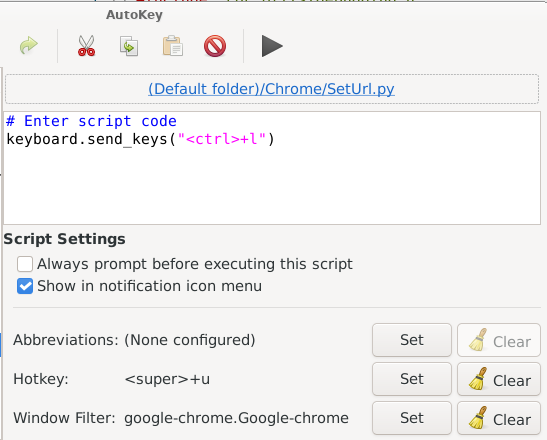
But from time to time I would see a < being inserted to the address bar (and of course replaced the url), as if I manually type < after Ctrl+l. This is happening pretty frequently, but not always. And this is not happening to this particular key mapping, but pretty much every key mapping I have set up in chrome. So I wonder if this is a known issue or just something not sufficient I did in my script.

It's not possible to write a simpler script than yours. It looks fine to me.
TL;DR: I have no idea what might be causing this, but below are some things you might try to help figure it out.
Does this ever happen when you run the script from the AutoKey icon context menu?
A few things to try:
Try adding time.sleep(0.1) before and after the keyboard API call. It probably won't make a difference, but it's worth trying. If that doesn't help, you could make one or both of these ridiculously long (1 or more seconds), it might slow things down enough to see when the < is getting inserted.
Temporarily assign a different hotkey to make sure that no one else is seeing it. This is unlikely to help, but it's worth checking.
Please run an AutoKey trace so we can look for any clues as to where the < might be coming from.
The trace might get rather long if you have to run the script multiple times before the < appears. You should save the whole trace, but we will probably only need to look at the last 50 or so lines, so just post that to start with.
One red flag is that you mention remapping your keyboard. AutoKey doesn't like remapped keyboards and often acts as if the keyboard wasn't remapped at all. I don't know if that's relevant to this issue.
While I'm grasping at straws, it would be interesting to see if this problem occurs in another browser like Firefox or chromium-based browsers such as Brave or Vivaldi. 'Ctrl+l` should work the same in all of them. If you don't have any other browsers installed and don't want to bother with it, that's fine.
It might also be interesting to see if the problem occurs when using autokey-qt. Both front ends can be installed at the same time with no issues, but if you don't have any other Qt applications installed, it will add a bunch of dependencies to your system. These will be marked as automatic, so if you later uninstall autokey-qt, they will all be set to be autoremoved by apt when you subsequently update your system (unless something else on your system needs them.)

There may be a clash between AutoKey, system, or another app monitoring the key combination. I am unable to use "autokey-gtk --verbose from the terminal?

I'd love to know if the beta fixes this, because there was a vaguely similar issue about duplicated keys being sent that I think is fixed in the beta.
You can install it with pip, check the discussions page or wiki

@huangzonghao can you confirm if this is still an issue? Otherwise I would suggest closing this? (At least this is what Code Triage is proposing to do if an issue goes stale)


I think the issue might be with chrome, instead of autokey. I have been using the same set of key mappings on both chrome and firfox for awhile (creating new tabs, switching tabs, scrolling up & down, etc), and it seems only chrome would have that extra < inserted, and nothing weird happened on firefox at all. I would give it a couple of more days for testing, and would come back to close this issue if I can confirm it only happens on chrome. Thanks for the attention.
There are some key code combinations that browsers reject or do crazy things. This happens in both browsers mentioned. In Firefox, which a user can program to disable its FF shortcuts by preference, no longer works. As for Chrome, AFAIK there is very little a user can change.
However, the Vivaldi browser is chromium based, nearly as fast, uses chrome add-ons, and is an eye candy for techies.
It has an extensive system of keyboard controls, separate for Vivaldi key assignments, which can be disabled with a single selection, or cleared or reassigned key by key, and also can disable website initiated access keys.
I asked them years ago about to provide users with better control over Vivaldi's own keyboard assignment system (which is very impressive), by clearing the Vivaldi keyboard assignments with a single clear/restore, but instead they added the above features.
P.S: The same goes for their mouse controls.
@ineuw Could you correct the grammar of your third sentence? I'm not sure what it means.
I'm really an old timer, but to me, FF is the ASCII code for formfeed. Since I'm sure you are using it to mean Firefox, it would be good to add (FF) right after the first instance where you spell out Firefox.
If somone wants something a bit of the way toward Vivaldi from Chrome, Brave is a very nice chromium based browser.
I don't have much use for AutoKey within browser windows, but the one thing I do use works there works in all of them except Chrome (I won't touch Chrome) and triggers on Ctrl+p.
I do have a separate script on the same hotkey (with a different window filter) for Mozilla (Firefox and Thunderbird) because it automates the Print dialog and Mozilla and chromium have different Print dialogs.
I just noticed that AutoKey was installed via PPA. Do we have a PPA or is that someone else's? If it's not ours, it's possible it's an altered file.
We (or our friends) have had a few PPAs over time. AFAIK, there haven't been any current ones for several years, but this issue is from 2021. Ever since we stared building our own debs there really hasn't been any reason for anyone to use a PPA.
@huangzonghao, do you have any extensions enabled in Chrome when this happens? If so, have you tried disabling them to see if the problem goes away?
Even though it may be a valid PPA copy of AutoKey, I'd be curious as to whether this still occurs or not if AutoKey is installed in a different way.
@Elliria IDK, but if this were a current, esecially a frequent problem, we should have heard more from our users. I'm inclined to let the OP close this issue. A new one can always be opened if the problem recurs.