

 austinried
[Feature] Add support for "format" param, in addition to bitrate, for transcoding
So far I'm having a blast with Subtracks, it's my favorite Android client for my Navidrome instance, but I'm having problems transcoding tracks to lower bitrates.
By looking at logs I realized that no matter how I set the max bitrate in Subtracks, it won't get Navidrome to transcode it apparently. In particular, i'm playing flac files and trying to transcode them to 320kbps. Substreamer client does that with no issues.
Here's a log entry for Subtracks playback:
time="2021-11-04T15:05:58Z" level=info msg="Streaming file" artist=Kaede/Lamp bitRate=0 cached=false format=raw originalBitRate=905 originalFormat=flac title="君が大人になって" transcoding=false user=user
The max bitrate in the settings is set to 320kbps.


So with Navidrome you have to configure a transcoding profile and then assign it to a player before it will start transcoding for that player, have you set that up yet?
(Right now subtracks will show up multiple times in the players menu because of a recent Navidrom update, but the one you want to assign the transcoding profile to is subtracks [ExoPlayerLib/Android]. This will be fixed in the next release so that it only shows up once.)
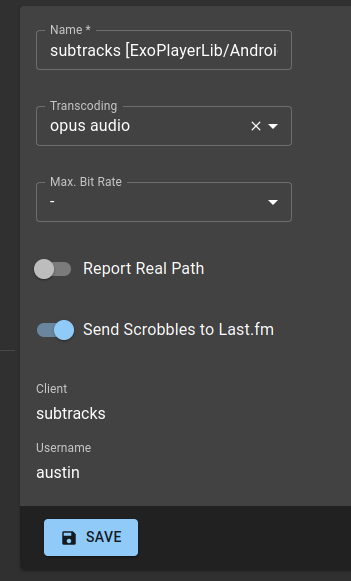

Thank you for looking into this. It works with this setting!
I did some digging since transcoding with Substreamer works without it - here's a request made by Subtracks:
https://domain.com/rest/stream?u=xxx&t=xxx&s=xxx&v=1.15.0&c=subtracks&id=xxx&estimateContentLength=true&maxBitRate=320
Subtracks always properly passes the maxBitrate=320 parameter in the GET-requests, but Navidrome still returns a FLAC without the setting.
Here's a request by Substreamer:
https://domain.com/rest/stream.view?u=xxx&t=xxx&s=xxx&v=1.13.0&c=substreamer&f=json&id=xxx&maxBitRate=320&format=mp3&estimateContentLength=false
There's an additional format=mp3 parameter (which seems to do the trick - documented here) I also tested DSub, which doesn't pass a format and doesn't work without the setting either:
https://domain.com/rest/stream.view?u=xxx&s=xxx&t=xxx&v=1.2.0&c=DSub&id=xxx&maxBitRate=320
There's an ongoing issue for Navidrome about this: https://github.com/navidrome/navidrome/issues/351 So it seems to be a general problem with Navidrome. Sorry for blaming Subtracks prematurely!
Ah I see, yeah it seems like it's a little up in the air on the server side as to what should happen when a bitrate is sent without a format then. I use Navidrome with Subtracks myself but I've had those transcoding profiles set up so it was using that to determine format for me.
Seems like it would be a good idea to eventually support that format param though, so I'll change this issue into a feature request for a format option to send along with bitrate, probably breaking those options out into another category or something then, if that's alright with you.
Implemented in v2.0.0-alpha.1, with a few default format options. Let me know if there are more you think would be good to add!