

 atteneder
Support for more than 4 bone weights
Hello, I want to expand the bone weight value when importing runtime gltf. The gltf importer is basically limited to 4 bone weights, but the source I want to use is 16 bone weights. So the mesh is not reflected properly.
I wonder if I can fix this on this part.

Hi,
Thanks for your interest. It's not exactly easy, but I can give you the high level starting points.
- Add
JOINTS_1-3andWEIGHTS_1-3toMeshPrimitive - Create Variants of the struct
VBonesthat accepts 8,12, or 16 weights - Extend
VertexBufferBonesto deal with dynamic bone/weight counts (including sorting them by weight).
Would be cool if you provide a test file.

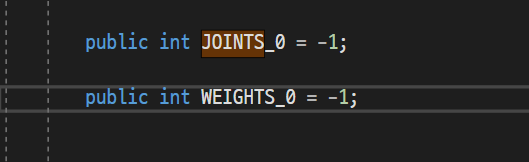 Hi~ I found MeshPrimitive.cs and i add Add JOINTS_1-3 and WEIGHTS_1-3.
However, if you save it, it will be initialized back to its original state.
Can't I edit this part?
Hi~ I found MeshPrimitive.cs and i add Add JOINTS_1-3 and WEIGHTS_1-3.
However, if you save it, it will be initialized back to its original state.
Can't I edit this part?
so you added something like this:
public int JOINTS_1 = -1;
public int JOINTS_2 = -1;
public int JOINTS_3 = -1;

public int WEIGHTS_1 = -1;
public int WEIGHTS_2 = -1;
public int WEIGHTS_3 = -1;
right?
What do you mean, saving it? I thought you're trying to import, so where and why do you save (i.e. serialize) it? Those lines won't make export/serialization work out of the box.
Hi, I had the same problem.When I imported glb which has some 8 bone weights mesh,the mesh is not reflected properly

https://user-images.githubusercontent.com/53991007/199401147-4b7dbc34-a2f5-452f-881f-a39187ddde67.mp4
What I meant was that if i edit the code and save it, it will be initialized. As in the video, if i edit the MeshPrimitive.cs part and the GltfImport.cs part (including other codes) and save it, the initialization continues.
Please stick to English, since I cannot read Korean.
What's shown in the video is just the starting point of implementing this, namely creating the properties in the Schema so that they are properly de-serialized. Of course the actual work of implementing it all just started. Not sure if your expectation was different.
When I importing 8 bone weights glb, There is an error here:
 Code is :
 I don't know what went wrong
That indicates to me that you either not yet know the structure/flow of glTFast or how meshes are generated in Unity in general. Unfortunately I don't have the time to explain this in detail so you either (hopefully) figure it out yourself or wait until another dev tackles it. Thanks!
Sorry! The message has been edited. As you answered above, overall I understand how to add boneweight. Currently, my problem is that the script itself cannot be modified. That is, if i modify the script and save it, it will return to the original state. I think the situation that deserves suspicion is Scoped Registries, Isn't the package manager's Scoped Registries not fixing the code?
Ah, I see.
In order to develop glTFast, you have fork and clone the repository (so you have a local copy) and add the local /package.json to your project (in the project manager):
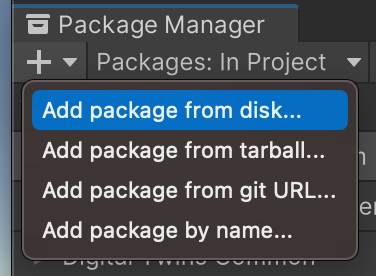
You don't need to remove glTFast or any package before. The package manager smartly overrides the glTFast with the local version.
Then you'll be able to make permanent changes, commit them and push them to your forked repository. Once you're happy with the changes, open a pull request (PR), so I can review and adopt the changes.