

 atom
atom
Git panel always loads diff on top of itself
Prerequisites
- [X ] Put an X between the brackets on this line if you have done all of the following:
- Reproduced the problem in Safe Mode: https://flight-manual.atom.io/hacking-atom/sections/debugging/#using-safe-mode
- Followed all applicable steps in the debugging guide: https://flight-manual.atom.io/hacking-atom/sections/debugging/
- Checked the FAQs on the message board for common solutions: https://discuss.atom.io/c/faq
- Checked that your issue isn't already filed: https://github.com/issues?utf8=✓&q=is%3Aissue+user%3Aatom
- Checked that there is not already an Atom package that provides the described functionality: https://atom.io/packages
Description
Minor in the grand scheme of things, but in Linux for the last month or so the GitHub package appears to ignore the "Direction to open diff pane" setting and always opens it on top of the Git tab itself when I click on an entry in the "Unstaged Changes" list. If I manually move the diff pane to another panel and click in the list again, it will simply open a new diff tab. Makes it somewhat frustrating to work through and commit a complex set of changes.
Steps to Reproduce
- Have some unstaged changes, and open the Git tab (ctrl-shift-9)
- Ensure the "Direction to open diff pane" setting in Packages / GitHub is not none
- Click on an entry in the Unstaged Changes list
Expected behavior:
Should obey the setting and open in a separate pane. If the diff panel is moved to a new pane, the next click in the "Unstaged Changes" list should still update it rather than creating a new diff panel.
Actual behavior:
See description.
Reproduces how often:
Every time for at least the last month.
Versions
Atom : 1.38.2 Electron: 2.0.18 Chrome : 61.0.3163.100 Node : 8.9.3
apm 2.1.7 npm 6.2.0 node 8.9.3 x64 atom 1.38.2 python 2.7.5 git 1.8.3.1
OS: CentOS 7
Additional Information
Works correctly on my Mac running Atom 1.38.1

Thanks for the report -
but in Linux for the last month or so the GitHub package appears to ignore the "Direction to open diff pane" setting and always opens it on top of the Git tab itself when I click on an entry in the "Unstaged Changes" list.
Huh, so right above the "Unstaged Changes" list?
If I manually move the diff pane to another panel and click in the list again, it will simply open a new diff tab.
Just to clarify, is the new diff tab opened above "Unstaged Changes" again?

What I meant by “on top of” is “as a new tab in the same panel”, covering the git tab entirely. Leads to a lot of switching back and forth between tabs when doing a complex multi-file commit.
Just to clarify, is the new diff tab opened above "Unstaged Changes" again?
Yes - it creates a new diff tab in the same panel as the Git tab, once again covering it.
On 28 Jun 2019, at 21:33, Robert Sese [email protected] wrote:
Thanks for the report -
but in Linux for the last month or so the GitHub package appears to ignore the "Direction to open diff pane" setting and always opens it on top of the Git tab itself when I click on an entry in the "Unstaged Changes" list.
Huh, so right above the "Unstaged Changes" list?
If I manually move the diff pane to another panel and click in the list again, it will simply open a new diff tab.
Just to clarify, is the new diff tab opened above "Unstaged Changes" again?
— You are receiving this because you authored the thread. Reply to this email directly, view it on GitHub, or mute the thread.
Same issue here. Piggybacking for visibility. Started happening about a week ago.
Prerequisites
- [X] Put an X between the brackets on this line if you have done all of the following:
- Reproduced the problem in Safe Mode: https://flight-manual.atom.io/hacking-atom/sections/debugging/#using-safe-mode
- Followed all applicable steps in the debugging guide: https://flight-manual.atom.io/hacking-atom/sections/debugging/
- Checked the FAQs on the message board for common solutions: https://discuss.atom.io/c/faq
- Checked that your issue isn't already filed: https://github.com/issues?utf8=✓&q=is%3Aissue+user%3Aatom
- Checked that there is not already an Atom package that provides the described functionality: https://atom.io/packages
Description
Steps to Reproduce
- Completely uninstall atom as per these steps.
- Perform a fresh install of atom
- Create a new project folder via
mkdir empty-project - Create a new git repo via
cd empty-project; git init - Create a new file in the repo. Make a small change.
- Click on the file within the git pane.
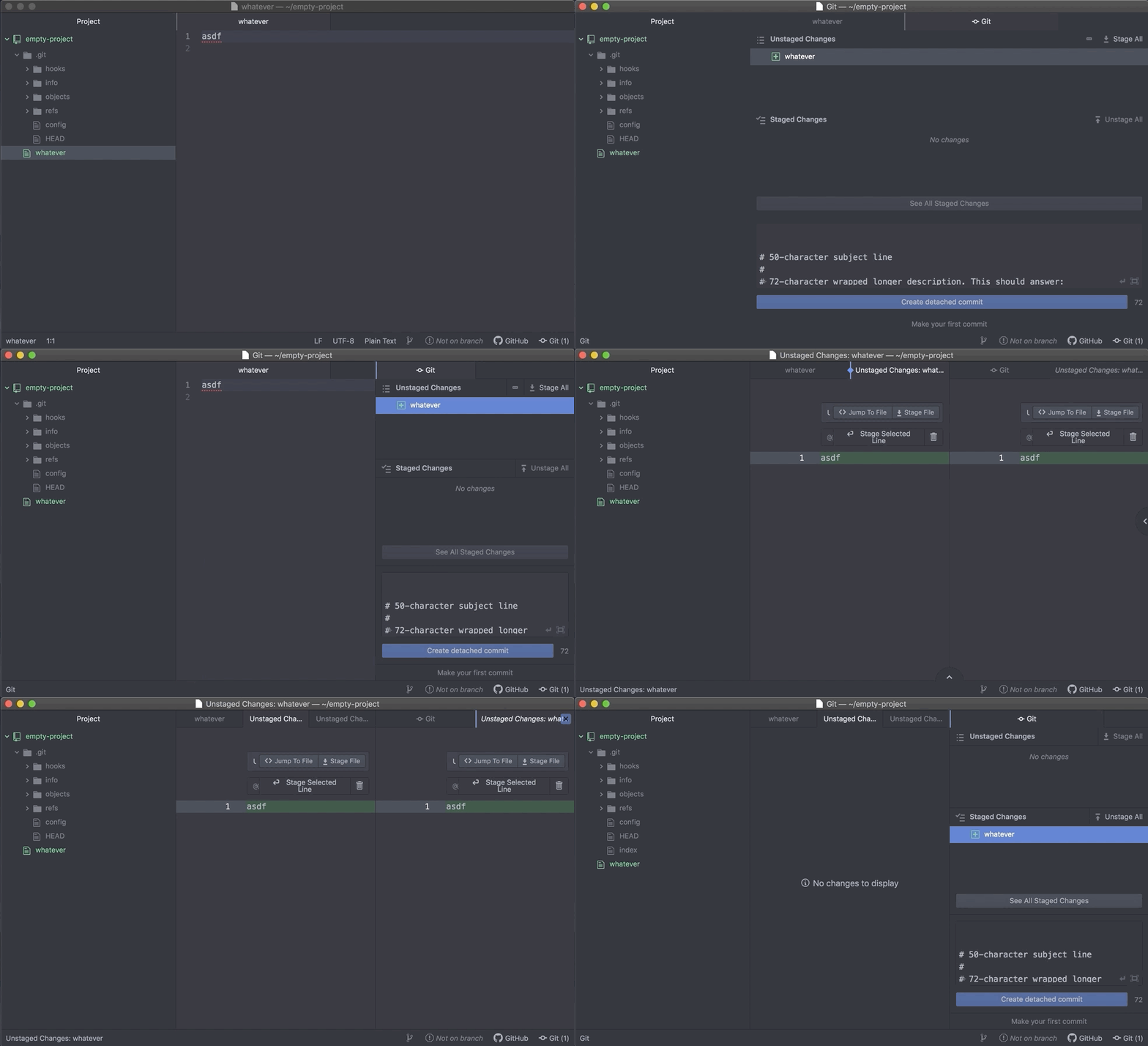
Expected behavior:
The file should be highlighted, and no window should open.
Actual behavior:
The file is opened in the same pane as the git view.
Reproduces how often:
100% of the time.
Versions
# atom --version
Atom    : 1.40.1
Electron: 3.1.10
Chrome  : 66.0.3359.181
Node    : 10.2.0
# apm --version
apm  2.4.3
npm  6.2.0
node 10.2.1 x64
atom 1.40.1
python 2.7.10
git 2.22.0
macOS Mojave 10.14.6 (18G87)
Additional Information

Hmm, still unable to reproduce on macOS 10.14.6 with 1.40.1 using your steps @rickgorman.
Though I think this is covered in the macOS uninstall instruction, does it make any difference if you clear saved state? Note that you'll lose any unsaved data across projects, but if that's ok let us know how it goes.
@rsese I went through those steps and the issue persisted.
Now, what wound up fixing my issue was to open a second workspace in the same atom window, and then switch back to the original workspace. Why this works, I don't know, but hey, happy to sweep this one under the carpet. Thanks for the attention @rsese.
@rickgorman this package currently refreshes the entire Git/GitHub panel when workspace directories change. You likely allowed the state of your other project to reset by switching.

i got the same issue.
what's weird on my case is that there are projects wherein when i open the git panel and click a changed file in there. that git panel doesn't disappear. the code just open on the left side.
on some of the project however, if i open the git panel. it occupies the whole window. and when i click a changed file, it creates a new tab for the code.
what i did is to open the project that is not broken. then from there i do "add project folder" for the broken project. then "remove project folder" the first one.
now both project behaves as i want them to be regarding the viewing of git diffs.
