

 atom
atom
Autocomplete does not complete scripts or directories.
Prerequisites
- [X] Put an X between the brackets on this line if you have done all of the following:
- Reproduced the problem in Safe Mode: http://flight-manual.atom.io/hacking-atom/sections/debugging/#using-safe-mode
- Followed all applicable steps in the debugging guide: http://flight-manual.atom.io/hacking-atom/sections/debugging/
- Checked the FAQs on the message board for common solutions: https://discuss.atom.io/c/faq
- Checked that your issue isn't already filed: https://github.com/issues?utf8=✓&q=is%3Aissue+user%3Aatom
- Checked that there is not already an Atom package that provides the described functionality: https://atom.io/packages
Description
Autocomplete-plus should active and autocomplete file and directory names when hitting enter or tab. After a recent update this no longer works. It will work after only writing the first letter of the script / directory. If there is more than one letter before hitting enter or tab, it will not autocomplete.
Steps to Reproduce
- Run this quick bash script to create a new test project:
mkdir test && cd test/ && \
echo "export class Test {}" > test_file.ts  && \
echo "import {Test} from './'" > check_file.ts && \
atom ./check_file.ts
- Attempt to autocomplete:
import {Test} from './'intoimport {Test} from './test_file';by adding atebefore the final'and hitting enter.
Expected behavior:
The import statement should autocomplete and show import {Test} from './test_file';
Actual behavior: Closes the autocomplete dropdown and doesn't add the file name. Sometimes it will work the first time, but subsequent attempts fail.
Reproduces how often: 95%
Versions
Atom    : 1.28.0
Electron: 2.0.3
Chrome  : 61.0.3163.100
Node    : 8.9.3
apm  1.19.0
npm  3.10.10
node 6.9.5 x64
atom 1.28.0
python 2.7.10
git 2.15.2
Mac OSX High Sierra
10.13.3
Additional Information
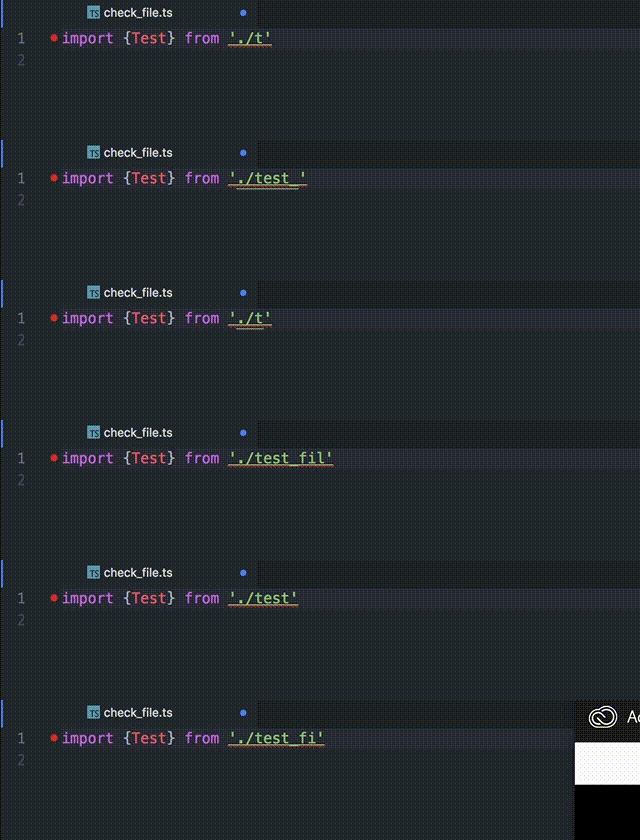
Here is a gif of it working intermittently. Each time the dropdown disappears its because I've attempted to autocomplete by hitting enter or tab.

AFAIK, this package doesn't do that. It would be a separate provider like autocomplete-paths that does that (it's confusing, I know).
Of course, it could be somehing here that broke it. But I think it's better to work out which package was giving you file path completions before, and making the issue there for now.

Are you sure?
I went through and disabled all (autocomplete) plugins and was left with just this one. And only this plugin showed the autocomplete options for a script / directory.
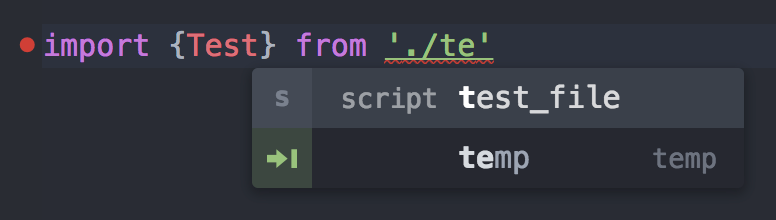
I tried installing the paths plugin too, which did add full path support however it seems the first option is still an autocomplete-plus which wont work? See here with autocomplete-paths installed:

Also, it looks like it will autocomplete a script or directory only if you've typed no more than the first letter to that script or directory. In the test case mentioned above, it will work if you type a t and hit enter, but will fail if you type a te.