
jira-cloud-for-sketch
 jira-cloud-for-sketch copied to clipboard
 atlassian
Support JIRA Server
Currently the JIRA Cloud for Sketch only supports JIRA Cloud. We should consider supporting JIRA Server as well.
edit: server support is now in beta!

I just tried downloading this app. Unfortunately, it was only available for cloud where we host our own Jira service. Adding this would be great!

Agreed! The company I'm working with and I would love to see support for JIRA Server.


Adding another request for JIRA Server support :) HomeAway would love this!


@johanneslamers I can confirm that—due to overwhelming demand—server support will almost certainly be the next major feature for the plugin, but I can't commit to a firm date just yet. Keep your 👀 peeled.


Thank you for your patience everyone! I've put together a beta release of the plugin with support for Jira Server. It should work with Jira 6 and above (I've specifically tested it with 6.0.8 and 7.5.0 so far).
Latest server beta
Beta 3: https://s3-us-west-2.amazonaws.com/atlassian-sketch-plugin/jira.sketchplugin-server_beta3.zip
Earlier server betas
Beta 2: https://s3-us-west-2.amazonaws.com/atlassian-sketch-plugin/jira.sketchplugin-server_beta2.zip
Beta 1: https://s3-us-west-2.amazonaws.com/atlassian-sketch-plugin/jira.sketchplugin-server_beta1.zip
If you already have an earlier version of the plugin installed you will need to restart Sketch after installing the beta. Otherwise the plugin will fail to load the 'Connect' screen properly (I'm currently working on a fix that will avoid needing the restart).
One other thing to note is that the connection process is slightly different to the Jira Cloud version, in that the plugin uses username/password authentication instead of the oauth to authenticate with Jira. When first connecting to a server instance, you will be prompted for your username and password, which will be stored securely in the MacOS keychain. For security reasons, the plugin will only work with Jira servers secured with SSL (i.e. your server URL must start with https://).
Enjoy! Please let me know if you run into any issues, and if you have a moment, please let me know what version of Jira Server you've tested it against (the version number is usually in the footer of the Jira dashboard).
I just tried the plugin @kannonboy But when putting the url it says an ssl error occured. Is this related to the fact that our JIRA is only available from our own private network? (My macbook is on the same network though )
@reshadf is your Jira server secured with SSL? (i.e. does the URL start with https://) For security reasons—to avoid sending your username and password in clear text—the plugin currently only supports connecting to servers over https.
If your Jira Server is behind https, your Jira Server may be running with a self-signed certificate, which I haven't explicitly tested yet. If this is the case, would you mind sending your log file to [email protected]?
The log is cleared automatically whenever Sketch is restarted, so you'll need to:
- Reproduce the error.
- Attach the file at ~/Library/Logs/com.bohemiancoding.sketch3/Plugin Output.log to the email
An easy way to get to this file is by opening Console.app (under Applications -> Utilities), navigating to Plugin Output.log, right-clicking and clicking "Reveal in Finder".
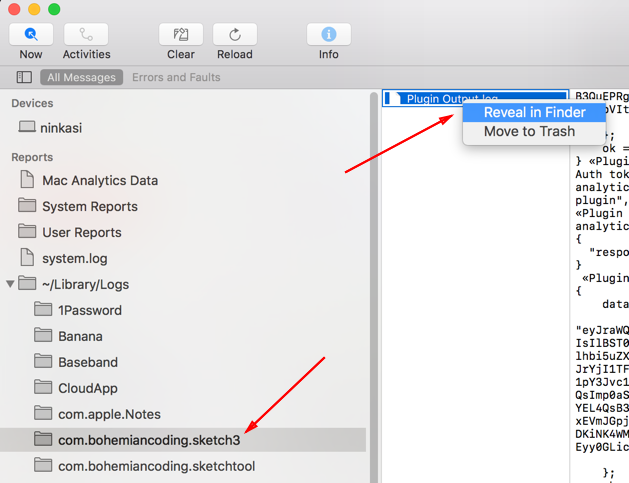
Thanks for your help!
I see the same SSL error message. The version number below is v7.2.8#72010-sha1:dc33de3:node1 and it starts with https
Thanks for the report @Maruceau. Are you able to send your log file to [email protected]? (using the process described in my comment above)
It's close to midnight here, but I'll take a look tomorrow and see if I can fix the SSL issues. It looks like a patch to support self-signed certificates (if that turns out to be the issue) should be pretty straight forward. Thanks for the quick tests folks!
should be pretty straight forward
I've learned quite a bit about MacOS security since making that foolhardy statement. Supporting self-signed certificates is turning out to be a bit difficult in the context of a Sketch plugin, because the security settings are defined by Sketch itself. I'm confident I'll be able to find a workaround, but unfortunately it's going to take a little longer.
If you have influence with your server administrators, you might be able to convince them to reconfigure Jira Server to use a properly signed certificate (https://letsencrypt.org/ provides them for free!) but otherwise you might have to sit tight a little longer. I'll post another update soon.



Hey folks! Another quick update — I've just released beta 3 which adds some better error handling, analytics, and fixes an issue that @eliasjulian reported where you couldn't connect if your Jira Server username or password changed. Server support will be merged into the general release stream soon.
Unfortunately after discussing the problem with Bohemian Coding, it looks like we won't be able to support self-signed certs 😞. There is currently no way for a Sketch plugin to override the security configuration of Sketch.app itself, and no plans to allow it in the future (which is fair enough when you think about it). Therefore @Maruceau @reshadf unfortunately you may have to convince your system administrators to start using official SSL certs. https://letsencrypt.org/ is a great—and free!—certificate provider if you're looking for one.

Server Beta 3 works on Jira v7.10.2#710003-sha1:897b0c4. I am able to perform exports to Jira; however, it crashes Sketch 52.2 when I close the plug-in or edit my Sketch files. I'll update as I use it more.


Is there anyway to support logins other than user/pass? for example a card/pin?

This crashes in 53.2, any updates on when or if we will get a stable build for Jira Server?
